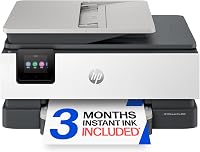
HP OfficeJet Pro 9125 Review: Home Office All-in-One (October 2026)
The HP OfficeJet Pro 9125 suits a busy home office that needs color printing, duplex scanning, fax and a 250-sheet tray. It uses cartridges with original HP chips or circuitry.
On this page (8 sections)
- What does the HP OfficeJet Pro 9125 do well?
- What should you know about its ink?
- How does the 9125 compare with nearby OfficeJet Pro models?
- Should you choose the OfficeJet Pro 9135 instead?
- Is the OfficeJet Pro 8139 a better fit for lighter use?
- When is the OfficeJet Pro 8125 enough?
- What should you check before buying?
- Who should buy the HP OfficeJet Pro 9125?
The HP OfficeJet Pro 9125 is a home office all-in-one for color printing, scanning, copying and faxing. It adds automatic two-sided printing and scanning, an automatic document feeder (ADF) and a 250-sheet input tray.
Its main buying consideration is ink: it is intended for cartridges with original HP chips or circuitry and will block cartridges using non-HP chips or circuitry. If you need a simpler setup, compare it with the HP OfficeJet Pro 8125 vs 9125 guide.
What does the HP OfficeJet Pro 9125 do well?
The HP OfficeJet Pro 9125 combines office-focused paper handling with print, scan, copy and fax functions. Its stated print speeds are up to 22 pages per minute in black and 18 in color.
HP OfficeJet Pro 9125: Best for duplex office tasks

- Print, scan, copy and fax
- 250-sheet input tray
- Automatic two-sided printing and scanning
A home office all-in-one with an automatic document feeder, automatic two-sided printing and scanning, and a 250-sheet input tray.
Pros
- Automatic two-sided printing and scanning
- ADF and 250-sheet input tray
- Fax and mobile printing through the HP app
Cons
- Requires cartridges with original HP chips or circuitry
- Uses four HP 936 ink cartridges
The ADF helps with multi-page documents, and automatic two-sided scanning can handle both sides without turning each page by hand. The 250-sheet tray also means fewer reloads than a smaller input tray when you print regularly.
The 2.7-inch color touchscreen handles printer controls, while the HP app supports printing, scanning, copying and faxing from a smartphone. HP says its dual-band Wi-Fi automatically detects and resolves connection issues.
When does the OfficeJet Pro 9125 make sense?
Choose it if you routinely print color office documents and need one device for paper-based tasks. It is especially relevant when two-sided scanning and fax are part of your normal workflow.
For occasional forms and basic home printing, its office features may be more than you need. The best printers for a home office guide compares other options by work style.
What should you know about its ink?
The 9125 uses four HP 936 ink cartridges and is designed to accept cartridges with original HP chips or circuitry. It will block cartridges using non-HP chips or circuitry, and periodic firmware updates maintain these measures.
The box includes setup cartridges. Their estimated yields are about 800 pages for black and 420 pages for each color, though your results depend on page coverage and print habits.
An included three-month Instant Ink trial is optional. A monthly fee applies after the trial unless you cancel, so review the plan terms before enrolling.
For the broader ink-cost question, see why printer ink is so expensive. If you want to understand the subscription itself, read what HP Instant Ink is and how it works.
How does the 9125 compare with nearby OfficeJet Pro models?
The 9125 balances office features and moderate paper capacity. The 8125 keeps a 225-sheet tray and omits fax, while the 9135 adds a second tray and single-pass two-sided scanning.
| Model | Key differences | A fit for |
|---|---|---|
| HP OfficeJet Pro 9125 | 250-sheet tray, ADF, automatic two-sided print and scan, fax | Home offices with mixed document tasks |
| HP OfficeJet Pro 8125 | 225-sheet tray, ADF, automatic two-sided printing, no fax | Home offices with simpler needs |
| HP OfficeJet Pro 9135 | Two 250-sheet trays, single-pass two-sided scanning, larger touchscreen | Higher document volume and frequent duplex scanning |
| HP OfficeJet Pro 8139 | 225-sheet tray, ADF, fax, automatic two-sided printing | Home offices that want fax and a one-year trial |
The 9125 vs 8125 comparison focuses on whether fax and the larger tray justify choosing the 9125. For a broader brand comparison, see best HP printers for home use.
Should you choose the OfficeJet Pro 9135 instead?
Choose the HP OfficeJet Pro 9135 if you often scan two-sided documents or want more paper loaded at once. It has two 250-sheet trays, single-pass two-sided scanning and a 4.3-inch touchscreen.
HP OfficeJet Pro 9135: Best for two-sided scanning volume

- Print, scan, copy and fax
- Two 250-sheet input trays
- Single-pass two-sided scanning
A larger office option with two 250-sheet input trays, single-pass two-sided scanning and a 4.3-inch touchscreen.
Pros
- 500-sheet combined input capacity
- Single-pass two-sided scanning
- Larger touchscreen than the 9125
Cons
- Larger and heavier than the 9125
- Requires cartridges with original HP chips or circuitry
Its stated print speeds are up to 25 pages per minute in black and 20 in color. The larger capacity and faster stated speeds matter most when several people share the printer or jobs arrive in batches.
The 9135 measures 15.6 in deep, 17.2 in wide and 12.53 in high, and weighs 26.1 lb. The 9125 measures 13.48 in deep, 17.3 in wide and 10.94 in high, and weighs 20.5 lb.
Is the OfficeJet Pro 8139 a better fit for lighter use?
The HP OfficeJet Pro 8139 offers a 225-sheet tray and fax with lower stated print speeds than the 9125. It prints up to 20 pages per minute in black and 10 in color, and it includes an ADF and automatic two-sided printing.
HP OfficeJet Pro 8139: Best for a home office with fax

- Print, scan, copy and fax
- 225-sheet input tray
- One-year Instant Ink trial included
A home-office model with fax, an ADF, automatic two-sided printing and a 225-sheet tray.
Pros
- Fax and automatic two-sided printing
- 225-sheet input tray
- One-year Instant Ink trial included
Cons
- Slower stated color speed than the 9125
- Requires cartridges with original HP chips or circuitry
The 8139 includes a one-year Instant Ink trial. A monthly fee applies after the trial unless you cancel.
Choose it when a home office needs fax but prints fewer color pages or loads less paper at a time. The 9125 is the stronger match when its faster stated color speed, larger tray and automatic two-sided scanning are useful.
When is the OfficeJet Pro 8125 enough?
The HP OfficeJet Pro 8125 is a simpler alternative for print, scan and copy without fax. It has a 225-sheet tray, an ADF and automatic two-sided printing.
HP OfficeJet Pro 8125: Best for home office basics
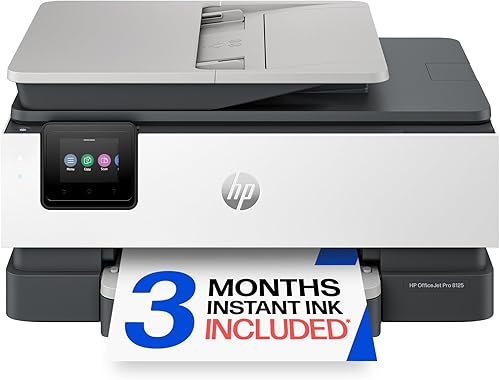
- Print, scan and copy
- 225-sheet input tray
- Automatic two-sided printing
A simpler home-office alternative with an ADF and automatic two-sided printing, without fax.
Pros
- Automatic two-sided printing
- ADF and 225-sheet input tray
- Lower stated print speed matches lighter workloads
Cons
- No fax function
- Requires cartridges with original HP chips or circuitry
Its stated speeds are up to 20 pages per minute in black and 10 in color. It uses HP 923 cartridges and is designed for cartridges with original HP chips or circuitry.
Pick it if fax is unnecessary and your workload fits the smaller tray and slower stated color speed. The 9125 is the better match when you need fax, a 250-sheet tray and duplex scanning.
What should you check before buying?
Check your paper volume, scanning routine and ink preference before choosing the 9125. Those details matter more than its feature list in isolation.
- Paper loading: A 250-sheet tray suits regular work better than the 225-sheet trays on the 8125 and 8139.
- Two-sided documents: Automatic two-sided printing and scanning can help when reports or forms use both sides.
- Fax: The 9125 includes fax; the 8125 does not.
- Ink rules: Plan to use cartridges with original HP chips or circuitry.
- Placement: The 9125 measures 17.3 in wide, 13.48 in deep and 10.94 in high, and weighs 20.5 lb. Allow room for access and paper handling.
- Connection: It supports wireless printing, and its hardware interfaces include Ethernet and USB.
If most of your work is basic home printing, compare it with the best printer for home use guide. For scanning terminology, what an ADF is on a printer explains how an automatic document feeder handles multi-page jobs.
Who should buy the HP OfficeJet Pro 9125?
The HP OfficeJet Pro 9125 suits a home office that needs an ADF, fax, duplex scanning and a 250-sheet tray. Its combination of office functions and stated color speed makes it more appropriate for regular document work than occasional printing.
Choose the 9125 if you need those features and accept HP’s cartridge requirements. Pick the 9135 for two trays and single-pass two-sided scanning, the 8139 for fax with a smaller tray, or the 8125 when you do not need fax.
Frequently asked questions
Is the HP OfficeJet Pro 9125 good for a home office?
The HP OfficeJet Pro 9125 fits a home office that prints color documents and needs scanning, copying and fax in one device. Its ADF, automatic two-sided printing and scanning, and 250-sheet input tray suit recurring paperwork.
Consider a simpler model if you rarely print or do not need fax.
Does the HP OfficeJet Pro 9125 print on both sides?
Yes. The HP OfficeJet Pro 9125 supports automatic two-sided printing and scanning.
Its ADF can help with multi-page document tasks, while duplex scanning reduces the need to turn pages by hand.
Consider whether you scan two-sided documents often enough to use this feature.
Which ink does the HP OfficeJet Pro 9125 use?
The HP OfficeJet Pro 9125 uses HP 936 cartridges: black, cyan, magenta and yellow. It is intended to work with cartridges that use original HP chips or circuitry and will block cartridges using non-HP chips or circuitry.
What is the difference between the HP OfficeJet Pro 9125 and 9135?
The 9135 adds a second 250-sheet tray, single-pass two-sided scanning and a 4.3-inch touchscreen. The 9125 has one 250-sheet tray and a 2.7-inch touchscreen.
Both print, scan, copy and fax, and both support automatic two-sided printing and scanning.