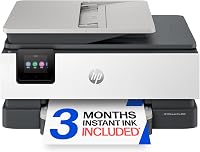
9 Best Printers for a Home Office (October 2026)
The best printers for a home office include the HP OfficeJet Pro 9125 for everyday office documents, the Canon PIXMA TR8620a for mixed documents and photos, and the HP OfficeJet Pro 9135 for larger paper batches.
On this page (6 sections)
Best Printers for a Home Office
The HP OfficeJet Pro 9125 is the best printer for a home office if you need fast color printing, automatic two-sided scanning and fax in one machine. Choose the Epson EcoTank ET-4800 for refillable tanks or the Brother INKvestment 5010 for fast output and two-sided document handling.
A home-office printer should fit your routine: reports, forms, labels, school pages, color graphics, or some combination. The best choice depends on how much you print, whether you scan multi-page documents, and how you prefer to replace ink.
For a wider home-use comparison, see our ink tank vs inkjet guide. If ink expense is the main concern, our printers with cheap ink guide explains cartridge and tank systems.
Our picks at a glance
-
1

-
2

-
3

Which home office printer fits your workload?
The HP OfficeJet Pro 9125 is the best all-around fit here for mixed color documents, duplex scanning and office tasks. Other models suit you better if you prioritize refillable tanks, more paper capacity, faster stated speeds, or a particular scanning workflow.
HP OfficeJet Pro 9125: Best for everyday office documents
- 22 ppm black and 18 ppm color
- Automatic two-sided print and scan
- 250-sheet input tray
- ADF and fax
Fast color printing, duplex scanning, fax and a 250-sheet tray cover a broad mix of home-office tasks.
Pros
- Automatic two-sided scanning
- 250-sheet input tray
- Print, scan, copy and fax
Cons
- Uses HP 936 cartridges
- Blocks cartridges without original HP chips or circuitry
The OfficeJet Pro 9125 prints up to 22 pages per minute in black and 18 in color. Its 250-sheet input tray reduces how often you reload paper, and the ADF handles multi-page documents.
It also scans both sides automatically, prints on both sides, copies and faxes. Those functions suit a desk that regularly handles forms, reports and color presentations.
HP includes a 3-month Instant Ink trial. A monthly fee applies after the trial unless you cancel, and the printer blocks cartridges without original HP chips or circuitry.
Choose it for a strong mix of color speed, document handling and capacity. Skip it if you want to use cartridges without HP chips, or if your most common job is scanning two-sided stacks and you want a larger feeder.
Canon PIXMA TR8620a: Best for mixed documents and photos
- Print, copy, scan and fax
- Automatic two-sided printing
- 200-sheet capacity across two feeds
- Micro SD slot
A home-office all-in-one with separate cassette and rear paper feeds, plus a micro SD slot.
Pros
- Two paper feeds
- Automatic two-sided printing
- Print, copy, scan and fax
Cons
- No duplex scanning detail in the available product facts
- Uses ink tanks
The Canon PIXMA TR8620a prints, copies, scans and faxes, with a 200-sheet capacity split between a 100-sheet cassette and a 100-sheet rear feed. A second feed is useful when you switch between plain paper and another paper type.
Its stated speeds are 15 ipm in black and 10 ipm in color, and it supports automatic two-sided printing. It also has a micro SD slot.
Automatic two-sided scanning is not specified for this model. If you often scan double-sided originals, choose a printer with that feature clearly stated instead of assuming the ADF handles it.
Pick the TR8620a for a mix of documents and photos, or for the flexibility of two paper feeds. Skip it if duplex scanning is essential to your routine.
For more Canon options, see our Canon printer reviews and comparisons.
HP OfficeJet Pro 9135: Best for larger paper batches
- 25 ppm black and 20 ppm color
- Two 250-sheet input trays
- Single-pass two-sided scanning
- 4.3-inch touchscreen
The 9135 adds a second paper tray and single-pass duplex scanning for offices that handle larger batches.
Pros
- Two 250-sheet trays
- Single-pass two-sided scanning
- Larger touchscreen
Cons
- Larger and heavier than the 9125
- Uses HP 936 cartridges
The HP OfficeJet Pro 9135 is the faster, higher-capacity sibling to the 9125. Its stated print speeds are up to 25 pages per minute in black and 20 in color, and its two 250-sheet trays give you room to keep different paper types ready.
Its ADF supports single-pass two-sided scanning, which can reduce page handling for double-sided forms. The 4.3-inch touchscreen is larger than the 9125's 2.7-inch display.
At 26.1 lb, it is heavier than the 9125 at 20.5 lb, so plan its desk location before setup. It uses HP 936 cartridges and includes a 3-month Instant Ink trial, after which a monthly fee applies unless canceled.
Choose it for a busy office that wants two trays and single-pass duplex scanning. Skip it if you print modest amounts, have limited desk space, or don't need its extra paper capacity.
For a related HP comparison, see our OfficeJet Pro 8125 vs 9125 comparison.
Epson EcoTank ET-4800: Best for fewer cartridge changes

- Refillable high-capacity ink tanks
- ADF, flatbed scanner and fax
- Epson says included ink can print up to 4,500 black and 7,500 color pages
- 10 ppm black, 5 ppm color
Refillable tanks reduce reliance on small cartridges, and the machine combines document scanning with fax.
Pros
- Refillable tank system
- ADF and flatbed scanner
- Epson states longer intervals between ink replacement
Cons
- Slower stated print speed than the office-focused picks
- Duplex printing is manual
The Epson EcoTank ET-4800 uses refillable high-capacity ink tanks and EcoFit bottles instead of small cartridges. Epson says the included ink can print up to 4,500 black pages and 7,500 color pages, though actual use varies with page coverage and print habits.
Its all-in-one functions include a flatbed scanner, ADF and fax. Stated print speeds are 10 pages per minute in black and 5 in color, so it suits routine pages better than urgent large batches.
The ET-4800 has manual duplex printing. You turn or reload the paper yourself for two-sided pages, adding a step to long jobs.
Choose it if you print often and want refillable tanks with fewer ink replacement interruptions. Skip it if fast color output or automatic two-sided printing is a must.
Our guide to printers with lower ink costs compares tank and cartridge models.
HP OfficeJet Pro 8139: Best for a compact work area

- 20 ppm black and 10 ppm color
- 225-sheet input tray
- ADF and automatic two-sided printing
- Print, scan, copy and fax
A home-office all-in-one with a smaller paper tray than the 9125 and automatic two-sided printing.
Pros
- ADF and fax
- Automatic two-sided printing
- One-year Instant Ink trial included
Cons
- No duplex scanning detail in the available product facts
- Uses HP 923 cartridges
The HP OfficeJet Pro 8139 offers an ADF, automatic two-sided printing, scanning, copying and fax. Its 225-sheet input tray is smaller than the 9125's, and its stated speeds are up to 20 pages per minute in black and 10 in color.
The 2.7-inch touchscreen provides on-printer controls. HP's app supports printing, scanning, copying and faxing from a smartphone.
HP includes a one-year Instant Ink trial. A monthly fee applies after the trial unless canceled, and the printer blocks cartridges without original HP chips or circuitry.
Choose it for a home office that wants a color all-in-one and values the included trial. Skip it if you need specified duplex scanning or prefer freedom to use non-HP-chip cartridges.
Epson WorkForce Pro WF-4820: Best for fast document batches
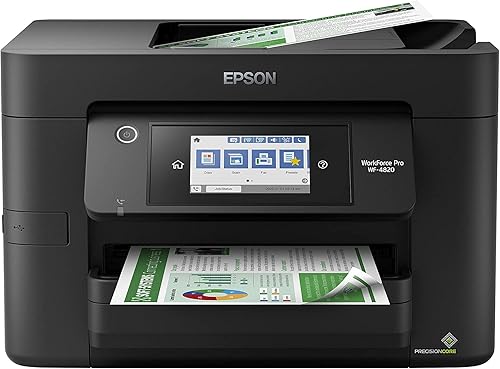
- 25 ppm black and 12 ppm color
- 250-sheet paper capacity
- Automatic two-sided printing
- 35-page ADF
Its stated black print speed and 250-sheet capacity suit document-heavy work, with a 35-page ADF for scanning.
Pros
- Fast stated black print speed
- 250-sheet capacity
- Ethernet and wireless connectivity
Cons
- Uses cartridges
- No fax function in the available product facts
The Epson WorkForce Pro WF-4820 is suited to document work, with stated speeds of 25 pages per minute in black and 12 in color. Its 250-sheet tray and 35-page ADF support longer print and scan jobs.
Automatic two-sided printing reduces manual page handling. The WF-4820 also has wireless, Wi-Fi Direct and Ethernet connections, a 4.3-inch touchscreen and the Epson Smart Panel app.
It uses DURABrite Ultra pigment inks and genuine Epson cartridges. Fax capability is not specified, so choose another model if sending faxes is part of your workday.
Consider it when black document speed and a large paper tray matter most. Skip it if you need fax or routinely scan two-sided originals and want the feeder to handle both sides.
If you use an Apple computer, our guide to printers for Mac users covers another useful choice factor.
Brother INKvestment 5010: Best for fast two-sided workflows

- 28 ppm black and 26 ppm color
- 50-page single-pass duplex ADF
- 250-sheet paper tray
- Print, copy, scan and fax
High stated print speeds, a 50-page duplex ADF and fax make it a productivity-focused choice for document work.
Pros
- 50-page single-pass duplex ADF
- Automatic duplex printing
- Ethernet, wireless and USB connections
Cons
- Larger footprint than compact office models
- Uses Brother LC506 cartridges
The Brother INKvestment 5010 has the highest stated print speeds in this roundup: up to 28 pages per minute in black and 26 in color. Its 50-page single-pass duplex ADF handles two-sided copying and scanning, while automatic duplex printing handles two-sided output.
It has a 250-sheet paper tray, fax and a 2.7-inch color touchscreen. Connection options include wireless networking, Ethernet and USB, with support for printing from and scanning to popular cloud apps.
Brother recommends genuine LC506 ink for this printer. At 30.9 lb, it needs a sturdy desk or stand.
Choose it if fast output and two-sided document handling matter more than a small footprint. Skip it if you want a lighter printer for occasional home use.
For occasional printing, the smaller feeder on the Brother INKvestment 4355 may be enough.
Brother INKvestment 4355: Best for a built-in ink supply

- Up to one year of ink in the box
- 20-page ADF
- Automatic duplex printing
- 150-sheet paper tray
The included ink supply and compact all-in-one functions suit a home office that wants fewer early supply changes.
Pros
- Ink included for up to one year of printing
- ADF and flatbed scanner
- Automatic duplex printing
Cons
- Smaller paper tray than several picks here
- Uses Brother LC506 cartridges
The Brother INKvestment 4355 prints, copies, scans and faxes, with automatic duplex printing and a 20-page ADF. Its 150-sheet adjustable tray plus bypass tray hold less paper than the 250-sheet models here.
Brother says it includes enough ink for up to one year of printing. How long it lasts depends on how much and what you print.
The 4355 supports printing from and scanning to popular cloud services through the Brother Mobile Connect app. Its stated speeds are 20 ppm in black and 19 ppm in color, which suit moderate office jobs.
Choose it if you want an all-in-one with included ink and don't need a large main tray. Skip it if you scan large stacks regularly, since its feeder is smaller than the 5010's.
Canon MAXIFY GX2020: Best for refillable office printing
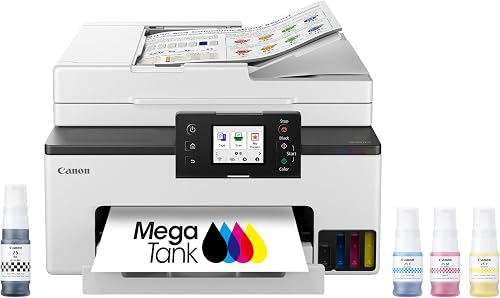
- Refillable ink tank system
- ADF and automatic two-sided printing
- Print, copy, scan and fax
- 2.7-inch color touchscreen
The refillable tank system and 35-sheet ADF suit frequent office printing with multi-page document needs.
Pros
- Refillable tank system
- 35-sheet ADF
- Automatic two-sided printing
Cons
- No duplex scanning detail in the available product facts
- Touchscreen is smaller than some office-focused models
The Canon MAXIFY GX2020 pairs refillable ink tanks with print, copy, scan and fax functions. Its 35-sheet ADF handles multi-page documents, while automatic two-sided printing helps with routine office pages.
Canon says one set of ink can print up to 3,000 black and 3,000 color pages. The GX2020 has a 2.7-inch color touchscreen and supports wireless printing.
Duplex scanning is not specified for this model. Confirm that feature if you often digitize two-sided paperwork.
Pick the GX2020 if you print frequently and want a tank printer with an ADF and fax. Skip it if two-sided scanning is central to your workflow.
For a broader comparison of tank options, see our ink tank printer guide.
How should you choose the best printer for a home office?
Start with your weekly tasks and paper volume, then decide which features save you time. The most useful comparisons are print speed, tray capacity, feeder size, two-sided scanning, and how you replace ink.
How many pages and what kinds of work do you print?
Estimate your normal week rather than choosing only by a printer's fastest stated speed. A few invoices and forms each day create a different need than frequent reports, presentations and long document batches.
Color matters if you prepare charts, flyers or visual work. If most pages are plain black text, prioritize a suitable document speed and paper handling rather than paying attention to features you rarely use.
Which paper capacity matches your routine?
A larger tray means fewer interruptions to add paper, especially when you print in batches. Several picks hold 250 sheets, while the HP OfficeJet Pro 9135 has two 250-sheet trays and the Brother INKvestment 4355 has a 150-sheet tray plus bypass feed.
Two trays can help if you switch between paper types, but they take space. Measure the printer's depth and width, and leave room for paper trays, cables and the rear feed before you commit to a desk location.
Is an automatic document feeder useful?
An ADF saves time when you scan or copy multiple pages because you can load a stack instead of placing each sheet on the glass. The Brother 5010's 50-page feeder is a better match for large stacks than the 20-page feeder on the 4355.
Feeder capacity is only part of the decision. If you work with two-sided originals, check whether the printer scans both sides automatically and whether it does that in one pass.
Do you need duplex scanning or just duplex printing?
Automatic duplex printing produces two-sided pages without requiring you to turn each sheet manually. Duplex scanning captures both sides of a two-sided original, which matters when you digitize signed forms or multi-page records.
These functions are separate. The HP OfficeJet Pro 9125 and 9135 specify automatic two-sided scanning.
The Brother 5010 has a 50-page single-pass duplex ADF. For a plain explanation, read our guide to duplex printing and our ADF guide.
Are refillable ink tanks right for you?
Refillable tanks may be a good fit if you print frequently and prefer bottle refills over regular cartridge replacement. The Epson EcoTank ET-4800 and Canon MAXIFY GX2020 both use tank systems, with different trade-offs in speed and two-sided paper handling.
Think about how predictable your printing is. A printer that sits unused for long stretches may not be the right choice just because its tanks hold more ink; pick a system you are comfortable maintaining and refilling.
For cartridge models, check the exact replacement cartridges and any limits before you buy. The HP OfficeJet Pro models here block cartridges without original HP chips or circuitry, while the Brother picks use LC506 cartridges.
Will the printer fit your desk and network?
Check the printer's width, depth and weight against your available space. A model with two trays or a large feeder can take more room than a compact all-in-one, and a heavy printer is harder to reposition after setup.
Decide where you want the printer before connecting it. Make sure the power outlet and Wi-Fi signal are reachable, and leave enough open space to add paper or access the scanner lid without moving other equipment.
When is a laser printer a better match?
All 9 picks here are inkjet printers, so this roundup focuses on color printing and all-in-one office tasks. If you mainly print black text and rarely need color, compare laser printers as well.
Inkjet choices provide color and include both cartridge and tank systems. Your need for scanning, copying or faxing can further narrow the options.
How do you set up a home office printer?
Set up the printer near its regular workspace, connect it to the network you use for work, and add it to each computer or phone that needs access. A little planning before unpacking can prevent paper, cable and Wi-Fi problems later.
First, clear a stable surface with room to open the scanner lid and access the paper trays. Keep the printer close to the router if the wireless signal is weak, or use Ethernet on models that support it and where a wired connection is convenient.
Follow the on-screen setup steps for the printer and install its companion app if you want mobile printing or scanning. During setup, connect the printer and your devices to the same network, then print a short document to confirm the connection and page orientation.
Load plain paper in the main tray and make sure the guides touch the stack without bending it. If you plan to use a rear feed or bypass slot, read the printer's instructions for loading that paper path before sending a large job.
Tank models need careful initial filling, so use the correct bottle and follow the fill instructions. Keep the bottles upright, fill the matching color tanks, and wipe any drips promptly according to the printer's setup directions.
What common home office printer mistakes should you avoid?
The most common mistake is buying for one impressive feature while overlooking the routine work around it. Compare the full workflow, including loading paper, scanning both sides, replacing ink and finding a place for the machine.
Don't assume duplex printing means duplex scanning. If you regularly scan double-sided contracts or forms, choose a model that clearly specifies that function and check whether its feeder scans both sides in one pass.
Don't compare print speeds as if every page will finish at the same rate. Graphics, paper type, connection quality and print settings can affect the time a job takes, so use the published speeds as a guide for relative fit.
Don't buy an ink tank solely because the included supply looks large. Consider how much you print, how often you print, and whether you prefer refilling bottles or replacing cartridges.
Avoid placing a printer where a tray cannot extend fully or where paper exits into a wall. A cramped spot can turn everyday loading into an annoyance and make jams harder to clear.
Don't ignore cartridge restrictions or ongoing supply choices. Check which ink the model accepts and decide whether any subscription or ink delivery plan fits your preferences; trial periods can become paid plans unless canceled.
Forgetting to set two-sided printing as a default can waste paper on routine reports. Choose the setting in your print dialog when appropriate, and switch it off for forms or documents that need single-sided pages.
Which home office printer should you choose?
Choose the HP OfficeJet Pro 9125 for balanced color printing, automatic two-sided scanning and a 250-sheet tray. Pick the HP OfficeJet Pro 9135 if you need two trays and single-pass duplex scanning, or the Brother INKvestment 5010 for the fastest stated speeds and a 50-page duplex feeder.
Choose the Epson EcoTank ET-4800 or Canon MAXIFY GX2020 if refillable tanks fit your printing habits. If you print modest amounts and want an included ink supply, consider the Brother INKvestment 4355; if you switch paper types often, consider the Canon PIXMA TR8620a.
For a broader choice based on home printing, start with our home-use printer guide and compare printers with cheap ink.
Our top 3 picks at a glance
-
1
-
2
-
3
Frequently asked questions
What is the best printer for a home office?
The HP OfficeJet Pro 9125 suits mixed home-office work because it prints, scans, copies and faxes, with automatic two-sided printing and scanning. Choose the Epson EcoTank ET-4800 if refillable tanks matter more than speed, or the Brother INKvestment 5010 for a larger duplex feeder.
Start with the jobs you handle most.
Should I choose an ink tank or cartridge printer for a home office?
Choose an ink tank printer if you print often and want to refill bottles less often than replacing small cartridges. Cartridge printers can suit lighter or less predictable printing, though you'll need to plan for replacement cartridges and check the printer's cartridge requirements.
Our ink tank printer guide compares the options.
Do I need an automatic document feeder?
An automatic document feeder helps when you scan, copy or fax multiple pages, since you can load a stack instead of placing each sheet on the glass. Check its page capacity and whether it scans both sides automatically if that matters for your work.
See our guide to printer ADFs.
Is automatic duplex printing the same as duplex scanning?
No. Duplex printing puts content on both sides of a sheet, while duplex scanning captures both sides of a double-sided original.
Some feeders scan both sides in one pass, which can save handling time on stacks of forms.
Check both features separately when comparing printers.