8 Best Inkjet Printers for Home Use (October 2026)
The best inkjet printers for home use include the HP OfficeJet Pro 8125 for busy households, the Canon PIXMA TS6520 for occasional printing, and the HP OfficeJet Pro 8139 for home office faxing.
On this page (6 sections)
The HP OfficeJet Pro 8125 is the best inkjet printer for home use for frequent mixed documents and scanning, with an ADF, automatic duplex printing and a 225-sheet tray. The Canon PIXMA TS6520 suits lighter home use, while Epson's XP-6100 puts more emphasis on photos.
A home printer should fit your actual routine. If you print a few school pages and photos each week, a compact model may be enough; frequent scanning, copying or multi-page jobs make an ADF and larger paper tray more useful.
For a wider comparison between inkjet and tank models, see our best printer for home use guide. If wireless printing is the deciding feature, our wireless printers for home use guide narrows the choices.
Our picks at a glance
-
1
-
2

-
3

Which inkjet printer for home use fits each routine?
The HP OfficeJet Pro 8125 is the best fit for frequent mixed printing, while the Canon PIXMA TS6520 works for occasional jobs and the Epson XP-6100 favors home photos. We compared the stated functions, paper handling, connectivity and print speeds to match each printer to a practical use.
HP OfficeJet Pro 8125: Best for busy households
- Print, scan and copy
- Automatic document feeder
- Automatic duplex printing
- 225-sheet input tray
- Up to 20 ppm black and 10 ppm color
An all-in-one with an ADF, automatic two-sided printing and a larger input tray for frequent home document work.
Pros
- ADF for multi-page originals
- Automatic duplex printing
- 225-sheet input tray
Cons
- Works only with cartridges that have original HP chips or circuitry
- Fax is not included
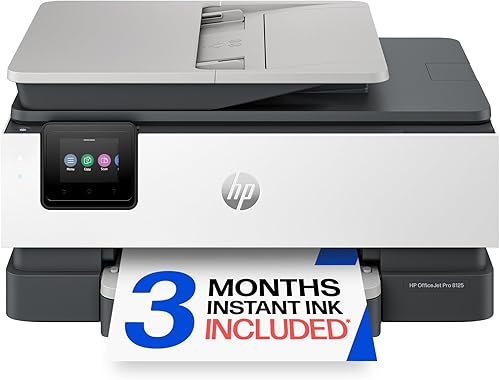
The HP OfficeJet Pro 8125 is a balanced pick when home printing includes reports, forms, schoolwork and occasional scanning. Its 225-sheet input tray means fewer reloads than the 100-sheet Envy 6555 or 150-sheet Brother models.
The ADF handles multi-page originals, and automatic duplex printing can print on both sides without manually turning each sheet. HP rates its speeds at up to 20 pages per minute in black and 10 in color.
A 2.7-inch color touchscreen and the HP app provide printer controls and mobile print, scan and copy functions. HP also describes an AI feature that removes unwanted content from web pages and emails before printing.
HP includes a three-month Instant Ink trial. After the trial, a monthly fee applies unless cancelled, and HP says the printer blocks cartridges that lack original HP chips or circuitry.
Choose it for a busy household that regularly prints documents and scans multi-page papers. Consider another model if you need fax, because the 8125's stated functions are print, scan and copy.
Canon PIXMA TS6520: Best for occasional printing
- Print, scan and copy
- Automatic duplex printing
- Dual-band Wi-Fi
- Compact design
- 1.42-inch OLED display
A compact all-in-one for schoolwork, recipes and photos, with automatic duplex printing and mobile printing support.
Pros
- Automatic two-sided printing
- Canon PRINT app, AirPrint and Mopria support
- Compact design
Cons
- No ADF
- Two-cartridge hybrid ink system
The Canon PIXMA TS6520 fits occasional family printing where the printer needs to handle documents and photos without a larger office-style footprint. It prints, scans and copies, and the automatic duplex feature can save manual page turning for double-sided jobs.
Its dual-band Wi-Fi supports 2.4 GHz and 5 GHz connections, and mobile options include Canon PRINT, Apple AirPrint and Mopria. The 1.42-inch monochrome OLED display shows ink levels and printer status.
Canon describes its two-cartridge hybrid ink system as producing sharp text and vivid colors. It supports document and photo printing up to 8.5 x 11 in, with or without borders.
There is no ADF, so scanning a stack of pages means handling them one at a time. That tradeoff is reasonable if you mostly print single pages, school projects, recipes or occasional photos.
Choose it for lighter home use where compact size and phone printing matter more than batch scanning. For regular multi-page scanning, pick a model with an ADF.
HP OfficeJet Pro 8139: Best for home office faxing
- Print, scan, copy and fax
- Automatic document feeder
- Automatic duplex printing
- 225-sheet input tray
- One-year Instant Ink trial
Adds fax to the OfficeJet Pro feature set, with an ADF and automatic two-sided printing for document-heavy home offices.
Pros
- Fax, scan and copy functions
- ADF and automatic duplex
- 225-sheet input tray
Cons
- Works only with cartridges that have original HP chips or circuitry
- Instant Ink trial becomes a monthly fee unless cancelled
The HP OfficeJet Pro 8139 suits a home office that needs fax along with printing, scanning and copying. It shares the 8125's 20 ppm black and 10 ppm color speed rating, ADF, automatic duplex and 225-sheet tray.
The 2.7-inch color touchscreen provides printer controls, while the HP app supports printing, scanning, copying and faxing from a smartphone. HP also includes its web page and email formatting feature.
This model includes a one-year Instant Ink trial. A monthly fee applies after the trial unless cancelled, so review the plan terms before enrolling.
The printer works only with cartridges carrying original HP chips or circuitry. Periodic firmware updates maintain this restriction.
Choose it for home office faxing and frequent document handling. If you don't need fax, compare the 8125's shorter trial and otherwise similar paper handling.
Brother Work Smart 1360: Best for cloud workflows

- Print, scan and copy
- 20-sheet single-sided ADF
- Automatic duplex printing
- 150-sheet tray
- Cloud app connections
A compact all-in-one with an ADF, duplex printing and cloud app connections through its color display.
Pros
- ADF for multi-page originals
- Prints from and scans to supported cloud apps
- Wireless and USB connections
Cons
- ADF is single-sided
- Tray holds fewer sheets than the OfficeJet Pro picks
The Brother Work Smart 1360 offers useful paper handling in a compact all-in-one. Its 20-sheet single-sided ADF, automatic duplex printing and 150-sheet tray cover common home office tasks without the larger 225-sheet capacity of the OfficeJet Pro models.
Brother rates it at up to 16 ppm in black and 9 ppm in color. A 1.8-inch color display provides access to supported cloud apps, including Google Drive, Dropbox, Box and OneDrive.
Wireless and USB connections give you options for a computer or mobile device. The Brother Mobile Connect app supports printing, copying, scanning and device management, and Page Gauge monitors ink usage.
The ADF is single-sided, so double-sided originals need to be turned over. Brother says the printer uses genuine LC501 ink and includes a two-month Refresh EZ Print trial.
Choose it for cloud app access and routine document work with occasional multi-page scanning. For fax, choose one of the OfficeJet Pro models instead.
HP Envy 6555: Best for homework and photos

- Print, scan and copy
- 35-sheet ADF
- Automatic duplex printing
- 100-sheet input tray
- HP P3 technology
A home-focused all-in-one with a 35-sheet ADF, automatic duplex and features aimed at everyday color documents and borderless photos.
Pros
- 35-sheet ADF
- Automatic two-sided printing
- 2.4-inch color touchscreen
Cons
- 100-sheet input tray
- Works only with cartridges that have original HP chips or circuitry
The HP Envy 6555 is designed around everyday home documents and photos, with a 35-sheet ADF and a 100-sheet input tray. It prints, scans and copies, and automatic duplex printing handles two-sided pages.
HP rates print speeds at up to 10 ppm black and 7 ppm color. Its 2.4-inch touchscreen and dual-band Wi-Fi support everyday operation, and HP's app adds mobile print, scan and copy functions.
HP describes its P3 technology as helping documents and photos look vibrant, and the Envy supports borderless photo printing. The input tray is smaller than the OfficeJet Pro and Brother trays, so frequent printing means more reloads.
The model includes a three-month Instant Ink trial. A monthly fee applies after the trial unless cancelled, and the printer works only with cartridges carrying original HP chips or circuitry.
Choose it for home color documents and photos when the ADF is useful but a large paper tray is not essential. For heavier print volume, compare the OfficeJet Pro 8125 or Brother Work Smart 1360.
Epson Expression Premium XP-6100: Best for photo printing

- Five-color ink system
- Photos up to 8 x 10 in
- Dedicated photo tray
- Automatic duplex printing
- Wi-Fi Direct
A compact all-in-one with a five-color ink system, photo tray and support for prints up to 8 x 10 in.
Pros
- Five-color ink system
- Dedicated photo tray
- Wi-Fi Direct
Cons
- Individual ink cartridges are sold separately
- No ADF
The Epson Expression Premium XP-6100 is the photo-oriented pick, with a five-color ink system and support for prints up to 8 x 10 in. It also prints, scans and copies in a compact desktop design.
Epson rates print speeds at up to 15.8 ISO ppm in black and 11.3 ISO ppm in color. A dedicated photo tray, 2.4-inch color LCD and automatic two-sided printing add useful controls for mixed document and photo jobs.
Wi-Fi and Wi-Fi Direct support wireless printing, including direct connections without a router. Built-in USB and memory card slots add ways to send files to the printer.
The XP-6100 uses an individual cartridge for each color, so you replace the cartridge that runs out. Epson's cartridges are sold separately, and there is no ADF for feeding a stack of originals.
Choose it for photo printing at home when the five-color system and photo tray are more useful than an ADF. For frequent scanning, consider a Brother or HP model with a document feeder.
HP OfficeJet Pro 8135: Best for app-based faxing

- Print, scan, copy and fax
- Automatic document feeder
- Automatic duplex printing
- 225-sheet input tray
- HP app
A document-focused all-in-one with fax, an ADF, automatic duplex and mobile printing through the HP app.
Pros
- Fax, scan and copy functions
- ADF and automatic duplex
- 225-sheet input tray
Cons
- Works only with cartridges that have original HP chips or circuitry
- Instant Ink trial becomes a monthly fee unless cancelled
The HP OfficeJet Pro 8135 is another document-focused all-in-one with fax, scan and copy functions. It has an ADF, automatic duplex and a 225-sheet tray, plus the same rated speeds as the other OfficeJet Pro picks.
The 2.7-inch touchscreen and HP app support print, scan, copy and fax tasks. HP's formatting feature can remove unwanted content from web pages and emails before printing.
HP includes a three-month Instant Ink trial. A monthly fee applies after the trial unless cancelled, and the printer works only with cartridges carrying original HP chips or circuitry.
Periodic firmware updates maintain the restriction.
The 8135 fills a similar role to the 8139, so compare their configurations and included trial terms before deciding. Both have the same stated core paper handling and rated print speed.
Choose it for fax and document feeding if its configuration suits your setup. The 8139 may be a better match if its one-year trial is useful and you understand the post-trial terms.
Brother INKvestment 1365: Best for bundled cartridge yield
- Print, scan and copy
- 20-sheet single-sided ADF
- Automatic duplex printing
- 150-sheet tray
- Included cartridges with stated yields
A Brother all-in-one with an ADF, duplex printing and included cartridges with stated page yields.
Pros
- Included black and color cartridges have stated yields
- ADF and automatic duplex
- Wi-Fi, Wi-Fi Direct and USB
Cons
- ADF is single-sided
- Uses Brother Genuine LC504 ink
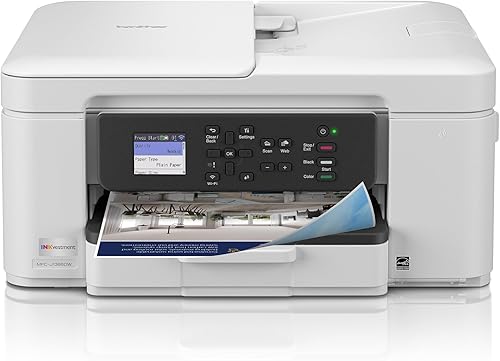
The Brother INKvestment 1365 pairs a 20-page single-sided ADF with automatic duplex printing and a 150-sheet tray. Its rated speeds reach 16 ppm in black and 9 ppm in color, matching the Work Smart 1360.
Brother includes one black cartridge with a stated 1,200-page yield and one cartridge for each color with a stated 500-page yield. Actual yield depends on the documents and print settings, so use those figures as reference points rather than a guarantee for your routine.
The 1.8-inch color display supports cloud app connections, and the Brother Mobile Connect app handles print, scan, copy and device management tasks. Wi-Fi Direct allows wireless printing without an external network connection.
This model uses Brother Genuine LC504 ink. The Refresh trial requires enrollment in a monthly billed service plan based on page allotments, so review those terms before signing up.
Choose it for its included cartridge yields and feeder features if the LC504 system fits your ink preferences. If you want similar Brother paper handling with LC501 ink, compare the Work Smart 1360.
How should you choose the best inkjet printer for home use?
Choose by your most common task: an ADF for multi-page scans, automatic duplex for double-sided documents, a photo tray or photo ink system for pictures, and a larger input tray if you print often. Rated speeds and extra features matter less if they do not match your weekly routine.
For mixed documents and scanning, the OfficeJet Pro 8125 combines an ADF with a 225-sheet tray. The Brother models offer ADFs and duplex printing at a smaller 150-sheet capacity, while the Envy 6555 includes a 35-sheet ADF and a 100-sheet tray.
For occasional printing, the Canon PIXMA TS6520 leaves out the ADF but keeps scan, copy, wireless and duplex functions. The Epson XP-6100 offers a five-color ink system and dedicated photo tray for buyers who print photos at home.
Which best inkjet printer for home use fits your print volume?
A printer's tray capacity and rated speed help you estimate how often you'll reload paper and how quickly a job may finish. They are useful comparisons, but your own documents, settings and print mix affect the time and ink each job uses.
If you print many pages each week, the 225-sheet tray on the OfficeJet Pro models means fewer paper reloads than the 100-sheet Envy or 150-sheet Brother models. The HP OfficeJet Pro 8125 also has the highest stated black and color speeds among these picks.
For a few pages at a time, a smaller tray is less of a concern. Choose the features you'll use often instead of paying attention to a speed figure that won't change your routine.
Does a home inkjet need an ADF and duplex printing?
An ADF is useful if you scan or copy several pages at once, while duplex printing helps with double-sided documents. Those features save handling time, but they may add little if you only print a few single-page items.
The Canon PIXMA TS6520 lacks an ADF, so it suits occasional scanning. The HP and Brother picks include feeders, but the Brother ADFs are single-sided, which means you'll need to turn double-sided originals over to scan their reverse sides.
Automatic duplex appears on all 8 printers in this guide. Use it for reports, schoolwork or household paperwork, and check the print dialog before a job if you need every page on one side.
Which ink system suits home printing?
The ink system affects how you plan replacements and whether an introductory subscription fits your habits. Compare cartridge models by the ink they use and any stated included yields, then check whether a trial requires monthly enrollment after it ends.
The OfficeJet Pro and Envy include Instant Ink trials, with monthly fees after the trial unless cancelled. The Brother Work Smart 1360 includes a Refresh EZ Print trial, and the INKvestment 1365 includes cartridges with stated yields plus a Refresh trial.
The Brother INKvestment 1365's included yield figures can help you plan an initial supply, but actual yield varies with print settings and content. The Epson XP-6100 uses an individual cartridge for each color, so you replace the color that runs out.
For a deeper look at cartridge and tank approaches, see our printers with cheap ink guide and ink tank printer guide. The best fit depends on how often you print and whether you prefer cartridges or refillable tanks.
How do you set up a home inkjet printer?
Set up a home inkjet printer on a stable, level surface near a power outlet and within reach of the Wi-Fi network or computer connection you plan to use. Leave space around the paper tray and scanner so you can load sheets and open the lid without moving the printer.
Follow the included setup guide to install the cartridges, load paper and complete the printer's initial setup. Then connect from the manufacturer's app or your computer, and print a basic document to confirm the selected device, paper size and connection.
For phone printing, install the matching printer app or use a supported service such as AirPrint or Mopria when available. The Canon PIXMA TS6520 supports Canon PRINT, AirPrint and Mopria, while Brother's Mobile Connect app supports print, scan and copy tasks on compatible mobile devices.
Before a larger job, check that the correct paper size and orientation are selected. A quick preview can catch cropped web pages, blank pages or a layout that spills onto extra sheets.
What common home printer mistakes can you avoid?
Many home printing problems start with a mismatch between the file, paper and print settings. Check those basics before repeating a job, especially when printing photos or web pages that may not fit a standard page cleanly.
Use the paper type setting that matches the sheets in the tray. Plain paper, photo paper and other media can need different settings, and using the wrong choice can affect how the printer handles a job.
Don't assume an ADF scans both sides of an original automatically. The Brother Work Smart 1360 and INKvestment 1365 have single-sided ADFs, so you must turn over double-sided pages if both sides need scanning.
Avoid leaving a large print job until the tray is nearly empty. Check the paper stack and ink supply first, then review the print preview to remove unwanted pages and save paper.
How can you care for a home inkjet printer?
Keep the printer on a firm surface and protect the paper supply from dust, moisture and bending. Reload paper neatly, align the stack, and keep the tray within its marked capacity to reduce feeding trouble.
Use the printer's built-in maintenance options when print quality changes, and follow the model's setup guide for cartridge handling. Avoid touching ink nozzles or forcing parts that do not move freely.
If you print infrequently, consider a small routine document now and then so the printer stays ready for ordinary work. Store spare cartridges according to their packaging instructions and check the compatible cartridge family before buying replacements.
For troubleshooting, start with the screen or app message and check paper, cartridge seating and connection status. Our guide to why a printer prints blank pages covers a common issue and steps to investigate it.
Which inkjet printer should you pick for home use?
Pick the HP OfficeJet Pro 8125 for frequent document printing and multi-page scanning, the Canon PIXMA TS6520 for occasional family use, or the Epson Expression Premium XP-6100 for photo features. If fax matters, compare the OfficeJet Pro 8139 and 8135, including their different Instant Ink trial terms.
For brand-specific options, see our best Epson printers for home use guide. If low ongoing ink cost is your main concern, compare cartridge and tank choices in the cheap ink printer guide.
Our top 3 picks at a glance
-
1
-
2
-
3
Frequently asked questions
Which inkjet printer is best for home use?
The HP OfficeJet Pro 8125 is a strong fit for frequent home printing because it combines print, scan and copy functions with an ADF, automatic duplex printing and a 225-sheet tray. For occasional jobs, the Canon PIXMA TS6520 is more compact and still scans, copies and prints double-sided pages.
Is an inkjet printer good for everyday home use?
An inkjet can suit home use if you print a mix of color documents, schoolwork and photos. Match the printer's paper handling and ink system to your routine.
Consider how often you print when comparing cartridges.
For large, regular print volumes, compare cartridge models with tank printers in our home printer guide.
Do I need an ADF on a home printer?
An ADF helps when you scan or copy several pages at once because you can load a stack of originals instead of placing each page on the scanner glass. It matters less if you mostly print single sheets or scan occasional photos.
The Canon PIXMA TS6520 has no ADF, while the other picks here include one.
Which home inkjet printer is best for photos?
The Epson Expression Premium XP-6100 is the photo-focused pick here, with a five-color ink system, a dedicated photo tray and support for prints up to 8 x 10 in. The Canon PIXMA TS6520 also supports borderless photos up to 8.5 x 11 in, making it another option for occasional photo printing.
How can I keep home printer ink costs in mind?
Compare the cartridge type, included ink and your expected print volume before choosing. Subscription programs may have terms that change after a trial, so read the plan details and cancellation rules from the printer brand.
Our guide to printers with cheap ink covers cartridge and tank options.



