What Is Duplex Printing and Do You Need It?
Duplex printing means printing on both sides of a sheet of paper. Automatic duplex printing handles the page flip for you, while manual duplex printing requires you to turn and reload the paper.
On this page (7 sections)
Duplex printing means printing on both sides of a sheet of paper. Automatic duplex printing turns the page for you; manual duplex printing asks you to reload it.
It can cut paper use for drafts, school assignments, and long documents. Whether you need it depends on how often you print multi-page jobs and whether you want to manage the page flip yourself.
What is duplex printing on a printer?
Duplex printing puts content on both sides of a sheet. A two-sided document uses fewer sheets than the same document printed on one side at a time, though the number of sheets saved depends on the layout and job.
The word “duplex” refers to the two sides of the page. Printer menus may call it “two-sided printing” or “print on both sides.”
The setting may offer a choice of binding edge. “Flip on long edge” is common for pages that turn like a book, while “flip on short edge” can suit pages that flip upward.
Check the preview before printing a large job.
What does automatic duplex printing mean?
Automatic duplex printing handles the page flip inside the printer. You choose two-sided printing in the computer or mobile print settings, and the printer feeds the paper through to print the other side.
That makes automatic duplex useful when you print two-sided documents often. It also reduces the chance of putting a stack back in with the wrong side or direction facing up.
What does manual duplex printing mean?
Manual duplex printing requires you to turn or reload the paper between sides. Some print menus guide you through printing one side first, then prompt you to put the pages back in.
The process can vary by printer and paper tray. Follow the on-screen prompts or your printer’s instructions, and try a short document before printing a large batch.
Do you need duplex printing?
You may want duplex if you regularly print multi-page documents and want to use fewer sheets. If you print mostly single-page forms, labels, or photos, you may rarely use the feature.
Duplex can be handy for:
- School assignments and reading packets
- Work documents and reports
- Household instructions and recipes
- Drafts that don't need to be single-sided
Keep single-sided printing available for forms that need space for notes, pages with heavy ink coverage, or documents whose instructions require one side per sheet. For help choosing a printer for a broader mix of home tasks, see our home printer guide.
Does duplex printing save paper and money?
Two-sided printing can reduce the number of sheets a job uses. It may also mean fewer sheets to store or carry, but the feature alone doesn't guarantee a specific paper or cost saving.
For example, a 10-page document printed on one side needs 10 sheets. Printed two-sided, it can fit on 5 sheets if the layout allows each sheet to hold two pages.
Your ink or toner use depends on what appears on the pages, not just which side is printed. If ink costs matter more to you than sheet use, compare printers in our guide to printers with cheap ink.
Can duplex printing also scan both sides?
No, duplex printing doesn't mean duplex scanning. Printing concerns output on the paper; scanning concerns how the printer captures pages you place on its scanner or feeder.
Some automatic document feeders handle multi-page originals, but that alone doesn't tell you whether they scan both sides of each page. Check for a specific two-sided scanning feature if that is part of your workflow.
Our guide to what an ADF does on a printer explains how document feeders handle multi-page jobs.
Which duplex printer fits your kind of printing?
Choose based on how often you print two-sided jobs and what else you need the printer to do. These four options all include automatic two-sided printing, with differences in their document handling and home-office features.
Which duplex printer fits a home office best?
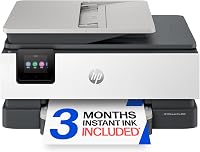
The HP OfficeJet Pro 8125 is the strongest fit here for a home office, with a 225-sheet tray, ADF, and automatic duplex printing. Its listed print speeds are up to 20 pages per minute in black and 10 in color.
Choose it if you print reports, presentations, or flyers and need its larger input tray. For more options, compare the printers in our home office printer guide.
Which duplex printer offers features for everyday home use?
The Canon PIXMA TS6520 offers automatic two-sided printing, scanning, and copying in a compact home printer. It doesn't include an ADF, so consider how often you scan or copy several pages at once.
It may suit households and students who print occasional two-sided jobs and don't need an ADF. For a closer look at school and campus needs, see our guide to printers for college students.
Is the Canon PIXMA TR7120 a fit for multi-page tasks?
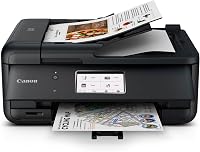
The Canon PIXMA TR7120 combines automatic two-sided printing with an ADF for scanning and copying multi-page documents. It also prints, scans, and copies, with a compact design and mobile printing support.
Choose it if you want both features in one home printer. If your main interest is phone printing, our guide to AirPrint and compatible printers explains how wireless printing from Apple devices works.
Is the HP Envy 6555 useful for home printing?
The HP Envy 6555 includes automatic two-sided printing, a 35-sheet ADF, and a 100-sheet input tray. It also prints, scans, and copies, with a touchscreen and wireless printing.
Consider it if you want two-sided printing alongside an ADF for home tasks. If you want to understand how printing, scanning, and copying come together, read our guide to all-in-one printers.
How do you turn on duplex printing?
Select two-sided or duplex printing in the print settings before you send the job. The option may appear under “Layout,” “Finishing,” or a similar menu, depending on your device and software.
Use print preview to check which edge will flip and whether the pages look right. If the job is manual duplex, follow the reload prompt and test a few pages first.
If you don't see a two-sided option, check the printer’s instructions and software settings. The feature may not be available for every paper size, media type, or print mode.
Which duplex printer should you choose?
Choose automatic duplex if you print two-sided pages often; choose a simpler printer if you rarely do. An ADF matters when you also scan or copy stacks of pages, while duplex printing by itself only handles printed output.
The HP OfficeJet Pro 8125 ranks first for this use, followed by the Canon PIXMA TS6520, Canon PIXMA TR7120, and HP Envy 6555. The Canon PIXMA TR7120 and HP OfficeJet Pro 8125 pair duplex printing with an ADF, while the Canon PIXMA TS6520 offers duplex without an ADF.
For a home office with regular document jobs, compare the home office printer guide. For a general household choice, start with our home printer guide.
Frequently asked questions
What is duplex printing on a printer?
Duplex printing prints on both sides of a sheet. With automatic duplex, the printer turns the page and prints the second side for you; manual duplex requires you to reload the paper.
Check the printer settings and instructions to see which method it supports.
Does duplex printing save paper?
Yes, printing on both sides can reduce the number of sheets needed for a document. It doesn't automatically cut paper use in half: title pages, blank pages, print layout, and jobs that need single-sided copies all affect how many sheets you use.
Is automatic duplex printing better than manual duplex?
Automatic duplex is more convenient for regular two-sided jobs because the printer handles the page flip. Manual duplex can work for occasional jobs if your printer supports it, but you have to reload the pages in the right order and orientation.
Can you scan both sides with duplex printing?
No. Duplex printing describes printing on both sides of paper; it doesn't tell you whether a printer can scan both sides of an original.
For two-sided scanning, check the scanner or automatic document feeder features separately.