8 Best Printers for College Students (October 2026)
The best printers for college students include the Canon PIXMA TR4720 for classwork and scanning, the Canon PIXMA TR7120 for multi-page assignments, and the HP Envy 6155 for color homework.
On this page (7 sections)
- How to choose the best printer for college students
- College printer features compared
- Best printers for college students by need
- How to set up a college printer without wasted pages
- How to care for a printer during the school year
- Common college printer mistakes to avoid
- Which college printer should you choose?
The Canon PIXMA TR4720 is the best printer for most college students because it prints, scans, copies and faxes, with an automatic document feeder and automatic two-sided printing. Choose the Epson EcoTank ET-2400 if you print often and want refillable tanks, or the Canon PIXMA TR160 if you need to print while moving between rooms or locations.
The right college printer depends on your workload, available space and whether you need scanning or copying. A student who prints a few pages a week has different needs from someone who regularly handles reading packets, forms and color projects.
If your printer will serve a dorm room and a shared home workspace, compare our best printer for home use and home office printer guide. You can also browse the printer guide for different uses to compare setups beyond campus.
Our picks at a glance
-
1

-
2

-
3

How to choose the best printer for college students
The best printer for college students is the one that fits the work you actually do, with enough features to avoid recurring hassles. Decide first whether your classes require only printouts or also scans and copies, then weigh printing frequency, ink type, paper handling and space.
Do you need a printer that scans and copies?
An all-in-one printer is useful if you need to digitize notes, copy forms or make a quick duplicate of a paper handout. The TR4720 and TR7120 add an automatic document feeder, which can take a stack of pages for a scan or copy job instead of making you place each sheet on the glass.
A printer without an automatic document feeder can still scan and copy, but multi-page work takes more manual handling. If you rarely scan, that may be a fair trade for a simpler printer; if you do it every week, a feeder can save time.
The TR160 is the exception in this group because it prints only. It makes sense when you already have access to a scanner or copier elsewhere and portability is the main requirement.
How much do you print, and which ink system fits?
Think in terms of your typical month, not just the first week of classes. Occasional assignments and forms can fit a cartridge model, while steady printing of lecture notes, drafts and project pages makes refillable tanks worth considering.
The EcoTank ET-2400 uses refillable bottles rather than cartridges. Epson says its included ink can print up to 4,500 black-and-white pages or 7,200 color pages, though your actual yield will depend on the amount of text, graphics and photos on each page.
Cartridge models keep the replacement process familiar, but ink is an ongoing cost to include in your decision. The Epson XP-4200 uses individual cartridges, which lets you replace only the color that runs out; the Canon models use cartridge systems as well.
Is automatic two-sided printing worth having?
Automatic duplex printing prints both sides of a sheet without requiring you to flip and reload the paper. It is helpful for long readings, drafts and handouts because you can choose double-sided output in the print settings and let the printer handle the page order.
Most of these picks offer automatic two-sided printing. The EcoTank ET-2400 and HP DeskJet 2923 require manual page handling for double-sided jobs, so allow time to flip the stack and confirm the reload direction before printing a large assignment.
For more detail on the feature, read our guide to duplex printing and when you need it. If you plan to print from your phone, our instructions for printing from an iPhone cover a common student setup.
How should you balance space and portability?
Measure the desk or shelf where you plan to place the printer, including room for paper to feed and for the scanner lid to open. A small-looking printer still needs space around it for loading paper, connecting cables and removing finished pages.
The TR160 is the clear choice if you need to carry a printer: it weighs 4.5 lb, fits in a bag or backpack, and can connect directly to a compatible device without a wireless router. It is print-only, so it won't replace a full-size all-in-one for scanning or copying.
For a fixed dorm desk, a compact all-in-one is usually more useful than a portable print-only model. Check the printer's actual dimensions against the space you have before settling on one.
College printer features compared
The Canon PIXMA TR4720 and TR7120 are the strongest choices for multi-page schoolwork because both combine an automatic document feeder with automatic two-sided printing. The EcoTank ET-2400 serves a different need, with refillable tanks for students who expect a steady print workload.
The HP Envy 6155 and Epson XP-4200 suit color assignments and projects. The Canon TS4320 and HP DeskJet 2923 are simpler options for lighter use, while the Canon TR160 gives up scanning and copying to stay portable.
| Product | Best for | Functions | Paper capacity | Duplex printing | Our score |
|---|---|---|---|---|---|
| Canon PIXMA TR4720 | classwork and scanning | Print, copy, scan and fax | 100 sheets | Automatic | 8.2 |
| Canon PIXMA TR7120 | multi-page assignments | Print, scan and copy | 100 sheets | Automatic | 8.1 |
| HP Envy 6155 | color homework | Print, scan and copy | 100 sheets | Automatic | 7.7 |
| Epson EcoTank ET-2400 | frequent printing | Print, scan and copy | 100 sheets | 7.7 | |
| Epson Expression Home XP-4200 | photo and class projects | Print, scan and copy | Automatic | 7.4 | |
| Canon PIXMA TS4320 | occasional printing | Print, scan and copy | Automatic | 7.3 | |
| Canon PIXMA TR160 Portable | printing on the move | Print only | 50 sheets | 7.2 | |
| HP DeskJet 2923 | basic everyday pages | Print, copy and scan | 60 sheets | Manual | 6.9 |
Best printers for college students by need
The Canon PIXMA TR4720 is the most versatile pick for a student who will print, scan and copy throughout the term. If your priority is ink replacement frequency, color work, basic occasional pages or portability, one of the other models may fit better.
Canon PIXMA TR4720: best printer for college students who scan
Canon PIXMA TR4720: Best for classwork and scanning
- Print, copy, scan and fax
- Automatic document feeder
- Automatic two-sided printing
- 100-sheet capacity
An all-in-one with an automatic document feeder for multi-page scanning and copying. Automatic two-sided printing can save paper on longer assignments.
Pros
- Automatic document feeder
- Automatic two-sided printing
- Prints, copies, scans and faxes
Cons
- Uses ink cartridges
- Not designed as a portable printer
The Canon PIXMA TR4720 is the best printer for college students who regularly handle paper notes, forms and assignments. It prints, copies, scans and faxes, and its automatic document feeder helps with multi-page scanning and copying.
Automatic two-sided printing is useful for long assignments and drafts. The 100-sheet capacity lets you keep paper loaded for routine classwork, and the printer can produce documents and borderless photos up to letter size.
Canon gives print speeds of up to 8.8 pages per minute for black documents and 4.4 for color documents. This is a practical all-in-one for a fixed desk, but the cartridge system and lack of a portable design make it a weaker match for heavy printing on the go.
Choose it if the scanner and feeder will see regular use. Skip it if your only goal is carrying a printer in a backpack or reducing cartridge changes across a high print volume.
Canon PIXMA TR7120: best printer for multi-page assignments
Canon PIXMA TR7120: Best for multi-page assignments
- Automatic document feeder
- Automatic two-sided printing
- Dual-band Wi-Fi
- OLED display
A compact all-in-one with an automatic document feeder and automatic two-sided printing. Dual-band Wi-Fi and mobile printing add options for a shared study space.
Pros
- Automatic document feeder
- Automatic two-sided printing
- Dual-band Wi-Fi
Cons
- Uses ink cartridges
- Does not list fax as a function
The Canon PIXMA TR7120 is a good fit for students who scan or copy packets and want automatic duplexing for written work. Its automatic document feeder handles multi-page jobs, and the 100-sheet capacity suits a regular desk setup.
Dual-band Wi-Fi supports 2.4 GHz and 5 GHz connections. For phones and tablets, it supports Canon PRINT, Apple AirPrint and Mopria Print Service, while its small monochrome OLED shows status and ink information.
Choose the TR7120 when wireless options and a feeder matter more than faxing. Skip it if you need refillable tanks or a print-only model you can carry between study locations.
HP Envy 6155: best printer for color homework
HP Envy 6155: Best for color homework
- Print, scan and copy
- Automatic two-sided printing
- 100-sheet input tray
- Color touchscreen
An all-in-one with automatic two-sided printing, a 100-sheet tray and a color touchscreen. It can handle everyday color documents alongside scanning and copying.
Pros
- Automatic two-sided printing
- Color touchscreen
- 100-sheet input tray
Cons
- Uses HP cartridges
- Instant Ink trial becomes a paid plan unless cancelled
The HP Envy 6155 suits students who print color homework, diagrams and photos as well as ordinary documents. It prints, scans and copies, with automatic two-sided printing, a 100-sheet input tray and a 2.4-inch color touchscreen.
HP gives print speeds of up to 10 pages per minute in black and 7 in color. The HP app supports printing, scanning and copying from a smartphone, which is helpful when coursework or images are on a mobile device.
HP includes a 3-month Instant Ink trial. A monthly fee applies after the trial unless you cancel, so account for the plan terms if you enroll.
Choose it if color output, a touchscreen and phone-based tasks are important. Skip it if you want refillable tanks or don't want to manage a subscription trial.
Epson EcoTank ET-2400: best printer for frequent printing
Epson EcoTank ET-2400: Best for frequent printing
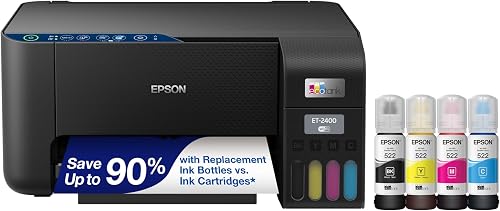
- Refillable ink tanks
- Print, scan and copy
- 100-sheet rear-feed tray
- Manual two-sided printing
Refillable tanks suit students who expect to print often and want to avoid cartridge replacement. It scans and copies, though two-sided printing is manual.
Pros
- Refillable ink tanks
- 100-sheet rear-feed tray
- Prints, scans and copies
Cons
- Two-sided printing is manual
- Larger footprint than a portable printer
The Epson EcoTank ET-2400 is the best match here for students who print regularly and prefer refillable ink tanks. It prints, scans and copies, and its rear-feed tray holds up to 100 sheets.
Epson says one set of bottles is equivalent to about 80 individual cartridges and that the included ink can print up to 4,500 black-and-white pages or 7,200 color pages. Those are manufacturer estimates; actual results depend on what you print.
The main tradeoff is manual two-sided printing. You must turn and reload pages yourself, so this model fits frequent printing better than a routine full of double-sided packets.
Choose the ET-2400 if you want to refill tanks and print a lot over the school year. Skip it if you prioritize automatic duplexing, easy portability or the smallest desk footprint.
Epson Expression Home XP-4200: best printer for photo and class projects
Epson Expression Home XP-4200: Best for photo and class projects
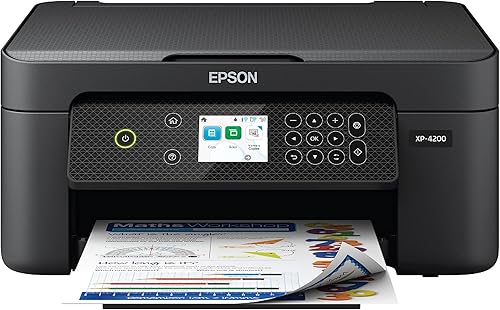
- Print, scan and copy
- Automatic two-sided printing
- Individual ink cartridges
- 2.4-inch color display
Individual cartridges let you replace only the color that runs out. Automatic two-sided printing helps with paper use, while the color display supports direct control.
Pros
- Automatic two-sided printing
- Individual ink cartridges
- Color display
Cons
- Uses cartridges
- No automatic document feeder
The Epson Expression Home XP-4200 fits projects that mix class documents with color graphics and photos. It prints, scans and copies, and individual ink cartridges let you replace only the color that has run out.
Automatic two-sided printing helps reduce paper use on longer assignments. The 2.4-inch color display provides direct controls, while the Epson Smart Panel app supports setup and printing from a smartphone or tablet.
This model does not have an automatic document feeder. Choose it if color projects and occasional scanning are more important than batch scanning a stack of readings.
Skip it if multi-page copying is part of your weekly routine. A model with an ADF, such as the TR4720 or TR7120, will reduce the number of times you need to handle pages individually.
Canon PIXMA TS4320: best printer for occasional printing
Canon PIXMA TS4320: Best for occasional printing

- Print, scan and copy
- Automatic two-sided printing
- Dual-band Wi-Fi
- Compact design
A compact all-in-one for light printing, scanning and copying. Automatic two-sided printing and mobile printing cover common coursework needs.
Pros
- Automatic two-sided printing
- Dual-band Wi-Fi
- Mobile printing
Cons
- Uses cartridges
- No automatic document feeder
The Canon PIXMA TS4320 is a straightforward all-in-one for students with light printing needs. It prints, scans and copies, and automatic two-sided printing can help with assignments and handouts.
It supports dual-band Wi-Fi and mobile printing through Canon PRINT, Apple AirPrint and Mopria. Canon describes setup for smartphones and computers as simple, which suits someone who wants to get ordinary jobs going without extra features.
Choose the TS4320 for occasional coursework, forms and photos in a compact setup. Skip it if you regularly scan or copy multi-page packets, since it has no automatic document feeder.
Canon PIXMA TR160: best printer for students on the move
Canon PIXMA TR160 Portable: Best for printing on the move

- Print-only design
- 4.5 lb weight
- Fits in a backpack
- Wireless Direct mode
A lightweight printer that fits in a bag or backpack and can connect directly to a compatible device without a wireless router. It does not scan or copy.
Pros
- Portable 4.5 lb design
- Wireless Direct mode
- Prints documents and photos
Cons
- Print only
- No automatic two-sided printing
The Canon PIXMA TR160 is the portable choice for a student who needs to print away from a fixed desk. At 4.5 lb, it fits in a bag or backpack, and Wireless Direct mode lets a compatible device connect without a wireless router.
It prints documents and photos up to 8.5 by 11 inches and holds up to 50 sheets. The 1.44-inch monochrome OLED shows ink levels, printer status and settings.
This is a print-only device, with no scanner or copier and no automatic two-sided printing. Choose it if carrying weight and direct connectivity are essential; skip it if you need a single machine for all your coursework tasks.
HP DeskJet 2923: best printer for basic everyday pages
HP DeskJet 2923: Best for basic everyday pages

- Print, copy and scan
- 60-sheet input tray
- Wireless and mobile printing
- Compact design
A compact all-in-one for basic color documents, copying and scanning. Its 60-sheet tray suits light workloads, and duplex printing requires manual page handling.
Pros
- Prints, copies and scans
- Compact design
- Wireless printing
Cons
- 60-sheet input tray
- Two-sided printing is manual
The HP DeskJet 2923 is suited to basic color documents, lists, letters and occasional scanning or copying. It has wireless and mobile printing, an icon LCD and a 60-sheet input tray.
Two-sided printing is manual, so you must turn and reload the pages for a double-sided assignment. HP includes a 6-month Instant Ink trial, after which a monthly fee applies unless you cancel.
Choose it if your workload is light and a compact all-in-one covers your needs. Skip it if you print large packets often, need automatic duplexing or want a feeder for multi-page scans.
How to set up a college printer without wasted pages
A careful first setup can prevent connection and paper problems during a deadline. Place the printer on a stable, level surface near a power outlet, with clearance to load paper and open any scanner lid.
Follow the included setup steps for the model and install its brand app if you plan to print from a phone. Connect the printer and device to the network the way the manufacturer specifies; on campus, check whether the student Wi-Fi allows personal devices to communicate with printers.
Load plain paper in the correct orientation and make sure the guides touch the stack without bending it. Before sending a long assignment, print a short document to confirm the connection, margins and page order.
For phone printing, use the printer's supported app or service. The TR7120 supports Apple AirPrint and Mopria as well as Canon PRINT, while the HP Envy 6155 offers the HP app; confirm your phone and network can reach the printer.
How to care for a printer during the school year
Keep the printer on a clean, dry surface away from drinks, bags and loose papers. Dust can collect around the paper path, so follow the manufacturer’s cleaning instructions and avoid forcing paper or touching parts that the guide says not to handle.
Store spare paper flat and dry to reduce curled sheets and feed problems. Keep ink bottles or cartridges for the exact printer model, and check compatibility before buying replacements.
If you print infrequently, avoid leaving important work until the last minute. Print a small page ahead of a deadline so you can spot low ink, connection trouble or a paper feed issue while there is time to respond.
For general cartridge care, see our guide to whether printer ink expires. If blank pages appear, our steps for fixing a printer that prints blank pages can help you narrow down the cause.
Common college printer mistakes to avoid
Buying by the printer’s initial footprint alone can lead to a cramped setup. Check space for paper loading, output pages, cables and scanning before placing an all-in-one on a narrow dorm shelf.
Another common mistake is choosing a print-only portable model when you also need scans and copies. The TR160 is easy to carry, but it cannot replace the all-in-one features found in the other picks.
Don't overlook the difference between automatic and manual duplexing. With manual duplexing, you must handle the stack between sides, so account for that extra step if you often print long assignments.
Finally, don't assume wireless printing will work on every campus network. Check device access rules and test a short page before relying on the printer for a deadline.
Which college printer should you choose?
Choose the Canon PIXMA TR4720 if you want the most capable all-in-one for college documents and multi-page scanning. Choose the Canon PIXMA TR7120 if you want similar feeder and duplex features with dual-band Wi-Fi and mobile printing.
Pick the Epson EcoTank ET-2400 if you expect frequent printing and prefer refillable tanks. The HP Envy 6155 and Epson XP-4200 suit color projects, while the Canon TS4320 and HP DeskJet 2923 are better for lighter everyday tasks.
Choose the Canon PIXMA TR160 when portability outweighs scanning, copying and automatic two-sided printing. Before buying, check your desk space, the device and network requirements, and whether the printer’s ink system fits your expected workload.
For a shared wireless setup, compare these picks with our guide to wireless printers for home use. Mac users can also see our recommendations for the best printers for Mac.
Our top 3 picks at a glance
-
1
-
2
-
3
Frequently asked questions
What should a college student look for in a printer?
Choose by how often you print and which tasks you need to handle. An automatic document feeder helps scan or copy multi-page notes, while automatic two-sided printing can reduce paper use on longer assignments.
If you print often, compare cartridge printers with a refillable-tank model.
If you move between rooms, check the printer's size and weight.
Is an ink tank printer worth it for college?
An ink tank printer can suit a student who prints often and wants refillable tanks instead of cartridges. The Epson EcoTank ET-2400 scans and copies and has a 100-sheet rear-feed tray.
Its two-sided printing is manual, so consider that if you print long assignments.
Do college students need an all-in-one printer?
An all-in-one is useful if you need to scan or copy notes, forms and course materials as well as print them. The Canon PIXMA TR4720 and TR7120 include an automatic document feeder for multi-page tasks.
If you only need printed pages and portability matters most, the Canon PIXMA TR160 is a print-only option.
Can I print from my phone to a college printer?
Yes, several picks support mobile printing. The Canon PIXMA TR7120 supports the Canon PRINT app, Apple AirPrint and Mopria Print Service, while the HP Envy 6155 supports printing through the HP app.
Check your device and campus network requirements before choosing a wireless setup.



