What Is an All-in-One Printer? Print, Scan, Copy Explained
An all-in-one printer combines printing, scanning, and copying in one machine. Some models also include fax, an automatic document feeder, wireless printing, or two-sided printing.
On this page (8 sections)
- What does an all-in-one printer do?
- How does printing work on an all-in-one printer?
- How do scanning and copying differ?
- Does every all-in-one printer include fax?
- Which extra features should you look for?
- Which all-in-one printer examples show these differences?
- Is an all-in-one printer right for your home or office?
- What is an all-in-one printer in simple terms?
An all-in-one printer combines printing, scanning, and copying in one machine. Some models also add fax, an automatic document feeder, wireless connections, or automatic two-sided printing.
The term describes a set of functions, not one fixed design. If you mainly need to print schoolwork or household forms, the basics may be enough; a home office may benefit from a feeder and fax.
For a broader look at the available choices, see our home printer guide. If you're setting up a workspace, compare it with our home office printer guide.
What does an all-in-one printer do?
An all-in-one printer handles multiple document tasks from one device. The common combination is print, scan, and copy, though some models include fax as well.
| Function | What it does |
|---|---|
| Puts digital documents or images onto paper | |
| Scan | Turns a paper document or photo into a digital file |
| Copy | Scans a physical page and prints a duplicate |
| Fax | Sends or receives documents over a fax service or phone line, when supported |
These functions may share a scanner, controls, and paper handling. That can save desk space and simplify occasional document tasks, but the exact setup varies between printers.
Check the functions individually before choosing. “All-in-one” alone does not tell you whether a model includes fax, an ADF, wireless printing, or automatic duplexing.
How does printing work on an all-in-one printer?
Printing sends a file from a computer, phone, or tablet to the printer, which transfers text or images onto paper. The connection may be wireless, through a mobile app, or by USB, depending on the model.
The printer needs the right paper and ink or toner for its design. Inkjet models use ink cartridges or bottles, while laser models use toner; the all-in-one label does not tell you which printing system it uses.
Some models can print on both sides automatically. Read our guide to what duplex printing means if you want to know when that feature helps.
Consider what you print most often. Frequent text documents, color pages, photos, and occasional forms can place different demands on paper handling, ink, and print quality.
How do scanning and copying differ?
Scanning saves a paper document as a digital file, while copying makes a printed duplicate. Both start with the scanner, but copying typically sends the scan straight to the print function.
A flatbed scanner lets you place one page, book, photo, or other item on a glass surface. It can be useful for originals that should not feed through rollers, though you handle each page yourself.
Some printers also have an automatic document feeder (ADF). It pulls a stack of loose sheets through the scanner, which can reduce page-by-page handling for multipage copies or scans.
Learn more in our ADF guide.
Before buying, check how many pages the feeder can handle and whether it scans one side or both sides automatically. Those details vary by model.
Does every all-in-one printer include fax?
No. Fax is an optional extra, even though some all-in-one models include it alongside print, scan, and copy.
Fax can be useful if an office or organization still requires documents that way. If you do not expect to send or receive faxes, it may not be a deciding feature.
Check the printer's connection requirements and setup instructions if fax matters to you. A printer may also offer mobile app functions, but that does not mean it can send a traditional fax.
Which extra features should you look for?
Choose features based on the tasks you repeat, because added functions can affect the price, space, and setup you need. An ADF is helpful for stacks of pages, while wireless printing can make it easier to print from more than one device.
- Automatic duplex printing: prints on both sides without turning pages by hand.
- ADF: feeds multiple pages for scanning or copying.
- Wireless printing: connects over a wireless network; supported phones and apps vary.
- Mobile app: can support printing, scanning, or device management from a phone.
- Fax: adds document sending and receiving where supported.
- Paper capacity: affects how often you need to refill the tray.
If printing from a phone is part of your routine, see our guide to printing from an iPhone. Check whether the printer and your phone support the same connection method.
Which all-in-one printer examples show these differences?
These examples show how the feature mix varies across all-in-one printers. Compare the functions you need first, then narrow your choice by paper handling, connections, and intended use.
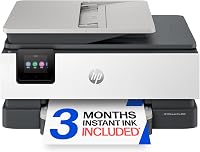
HP OfficeJet Pro 8125
The HP OfficeJet Pro 8125 has the highest score of these examples, at 8.4, and prints, scans, and copies, with an ADF and automatic two-sided printing. HP describes it as a home office printer with wireless printing and a mobile app.
Its 2.7-inch color touchscreen provides printer controls. The HP app supports printing, scanning, copying, or faxing from a smartphone, and the printer includes a 3-month Instant Ink trial.
Consider it if your routine includes a larger paper supply and phone-based tasks. The core features do not confirm that traditional fax is included, so check whether its fax setup fits your needs.
Canon PIXMA TR4720
The Canon PIXMA TR4720 scores 8.2 and combines print, copy, scan, and fax in one wireless printer. It also has automatic two-sided printing and an ADF.
It supports printing from a computer or mobile device, and Canon describes it as compatible with Canon apps for printing, scanning, and creative projects. Its paper capacity is 100 sheets.
Consider it if you want fax as well as the core three functions. Check whether its paper capacity and connections fit your routine.
Brother Work Smart 1360
The Brother Work Smart 1360 scores 8 and combines printing, scanning, and copying. It has automatic two-sided printing, a 20-sheet single-sided ADF, and a 150-sheet paper tray.
Its 1.8-inch color display supports connections to cloud apps, including Google Drive, Dropbox, Box, and OneDrive. Brother's Mobile Connect app supports printing, copying, scanning, and device management from a mobile device.
Consider it if cloud app access is useful for your document routine. Its ADF is specified for single-sided feeding, so review the workflow if you often process double-sided originals.
Epson Expression Home XP-5200
The Epson Expression Home XP-5200 scores 7.8 and combines printing, scanning, and copying. It supports wireless connections and mobile printing from Android or iOS devices.
It has a 150-sheet paper tray and a color display. Epson says its included ScanSmart software supports searchable PDFs.
Consider it if you want scanning software and automatic duplex printing for home use. Epson says the printer is designed for genuine Epson cartridges, so check cartridge compatibility when planning ongoing use.
Is an all-in-one printer right for your home or office?
An all-in-one printer suits you if you expect to print, scan, or copy often enough to want those tools in one device. It can also be a practical fit when fax or an ADF is part of your regular workflow.
A single-function printer may suit someone who only prints and wants fewer functions to consider. Compare the features and paper handling against your actual tasks, rather than choosing based on the all-in-one label alone.
Pick by workload: choose a basic print, scan, and copy setup for occasional home documents; look for an ADF and enough tray capacity if you handle stacks of pages. For more options, visit our home printer guide or home office printer guide.
What is an all-in-one printer in simple terms?
An all-in-one printer is one machine that combines printing, scanning, and copying. Some models add fax and features such as an ADF, wireless printing, or automatic two-sided printing, so check the exact functions before you choose.
Frequently asked questions
What does all-in-one mean on a printer?
An all-in-one printer combines printing, scanning, and copying in one machine. Some models add fax, an automatic document feeder, wireless printing, or automatic two-sided printing, so check which functions the specific model includes.
Can an all-in-one printer scan documents to a computer?
Many all-in-one printers can scan documents, but the steps and destinations depend on the model and its software. Check whether it supports scanning to your computer, phone, or a cloud service, and whether you need an app or a USB connection.
Is an all-in-one printer the same as a multifunction printer?
Yes. All-in-one and multifunction printer usually describe a machine that combines two or more tasks, such as printing, scanning, and copying.
The exact functions vary by model, so confirm whether fax or an automatic document feeder is included.
Do all-in-one printers print double-sided?
No. Some all-in-one printers support automatic two-sided printing, while others require you to turn the paper over yourself.
Look for automatic duplex printing in the features if you want the printer to handle both sides without manual page flipping.
What is the difference between an ADF and a flatbed scanner?
A flatbed scanner holds one page or item on a glass surface at a time. An automatic document feeder, or ADF, pulls multiple sheets through for scanning or copying, which can save handling time for a stack of loose pages.