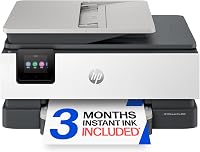
What Is an ADF on a Printer?
An ADF, or automatic document feeder, pulls a stack of pages into a printer's scanner for scanning or copying. It saves you from placing each sheet on the glass by hand.
On this page (9 sections)
- What Is an ADF on a Printer?
- What does ADF mean on a printer?
- How does an automatic document feeder work?
- When is an ADF useful?
- Does an ADF scan both sides automatically?
- What should you check when choosing an ADF printer?
- How should you set up and care for an ADF?
- What mistakes cause ADF problems?
- Is an ADF worth having on a home printer?
What Is an ADF on a Printer?
An ADF, or automatic document feeder, pulls a stack of pages into a printer's scanner for scanning or copying. If you're asking what is ADF on a printer, the practical answer is that it saves you from placing each loose sheet on the glass by hand.
It helps with forms, school papers, receipts, and work documents that run to several pages. The useful details are how many sheets it accepts, whether it scans one or both sides, and whether your originals are suitable for its paper path.
What does ADF mean on a printer?
ADF means automatic document feeder. Load loose sheets into its tray, select scan or copy, and the printer feeds them past the scanner.
Without a feeder, you place pages one at a time on the flatbed glass. That is fine for an occasional page, a photo, or a book, but gets tedious with a stack.
An ADF is for handling originals during scanning or copying. It does not mean the printer can scan both sides, and it is separate from automatic two-sided printing.
How does an automatic document feeder work?
An ADF moves sheets past a scanner one by one. The tray holds the stack, and rollers draw pages into the scanning path.
Some feeders scan one side at a time. A model with duplex scanning can capture both sides automatically, though the method varies by printer.
Before loading pages, remove staples and clips, straighten folded corners, and align the edges. Use the flatbed for books, delicate originals, or any paper the printer instructions say not to feed.
When is an ADF useful?
An ADF is useful when you regularly scan or copy multiple loose pages. It can save repeated lifting and page placement when you handle class notes, invoices, forms, or reports.
If you mostly print and only scan a page now and then, a flatbed may be enough. For shared home-office use, compare the options in our guide to printers for a home office.
For a broader explanation of print, scan, and copy functions, read what an all-in-one printer does.
Does an ADF scan both sides automatically?
Only an ADF with duplex scanning captures both sides automatically. Look for wording such as “duplex scanning” or “two-sided scanning” in the printer's scan features.
Duplex printing means the printer can print on both sides of a sheet. That does not tell you whether its scanner can capture both sides of an original.
With a one-sided feeder, you may need to turn the pages over and scan the reverse sides separately. See our guide to what duplex printing means for the printing side of the distinction.
What should you check when choosing an ADF printer?
Match the feeder to your usual stack size and scanning tasks. Capacity, two-sided scanning, paper handling, and the printer's other functions all affect how well it fits your routine.
A short-capacity feeder can still save effort on everyday documents, but larger batches may require reloading. Check the printer instructions for supported paper sizes and conditions before feeding anything unusual.
How many pages does an ADF hold?
Capacity tells you how many sheets you can load at once. The Brother Work Smart 1360 has a 20-sheet single-sided feeder, a practical fit for short batches of school or home-office papers.
The Canon PIXMA TR4720 has an ADF, but a capacity figure is not available here. It suits someone who wants an all-in-one with a feeder for ordinary multipage tasks, but frequent large batches call for a model with a confirmed capacity.
What is ADF on a printer, and when do you need a flatbed too?
An ADF handles loose pages, while a flatbed gives you a glass surface for individual originals. The glass is the better choice for books, photos, and fragile or irregular sheets.
The Brother Work Smart 1360 includes both a 20-sheet feeder and flatbed scanning capabilities. Choose it if you handle a mix of short document stacks and occasional single originals; skip it if you only need basic printing and rarely scan.
Which other printer features matter?
Choose an ADF printer that also fits your printing, copying, and connection needs. A feeder will not make up for a poor fit in paper capacity or everyday functions.
The HP OfficeJet Pro 8125 combines an ADF with scan and copy functions, automatic two-sided printing, a 225-sheet input tray, and a touchscreen. Its feeder capacity is not specified here, so it suits a home office that values those features but may not be the right choice if you must load a known number of pages at once.
The Canon PIXMA TR8620a combines an ADF, scan and copy functions, fax, and automatic two-sided printing. Its 200-sheet capacity is split between a 100-sheet cassette and a 100-sheet rear feed, making it a fit for a home office that wants more paper capacity and fax; skip it if those extras add no value to your routine.
How should you set up and care for an ADF?
Load a neat stack within the feeder's marked limits, and keep staples, clips, and folded corners out. Check the printer's instructions for loading orientation, supported page sizes, and jam clearing.
Fan the pages lightly, align their edges on a flat surface, and set them in the feeder as shown by its guides. Avoid overfilling the tray or forcing a sheet through the rollers.
If a page jams, follow the printer's removal steps and pull only where the instructions direct. Use the flatbed for thin, damaged, curled, or valuable paper unless the manual says it can go through the feeder.
What mistakes cause ADF problems?
The common mistakes are overloading the tray, feeding misaligned pages, and assuming printing features apply to scanning. A careful stack and a check of the scan specifications prevent many avoidable problems.
Pages that are stuck together, curled, or folded can misfeed. Separate and straighten the stack first, and sort mixed paper sizes instead of feeding them together when the printer's instructions do not support that combination.
Another mistake is buying an ADF for books or assuming every feeder scans both sides. Use a flatbed for bound or delicate originals, and confirm duplex scanning if automatic two-sided capture matters.
Is an ADF worth having on a home printer?
Buy an ADF if you often scan or copy stacks of loose pages. Choose a flatbed-only printer if you mostly print and scan the occasional single page, photo, or book.
For short batches plus glass scanning, the Brother Work Smart 1360 has a 20-sheet feeder and flatbed. For home-office tasks that also need fax, consider the Canon PIXMA TR8620a; for scan, copy, and two-sided printing with a larger input tray, consider the HP OfficeJet Pro 8125.
If your priority is a compact all-in-one with an ADF, the Canon PIXMA TR4720 is another option, though its feeder capacity is not specified here.
For a broader home-printer decision, use our home printer guide, or read our Canon PIXMA TR4720 review. When choosing, match the ADF capacity to your usual stack, confirm duplex scanning if you need both sides captured automatically, and use the flatbed for bound or fragile originals.
Frequently asked questions
What does ADF mean on a printer?
ADF means automatic document feeder. It moves pages from a stack through a scanner or copier, so you don't have to lift the lid and place each sheet on the glass by hand.
Check whether the feeder supports one-sided or two-sided scanning before choosing a printer.
What is the difference between an ADF and a flatbed scanner?
An ADF pulls loose pages from a stack, while a flatbed scanner reads a page placed on its glass. A flatbed suits books, photos, and fragile sheets; an ADF is more convenient for multipage documents.
Some all-in-one printers include both.
Does an ADF scan both sides of a page?
Not always. Some feeders scan only one side per pass, while other printers can scan both sides automatically or require you to turn the pages over.
Check scanning features specifically, since automatic two-sided printing doesn't mean the ADF scans both sides.
How many pages can an ADF hold?
ADF capacity varies by printer. The Brother Work Smart 1360 has a 20-sheet single-sided ADF, while capacity for the HP OfficeJet Pro 8125 isn't specified here.
Check the capacity and paper handling if you often scan larger stacks.