Canon PIXMA TR4720 Review: Budget All-in-One With ADF (October 2026)
A Canon PIXMA TR4720 review points to a home all-in-one for people who need fax, an automatic document feeder and two-sided printing. Choose it for routine paperwork and occasional photos, not fast, high-volume printing.
On this page (10 sections)
- What does this Canon PIXMA TR4720 review recommend?
- Who should buy the TR4720, and who should skip it?
- Which TR4720 features matter for home use?
- How should you set up the Canon PIXMA TR4720?
- What mistakes should you avoid with the TR4720?
- How fast is the Canon PIXMA TR4720?
- What should you know about ink and paper care?
- Which alternatives fit different printing habits?
- Should you choose the Canon PIXMA TR4720?
- Sources and research
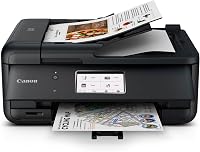
The Canon PIXMA TR4720 review comes down to a useful mix for home paperwork: print, copy, scan and fax, with an automatic document feeder and two-sided printing. It fits households that handle forms, school documents or occasional photos, and can accept measured print speeds and cartridge refills.
The TR4720 holds up to 100 sheets and supports wireless and USB connections. Its black and color document speeds are up to 8.8 and 4.4 ipm, respectively, so it is better suited to routine home jobs than repeated large batches.
What does this Canon PIXMA TR4720 review recommend?
Choose the TR4720 when fax and an ADF matter more than fast output or a large paper tray. Those features make it a practical home document center, while automatic duplex printing helps reduce paper use on longer jobs.
Canon PIXMA TR4720: Best for home paperwork

- Print, copy, scan and fax
- Automatic document feeder
- Automatic two-sided printing
- 100-sheet capacity
A home all-in-one with an ADF for multi-page scanning and copying, plus fax and automatic two-sided printing.
Pros
- Includes an automatic document feeder
- Prints, copies, scans and faxes
- Automatic two-sided printing
- Prints borderless photos up to letter size
Cons
- Stated black and color document speeds are 8.8 and 4.4 ipm
- Uses replaceable ink cartridges
The feeder is useful when you scan or copy several pages in one sitting. The fax function is a meaningful extra for paperwork that still needs to be sent that way, but it does not add value if you never fax.
Its 100-sheet capacity is enough for a modest home paper supply. If several people print frequently, or you handle large stacks of documents, consider a model with a larger tray and faster stated speeds.
Who should buy the TR4720, and who should skip it?
The TR4720 is a good fit for a home that needs multi-page scanning or copying, occasional faxing and everyday printing. It can also suit light photo use because it supports borderless prints up to 8.5 x 11 in.
Skip it if you need a high-volume printer, fast batches or a larger paper supply. The stated rates are modest, and cartridge ink is a recurring cost to consider if you print a lot of color pages.
It is also a poor match if you need the ADF to scan both sides of originals automatically. Automatic two-sided printing describes paper output, not two-sided scanning.
Which TR4720 features matter for home use?
The strongest reasons to choose the TR4720 are its four functions, ADF and automatic duplex printing. Together, they cover common home and home-office paperwork without needing separate machines.
| Detail | Canon PIXMA TR4720 |
|---|---|
| Functions | Print, copy, scan and fax |
| Document speed | Up to 8.8 ipm black, 4.4 ipm color |
| ADF | Automatic document feeder |
| Duplex | Automatic two-sided printing |
| Paper capacity | 100 sheets |
| Borderless printing | Up to 8.5 x 11 in |
| Ink cartridges | Canon PG-275 black and CL-276 color |
| Warranty | 1 year limited |
The ADF feeds pages for scanning and copying, so it saves repeated trips to the scanner glass. For double-sided originals, check Canon's instructions for the exact workflow before buying, since the feeder's presence alone doesn't mean it scans both sides automatically.
Automatic duplex is useful for reports, schoolwork and drafts that run beyond a few pages. It turns the sheets for printing, but it does not make the printer's stated output rate faster.
How should you set up the Canon PIXMA TR4720?
Set it up near your paper supply, power outlet and usual printing devices, with enough clearance to load paper and lift the scanner lid. The printer measures 17.2 in wide, 11.7 in deep and 7.5 in high.
Before starting, decide whether you will print from a computer, smartphone or both. The TR4720 supports wireless connections and USB, and its mobile compatibility makes phone printing an option; follow Canon's setup instructions for the chosen connection.
Install the cartridges and load paper as described in the manual. Confirm the printer is connected to the intended home network before sending a job, and keep the manual handy for cartridge replacement and feeder loading.
What mistakes should you avoid with the TR4720?
The most common buying mistake is treating automatic duplex as two-sided scanning. It prints on both sides, while the ADF's stated role is feeding originals for scanning or copying.
Another mistake is choosing by the feature list alone and overlooking speed. If you regularly print long assignments or work packets under time pressure, compare the stated rates with your workload and consider a faster alternative.
Don't assume every task needs the ADF. A single sheet can go on the scanner glass, while a stack is where the feeder saves time.
Avoid ordering ink by color or brand alone: verify the PG-275 and CL-276 cartridge numbers first.
How fast is the Canon PIXMA TR4720?
The TR4720 is rated for up to 8.8 ipm in black and 4.4 ipm in color on letter-size simplex documents. This makes it a reasonable option for routine home output, not a strong pick for frequent large print runs.
Photos take longer than plain text. A 4 x 6 in borderless photo on Canon PP-201 paper takes about 65 seconds, so choose this model for occasional photos rather than frequent photo batches.
For a different Canon home-office feature set, see the Canon PIXMA TR8620a review. Compare the functions each household will use most, such as fax, document handling and photo output.
What should you know about ink and paper care?
The TR4720 uses replaceable PG-275 black and CL-276 color cartridges, not refillable ink tanks. If you print often, include cartridge replacement in your running-cost estimate and check the exact cartridge numbers before ordering.
Store paper flat and dry, and keep the input supply within the printer's capacity. Load paper squarely and avoid mixing sizes in a single stack, which can help prevent misfeeds and make print jobs easier to manage.
If the printer will sit unused for long periods, follow Canon's care guidance and use its maintenance options as directed. For a broader look at cartridge costs and print volume, read our guide to printers with cheap ink.
Which alternatives fit different printing habits?
The TR4720 is the best match here when you specifically need fax along with an ADF. The alternatives trade that combination for a display, simpler occasional-use setup or a larger paper tray.
The Canon PIXMA TR7120 has an ADF, an OLED display and dual-band Wi-Fi support. Choose it if on-printer status and 2.4 GHz or 5 GHz wireless options are more useful to you than fax.
The Canon PIXMA TS4320 covers print, copy and scan for lighter home tasks. Its ADF and fax functions are not specified, so it suits buyers who want a simpler setup for occasional documents and photos.
The Brother Work Smart 1360 has a 150-sheet tray and a 20-sheet single-sided ADF. Its black print speed is up to 16 ppm, making it a stronger fit if you print more often and do not need fax.
For a wider brand comparison, see our guide to HP printers for home use. The Brother Work Smart 1360 review also explains that alternative's compact all-in-one features.
Should you choose the Canon PIXMA TR4720?
Choose the Canon PIXMA TR4720 if fax, multi-page scanning or copying, and automatic two-sided printing solve real jobs in your home. Its moderate document speeds and 100-sheet supply make the most sense for steady, everyday use rather than heavy batch printing.
Choose the TR7120 for its display and dual-band Wi-Fi, the TS4320 for occasional basic tasks, or the Brother Work Smart 1360 for a larger tray and faster stated black output. This Canon PIXMA TR4720 review favors the Canon when its ADF and fax are useful enough to justify cartridge ink; start with our printer brands guide if you're still comparing categories.
Sources and research
We compared the four printers' features and specifications to match them with practical home uses. Canon's PIXMA TR4720 support page has manuals and support information.
Frequently asked questions
Does the Canon PIXMA TR4720 have an ADF?
Yes. The TR4720 has an automatic document feeder for multi-page scanning and copying.
Load originals as directed in the manual, and confirm the feeder supports the task you plan to do.
An ADF saves you from placing each page on the scanner glass individually.
Can the Canon PIXMA TR4720 print on both sides?
Yes. The TR4720 supports automatic two-sided printing, so it can print on both sides of a sheet without you turning each page by hand.
This feature is for printing.
It doesn't mean the ADF scans both sides of an original automatically.
Does the Canon PIXMA TR4720 fax?
Yes. Canon describes the TR4720 as a 4-in-1 printer with print, copy, scan and fax functions.
If fax is part of a regular workflow, follow Canon's setup instructions and confirm the connection requirements before you rely on it.
What ink does the Canon PIXMA TR4720 use?
The TR4720 uses Canon PG-275 black and CL-276 color cartridges.
Check the cartridge number on the printer or in its manual before ordering. If you print often, compare expected volume with cartridge yield and replacement cost.