Canon PIXMA TR8620a Review: Home Office All-in-One (October 2026)
The Canon PIXMA TR8620a is a four-function inkjet for home offices that need fax, an ADF and automatic two-sided printing. This Canon PIXMA TR8620a review compares its document features with simpler Canon models and a faster office-focused Epson.
On this page (9 sections)
- Canon PIXMA TR8620a Review: Home Office All-in-One
- What does the Canon PIXMA TR8620a review show about its strengths?
- Who should buy the TR8620a, and who should skip it?
- How should you choose between the TR8620a and simpler Canon models?
- When is the Epson WorkForce Pro WF-4820 a better fit?
- What should you check before setting up the TR8620a?
- How can you avoid common print and scan mistakes?
- Is the TR8620a's paper capacity and speed enough for you?
- What is the final decision in this Canon PIXMA TR8620a review?
Canon PIXMA TR8620a Review: Home Office All-in-One
The Canon PIXMA TR8620a review comes down to a clear choice: pick this wireless inkjet if your home office needs fax, an auto document feeder (ADF) and automatic two-sided printing. Its four functions and two paper feeds are useful for varied document work, but casual print-and-scan needs rarely require all of them.
This review compares the TR8620a with three alternatives: two simpler Canon all-in-ones and an Epson aimed at heavier office workloads. The right fit depends on how often you handle multi-page documents, whether fax matters, and which connections you need.
What does the Canon PIXMA TR8620a review show about its strengths?
The TR8620a’s main advantage is that it combines print, copy, scan and fax with an ADF. That mix is more relevant to a small office than a printer that only needs to produce occasional school pages or photos.
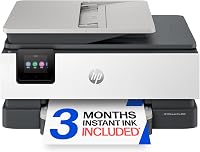
Canon PIXMA TR8620a: Best for fax-ready home offices

- Print, copy, scan and fax
- Auto document feeder
- 200-sheet capacity
- Automatic two-sided printing
A wireless all-in-one for a home office that needs faxing, an ADF and automatic two-sided printing. Two paper feeds provide a combined 200-sheet capacity.
Pros
- Prints, copies, scans and faxes
- Includes an auto document feeder
- Automatic two-sided printing
- 100-sheet cassette and 100-sheet rear feed
Cons
- Fax and ADF features may be unnecessary for light home printing
- Its 200-sheet capacity may be more than a casual user needs
The ADF helps with multi-page documents, while the flatbed gives you a place to position pages individually. Automatic duplex printing can handle both sides of suitable documents, so you don't have to turn each sheet yourself.
The printer has a touchscreen LCD and wireless connections, and it supports printing from Android devices and AirPrint. Canon also supports voice printing with Alexa, and Alexa can notify you when ink is running low if you connect the printer and enroll in Smart Reorders.
Those features don't make every task faster or simpler by themselves. Their value depends on your routine: an ADF earns its space when you scan or copy stacks, while fax support matters only if you send faxes.
Who should buy the TR8620a, and who should skip it?
Buy the TR8620a if you regularly fax documents, copy or scan several pages at a time, or print double-sided paperwork. Its fuller set of office tools can save steps when those jobs are part of a normal workweek.
Skip it if you mainly print a page now and then, scan a form occasionally, or want a small all-in-one for household tasks. A printer with print, copy and scan functions may fit that work without adding fax and ADF features you won't use.
Think about the kind of pages you handle, not just how many. If paperwork arrives in multi-page sets, an ADF can be more helpful than a slightly faster printer; if your jobs are short and simple, a compact model may be easier to place and use.
For a broader set of options organized around desk work, see our home office printer guide. If wireless printing from different rooms is your main concern, compare it with these wireless printers for home use.
How should you choose between the TR8620a and simpler Canon models?
Choose the TR8620a when you need fax or an ADF; choose the TS6520 or TS7720 when everyday documents, copying and photos are enough. Both alternatives also offer automatic two-sided printing, but neither has the TR8620a's fax function or ADF.
The Canon PIXMA TS6520 suits a compact home workspace shared by family members or someone working partly from home. It prints, copies and scans, supports dual-band Wi-Fi and mobile printing, and has a 1.42-inch monochrome OLED display for checking status and settings.
The Canon PIXMA TS7720 is another print, copy and scan option, with a 2.7-inch LCD touchscreen and automatic two-sided printing. Its two trays offer a combined capacity of up to 200 sheets, while the lack of fax and an ADF keeps it focused on everyday home use.
To choose between them, consider what causes friction today. If you often lift pages one by one onto a scanner or need to send faxes, pay attention to the TR8620a; if the printer mostly handles single-page jobs, the TS6520 or TS7720 covers the core functions with a simpler setup.
When is the Epson WorkForce Pro WF-4820 a better fit?
Choose the Epson WorkForce Pro WF-4820 if print speed, a larger ADF, paper capacity or Ethernet matters more than staying with Canon. It is designed for busier document queues and lists higher ISO print speeds than the Canon models in this comparison.
The WF-4820 lists 25 black and 12 color ISO pages per minute, a 35-page ADF and capacity for 250 sheets. It also supports automatic two-sided printing, wireless connections, Wi-Fi Direct and Ethernet.
It is larger and heavier than the Canon home models here. Epson says it uses genuine Epson-brand cartridges, so check cartridge compatibility and ongoing supply needs before choosing it.
For a smaller office workload that includes fax, the TR8620a keeps those functions in one Canon device. For faster printing or longer document stacks, the Epson's specified ADF and speed figures make it the more relevant comparison.
What should you check before setting up the TR8620a?
Before setup, choose a stable spot with room for the two paper feeds and document handling. The printer measures 17.3 in wide, 13.8 in deep and 7.5 in high, so measure the space and leave access for loading paper and opening the scanner area.
The TR8620a has a 100-sheet cassette and a 100-sheet rear feed. Decide which feed you'll use for your everyday paper, then check Canon's instructions for loading other media so you use the right feed and settings.
Follow the setup prompts and connect the printer to the wireless network you plan to use. Set up AirPrint or Android printing on the devices you use, and try a short print and scan job before relying on the printer for a larger batch.
If you plan to use Alexa, connect the printer and follow the setup steps for voice printing. Ink alerts and smart reorders are optional; enrollment is not required to use the printer's core print, copy, scan and fax functions.
How can you avoid common print and scan mistakes?
Most avoidable problems come from mismatched settings, incorrectly loaded pages or choosing the wrong scanner path. A quick check before a job can save paper and prevent repeated work.
For multi-page originals, check that the pages are aligned and loaded in the ADF as Canon directs. Use the flatbed when an original needs careful placement, then confirm the scan or copy settings before sending a whole stack.
For two-sided jobs, turn on automatic duplex printing in the print dialog and confirm the layout. If the result is unexpected, check the page orientation and paper settings before changing other settings.
When using the two feeds, confirm where the paper is loaded and select the matching source in your print settings if needed. Don't assume a paper type or size is supported in either feed; use Canon's manual for feed and media instructions.
Use the correct wireless network and device print option when a phone or computer can't find the printer. For routine upkeep, keep the paper path clear, protect unused paper from dust and follow Canon's care instructions if print quality changes.
Is the TR8620a's paper capacity and speed enough for you?
The TR8620a's combined 200-sheet capacity suits a home office that prints regularly but doesn't need the Epson's larger listed capacity. Each feed holds 100 sheets, so you can keep paper in both locations and select the source that suits the job.
Its stated speeds are 15 black and 10 color images per minute. Treat those figures as a comparison point, not a guarantee that every document will print at that pace; job complexity, paper and connection can affect the time you wait.
If you rarely refill paper, capacity may not affect your choice. If you print longer batches or scan larger stacks, compare the Epson's 250-sheet capacity and 35-page ADF with your normal workload.
What is the final decision in this Canon PIXMA TR8620a review?
Choose the Canon PIXMA TR8620a if your home office needs fax, an ADF and automatic two-sided printing in one wireless printer. Pick the TS6520 or TS7720 for simpler household printing and scanning, or the Epson WF-4820 when higher stated speeds, a 35-page ADF or Ethernet better fits your workflow.
Make the decision by listing the tasks you do in a typical week. If fax and multi-page scanning are recurring needs, the TR8620a's extra functions have a purpose; if not, a simpler model may be the more sensible fit.
For another Canon option with an ADF, read our Canon PIXMA TR4720 review and compare its feature mix with the TR8620a before choosing.
Frequently asked questions
Is the Canon PIXMA TR8620a good for a home office?
The TR8620a fits a home office that needs printing, copying, scanning and faxing, along with an ADF and automatic two-sided printing. Its two feeds hold 100 sheets each.
If you rarely handle multi-page documents or faxes, a simpler all-in-one may be enough.
Does the Canon PIXMA TR8620a have an ADF?
Yes, the TR8620a includes an auto document feeder for multi-page scanning and copying. It saves you from placing each page on the scanner glass by hand, which helps when you often handle paperwork.
Use the feeder for suitable stacks and the flatbed for pages that need careful placement.
Can the Canon PIXMA TR8620a print on both sides?
Yes, the TR8620a supports automatic two-sided printing. For a suitable document, enable duplex printing in the print settings so the printer handles both sides without requiring you to turn pages by hand.
Check the paper and layout settings before sending a large job.
How does the TR8620a compare with the Canon PIXMA TR4720?
The TR8620a includes fax and has two paper feeds with 200 sheets of combined capacity. The TR4720 is a budget all-in-one with an ADF, so compare the features you expect to use before choosing.
Read our Canon PIXMA TR4720 review for a closer look at that alternative.