Is an EcoTank Printer an Inkjet Printer?
Yes. An EcoTank printer is an inkjet printer that uses refillable ink tanks instead of disposable cartridges. The tank design changes how you supply ink, but it still prints by placing liquid ink onto paper.
On this page (10 sections)
- Is an EcoTank Printer an Inkjet Printer?
- How does an EcoTank printer work?
- Is an EcoTank printer different from a regular inkjet?
- Why do EcoTank printers use less replacement ink?
- Which EcoTank printer fits a home office?
- How is the Epson EcoTank ET-2800 different?
- Can a regular cartridge inkjet be the better choice?
- Are tank printers messy to refill?
- Does an EcoTank printer need special care?
- Which printer should you choose?
Is an EcoTank Printer an Inkjet Printer?
Yes, an EcoTank printer is an inkjet printer. It uses liquid ink to create text and images, but it stores that ink in refillable tanks instead of the small cartridges used by many other inkjet printers.
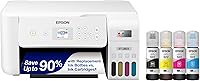
The word “EcoTank” describes Epson's tank system, not a separate printing method. Epson EcoTank models remain color inkjet printers, and the Epson EcoTank ET-2803 and Epson EcoTank ET-2800 both identify as inkjet printers.
That distinction matters when you're comparing running costs, setup, maintenance, and everyday features. A tank printer can reduce how often you replace ink, while a cartridge printer can be simpler if you print only a few pages.
How does an EcoTank printer work?
An EcoTank printer works by feeding liquid ink from built-in tanks to an inkjet print system. Tiny amounts of black, cyan, magenta, and yellow ink are placed on the paper to form text, graphics, and photos.
The main difference is where the ink is stored. A traditional cartridge inkjet holds ink in replaceable cartridges.
An EcoTank holds more ink in refillable reservoirs, and you add ink from bottles when the tanks run low.
Epson's EcoTank ET-2803 uses refillable tanks and Epson Micro Piezo Heat Free technology. It prints at up to 10 pages per minute in black and 5 pages per minute in color, according to its product data.
The Epson EcoTank ET-2800 also uses a refillable tank system and Micro Piezo Heat-Free Technology. Its listed print speeds are up to 10 pages per minute in black and 5 pages per minute in color.
Both Epson models print, scan, and copy. Their wireless features also let you send jobs from computers, laptops, smartphones, or tablets.
Is an EcoTank printer different from a regular inkjet?
An EcoTank printer is a type of inkjet printer, so the basic printing method is the same. The practical difference is the ink supply: EcoTank models use refillable bottles and tanks, while regular cartridge inkjets use replaceable cartridges.
That difference affects how you plan for ink. The ET-2803 and ET-2800 each include up to 2 years of ink based on about 125 pages per month.
Their replacement ink sets can produce up to 4,500 black pages and 7,500 color pages.
Those figures describe the ink capacity tied to the supplied system. Your actual page count depends on what you print, how much coverage each page uses, and how often you print color.
A cartridge printer can still make sense for occasional printing. If you print only a handful of pages each month, the lower initial complexity of cartridges may matter more than tank capacity.
For a broader comparison of common home options, see our guide to the printer for home use.
Why do EcoTank printers use less replacement ink?
EcoTank printers can reduce replacement frequency because their tanks hold more ink than many standard cartridges. Instead of changing a small cartridge after it runs out, you refill the tank with a bottle designed for the printer.
The ET-2803's product data says each replacement bottle set is equivalent to about 80 individual cartridges. The ET-2800 has the same stated comparison and includes ink bottles with the printer.
That doesn't mean every page costs the same or that every household will use the same amount of ink. A person printing dense color pages will use ink faster than someone printing short black text documents.
The tank design is most useful when you print often enough to notice repeated cartridge changes. It also gives you a visible supply system, since the printer stores ink in separate color tanks rather than combining all colors in one tri-color cartridge.
Is an EcoTank printer an inkjet printer with refillable ink?
Yes. An EcoTank printer is a refillable inkjet printer, not a laser printer or a different class of imaging device.
The ET-2803 and ET-2800 use black, cyan, magenta, and yellow ink. Their ink bottles refill the corresponding tank colors, and the printers continue using an inkjet print system.
This makes the term easy to remember: “inkjet” describes how the printer puts ink on paper, while “EcoTank” describes Epson's refillable tank design.
Which EcoTank printer fits a home office?
The Epson EcoTank ET-2803 fits a home office that wants a compact wireless color all-in-one with scanning and copying. It includes a high-resolution flatbed scanner, a color display, voice-activated printing, AirPrint, and the Epson Smart Panel app.
Its product data lists dimensions of 14.8 x 10 x 22.8 in and a weight of 8.8 lb. The ET-2803 also includes black, cyan, magenta, and yellow ink bottles, with up to 2 years of ink based on about 125 pages per month.
Choose the ET-2803 if you want a tank printer with mobile printing and a color display for basic navigation. Its 10-page-per-minute black speed and 5-page-per-minute color speed suit routine home documents rather than large print batches.
The printer uses simplex printing, which means pages print on one side at a time. Measure your available desk space before ordering because the stated depth is 22.8 in.
How is the Epson EcoTank ET-2800 different?
The Epson EcoTank ET-2800 is another wireless color all-in-one inkjet printer with refillable tanks. It prints, scans, and copies, and its flatbed scanner handles basic document and photo scanning.
The ET-2800 has an LCD display and supports wireless printing from computers, laptops, and smartphones. It measures 14.8 x 22.8 x 10 in and weighs 11.4 lb.
Its listed output is up to 10 pages per minute in black and 5 pages per minute in color. The included ink bottles provide up to 4,500 black pages and 7,500 color pages, according to the product data.
Choose the ET-2800 if its LCD control and black finish suit your space. It uses simplex printing, and Epson recommends genuine ink to support print quality and performance.
If you are comparing tank models with cartridge models for home use, our guide to inkjet printers for home use covers the broader category.
Can a regular cartridge inkjet be the better choice?
A regular cartridge inkjet can be the better choice when you prefer automatic ink delivery, two-sided printing, or a smaller ink commitment. The HP Envy 6155 uses a black cartridge and a tri-color cartridge rather than refillable tanks.
The HP Envy 6155 prints, scans, and copies, with automatic two-sided printing and a 100-sheet input tray. It prints up to 10 pages per minute in black and 7 pages per minute in color.
The HP Envy 6155 also has a 2.4 in color touchscreen, dual-band Wi-Fi, mobile printing through the HP app, and a maximum color print resolution of 4800 x 1200 dots per inch.
Choose this HP model if automatic duplex printing matters more than refillable tanks. Its cartridge system requires original HP chips or circuitry, and firmware updates maintain those measures.
The printer measures 17.05 x 5.35 x 14.21 in and supports letter-size media up to 8.5 x 11 in. Its included setup cartridges are rated for about 120 black pages and 75 tri-color pages.
Are tank printers messy to refill?
Tank printers are not automatically messy, but refilling requires care because you are handling liquid ink. Epson's ET-2803 description presents its EcoFit ink bottles as easy to fill without mess, while the ET-2800 uses refillable ink bottles for its tank system.
Keep the printer level during setup and refilling. Use the correct bottle for each color, hold the bottle steadily, and stop when the tank reaches its marked fill level.
Wipe any spilled ink promptly with a suitable disposable material. Keep bottles away from children, pets, paper, and surfaces that could absorb color.
A cartridge printer avoids bottle refills, but it replaces that task with cartridge changes. Our guide to are tank printers messy explains the trade-off in more detail.
The right choice depends on your printing pattern. Frequent color printing favors a refillable system, while occasional printing may favor the familiar routine of replacing cartridges.
Does an EcoTank printer need special care?
An EcoTank printer needs ordinary inkjet care: use the right ink, keep paper available, and respond to print problems before they become regular. Epson recommends genuine ink for the ET-2800 to support print quality and performance.
Tank printers still depend on liquid ink moving through the print system. Long gaps between print jobs can make inkjet maintenance more relevant, especially if text or color output becomes uneven.
Use the printer's available maintenance controls when output changes. Avoid mixing bottles or adding a color to the wrong tank, since each tank is intended for its matching ink color.
If pages come out blank, check the printer's ink levels and run the appropriate built-in maintenance process. Our guide to why is my printer printing blank pages covers common causes and practical next steps.
The ET-2803 and ET-2800 also include scanning and copying, so keeping the flatbed glass clean helps those functions produce clear copies and scans.
Which printer should you choose?
If you're asking, “is an eco tank printer an inkjet printer,” the answer is yes. Pick the Epson EcoTank ET-2803 for a compact wireless tank printer with a color display, mobile printing, scanning, copying, and high-capacity refillable ink.
Choose the Epson EcoTank ET-2800 if you want the same basic tank approach with an LCD display and a black all-in-one design. Both Epson models suit homes that print enough pages to benefit from bottle-based refills.
Choose the HP Envy 6155 if automatic two-sided printing, a 100-sheet tray, and a color touchscreen matter more than refillable tanks. It is still an inkjet printer, but it uses cartridges.
The simple rule is clear: EcoTank describes the refillable ink system, and inkjet describes the printing technology. Once you understand that, you can compare ink capacity, refill habits, duplex printing, wireless tools, and all-in-one features without treating them as separate printer types.
Frequently asked questions
Is an EcoTank printer better than a regular inkjet printer?
An EcoTank printer is better for people who print often and want refillable ink bottles instead of frequent cartridge replacements. A regular cartridge inkjet can suit lighter printing or anyone who prefers the familiar cartridge system.
Does an EcoTank printer use cartridges?
No. EcoTank models use refillable ink tanks and bottles.
Epson describes the ET-2803 and ET-2800 as cartridge-free printers, while the HP Envy 6155 uses setup black and tri-color cartridges.
Is an EcoTank printer good for home use?
Yes. EcoTank printers combine color printing with features such as scanning, copying, wireless printing, and included ink.
They fit homes and small offices that print documents, schoolwork, photos, or other everyday pages.
Can an EcoTank printer print without ink?
No. An EcoTank printer still needs liquid ink in its tanks to print.
The difference is that you refill the tanks with bottles instead of replacing a standard cartridge.