Are Tank Printers Messy?
No. Tank printers are not messy when you refill them the way the maker intends. Sealed bottles pour straight into keyed ports on the tank, so ink goes in without a funnel, syringe or squeeze.
On this page (9 sections)
- Why do people think tank printers are messy?
- How does the refill system keep ink contained?
- What actually causes ink spills and smudges?
- Are tank printers messier than cartridge printers?
- How do you refill an ink tank without spilling?
- Which tank printers handle refills cleanly?
- What should you do if ink gets on your hands or the desk?
- How do you keep the printer area clean long term?
- The bottom line on tank printer mess
No. Tank printers are not messy when you refill them the way the maker intends.
Sealed bottles pour straight into keyed ports on the tank, so ink goes in without a funnel, syringe or squeeze.
Most ink mess stories trace back to a tilted printer, an overfilled tank or the wrong bottle, not to the tank design itself.
That matters if you print a lot and want lower ink costs without a mess on the desk. The sections below cover how the fill system works, what really causes spills and how to keep the area clean.
Why do people think tank printers are messy?
The reputation comes from early refill kits, not from modern tank printers. Older bulk-ink setups used open bottles and syringes, so a slip meant ink on your hands and the table.
Today's models ship with sealed bottles and dedicated ports per color.
The ink itself is watery and stains quickly on fabric or paper, which makes any small drip look worse than it is. A single drop spreads under a fingertip and can look like a spill.
Brands also design the fill path so the bottle drains by gravity into the tank. You set the bottle in the opening and wait, so there's no squeezing or aiming.
That removes the main source of splashes in the old kits.
The other factor is user error. Filling past the top line, opening the caps on a slanted surface or pulling the bottle out early all push ink where it shouldn't go.
None of those are the printer's fault.
How does the refill system keep ink contained?
Each color has its own port with a shaped opening, and the bottle nozzle only fits that shape. The bottle seats, tilts and drains on its own, so the ink never passes through open air.
A vent path lets air escape as the ink goes in, which stops the bottle from glugging or overflowing.
Genuine bottles add a keyed design so the black bottle won't fit the cyan port, for example. That stops the wrong-color pour, which is the mess that's hardest to clean out.
Epson calls this EcoFit on its 522 bottles.
The tanks themselves are clear, with fill lines you can see from the front. You watch the level rise and pull the bottle when it reaches the line.
No guessing and no measuring cup.
The caps seal the tanks when you're not refilling. As long as they're closed and the printer sits level, the ink stays inside.
What actually causes ink spills and smudges?
Almost every mess comes from handling, not from the printer. The common triggers are overfilling, tilting the machine, using a bottle that doesn't fit the port and leaving caps open while you move it.
Here's how each one plays out.
Overfilling happens when you keep the bottle in past the top line. The tank can't hold more, so the extra ink has nowhere to go but out the vent.
Watch the line and stop.
Tilting the printer while the caps are open sends ink toward the printhead and the seams. Close the caps before you lift or move it, and keep it level.
A third-party bottle with a wide or short nozzle can miss the port and dribble down the side of the tank. Keyed genuine bottles avoid this, and so does checking the bottle matches your model.
Smudged prints are a different issue from a tank spill. That's usually ink on the printhead or paper path, not ink escaping the tank.
Are tank printers messier than cartridge printers?
No. A cartridge swap never touches loose ink, but a tank refill is contained too when the bottle seats correctly.
The comparison most people make is between two contained systems, so the mess question comes down to how carefully you handle each one.
A cartridge swap means lifting out a sealed unit and dropping in a new one. Your hands stay clean, but you pay more per page.
A tank refill means setting a bottle in a port and waiting a minute or two. Your hands stay clean too, as long as you keep the bottle upright.
The real difference is frequency. A tank set lasts thousands of pages, so you refill rarely.
A cartridge runs out sooner, so you swap more often. Neither one is inherently messier.
The one edge for cartridges is that there's no open ink at all. The edge for tanks is that you can see the level and top up a single color instead of replacing a whole cartridge.
How do you refill an ink tank without spilling?
Close everything else first, then fill one color at a time over a paper towel. Put the printer on a flat, stable surface and keep the bottles upright.
Open only the cap for the color you're filling.
Set the bottle in the port and let gravity do the work. Don't squeeze.
Pull the bottle out when the ink reaches the top line, then close the cap snugly.
Wipe the bottle nozzle with a dry paper towel before setting it down. Store the leftover bottles upright, capped and out of reach of kids and pets.
If a drop lands on the desk, blot it, don't wipe. Wiping spreads it.
Wash ink off skin with soap and warm water.
For the full routine, our guide on how to maintain an ink tank printer covers cleaning cycles and storage between print jobs.
Which tank printers handle refills cleanly?
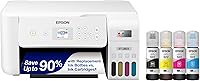
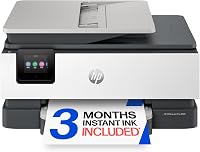
The Epson EcoTank ET-2803 and the HP Smart Tank 5003 both use sealed, keyed bottles that pour into dedicated ports. Both are all-in-one units with print, scan and copy, so the refill setup is the main difference to weigh.
The boxes below give you the reason each one fits a low-mess desk.
If you print photos and documents at home and want to compare the wider field, our printer for home use guide lines up ink tank and cartridge models side by side.
What should you do if ink gets on your hands or the desk?
Blot the ink first and rinse your skin with soap and water. On a hard surface, use a dry paper towel to lift the puddle from the edge inward so it doesn't spread.
A damp cloth with a little dish soap lifts the stain from most sealed desks.
On fabric, blot from the back of the stain with cold water before it dries. Hot water sets the dye.
Wash the item on its own afterward so the ink doesn't transfer.
On your hands, wash with soap and warm water, then repeat if the stain stays. Don't use harsh solvents on skin.
If ink gets inside the printer, don't tip it to pour it out. Blot what you can reach and let a cleaning cycle handle the printhead.
How do you keep the printer area clean long term?
Cap the tanks, keep the printer level and store bottles upright. A few habits keep the desk clean between refills.
Close every cap after a top-up and check they're snug.
A loose cap lets ink evaporate and dry into a crust around the port.
Run a print or a cleaning cycle now and then if the printer sits unused. That keeps the printhead from drying out and pulling ink where it shouldn't go.
Our post on why is my printer printing blank pages covers the dried-ink cases.
Keep spare bottles in a tray or box so a knocked-over bottle stays contained. Store them away from heat and direct sun.
Old ink thickens over time, so check dates; our guide on does printer ink expire explains what changes and when to replace a bottle.
Wipe the tank area with a dry cloth when you refill. A dry cloth lifts dust without pushing ink around.
The bottom line on tank printer mess
Tank printers are not messy when you use the maker's bottles and close the caps. The reputation comes from old bulk-ink kits, not from the sealed ports and keyed bottles on today's models.
Watch the fill line, keep the printer level and store leftover bottles upright.
Pick the Epson EcoTank ET-2803 if you want the keyed EcoFit fill system on an all-in-one. Pick the HP Smart Tank 5003 if you prefer bottles that plug in and drain with no squeeze.
Either way, the question "are tank printers messy" has a simple answer: not if you refill with care.
Frequently asked questions
Are tank printers messy to refill?
No, not when you use the maker's bottles and fill ports. The bottle nozzle seats in the tank opening and drains on its own, so you never squeeze or pour from a wide spout.
A paper towel under the printer is enough backup.
What causes ink mess around a tank printer?
Usually overfilling past the top line, tilting the printer while the caps are open, or using a bottle that doesn't fit the port. Genuine bottles are keyed to the right color, which cuts the chance of a wrong-color pour.
Do tank printers leak ink when you move them?
A printer can leak if you carry it while the tank caps are open or tilt it sharply. Close the caps and keep the printer level when you lift it.
Ink that settles in the printhead is a separate issue covered by a cleaning cycle.