HP Instant Ink vs Smart Tank: Which Costs Less? (October 2026)
In the HP Instant Ink vs Smart Tank choice, Smart Tank suits frequent printing and bottle refills; Instant Ink suits cartridge users who want ink delivered. Compare your print habits, the printer features you need and current subscription terms to decide which approach fits.
On this page (8 sections)
- HP Instant Ink vs Smart Tank: how do the ink systems differ?
- Which option costs less for your print volume?
- Who should choose each printer?
- How do you set up and manage each ink system?
- What common mistakes can make the choice more expensive?
- Does the Instant Ink trial make a cartridge printer cheaper?
- What should you check before choosing?
- Which should you choose: HP Instant Ink or Smart Tank?
HP Instant Ink vs Smart Tank comes down to your print volume and ink routine: choose a refillable tank for frequent printing, or a cartridge printer if you want ink delivered. The Smart Tank 5003 includes ink bottles, while the OfficeJet Pro 8125 and Envy 6155 include a 3-month Instant Ink trial.
These are different approaches to keeping a printer supplied. One has you refill ink tanks from bottles, while the other offers a subscription for eligible cartridge printers.
Neither approach is automatically cheaper for every household.
HP Instant Ink vs Smart Tank: how do the ink systems differ?
Instant Ink is a subscription option for eligible cartridge printers; Smart Tank uses refillable ink bottles. Think about whether you want to manage refills as needed or have HP deliver ink through a plan.
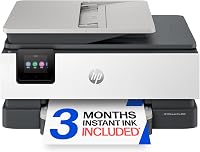
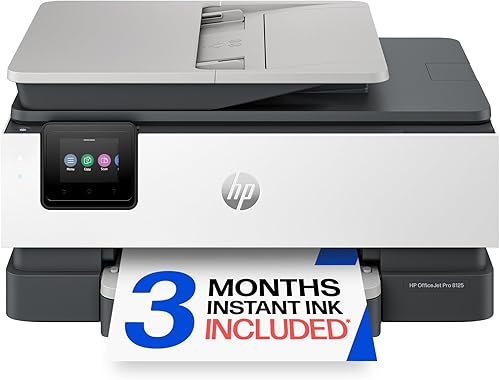
The OfficeJet Pro 8125 and Envy 6155 are cartridge printers, and each includes a 3-month Instant Ink trial. After the trial, a monthly fee applies unless you cancel.
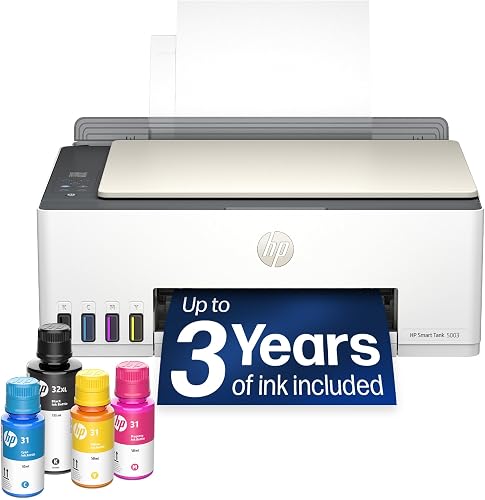
The Smart Tank 5003 is cartridge-free. It comes with black and color bottles, and HP says the included ink can print up to 6,000 color or black pages.
The “up to 3 years” claim is a maximum estimate, not a promise that every home will go that long before refilling.
That difference shapes the buying decision. A subscription may suit someone who values delivery and accepts a recurring plan, while bottles may suit someone who wants to buy ink as needed and refill the tank.
Which option costs less for your print volume?
Compare your expected ink use and subscription charges over the same period; there is no universal cost winner. A household printing a few pages some months has a different cost pattern from a home office printing every day.
HP describes the Smart Tank 5003 as a low-cost option for high-volume printing, and its included bottles can reduce the need to buy ink at the start. After that ink is used, factor in compatible replacement bottles and how much color printing you do.
Instant Ink can be convenient if you want HP to deliver ink before you run out. But a trial does not guarantee long-term savings: the OfficeJet models’ trial lasts 3 months, then a monthly fee applies unless you cancel.
How to compare HP Instant Ink and Smart Tank costs
Start with a typical month, including color documents, schoolwork, forms and photos. If your printing changes with the season, use a realistic average rather than your busiest month.
Next, compare a year or another period that makes sense for you. For Instant Ink, check HP’s current plan terms for your eligible printer, including how the plan matches your expected printing.
For Smart Tank, count the included bottles first, then estimate when you might need replacement ink.
The Smart Tank 5003 uses HP 31 cyan, magenta and yellow bottles, plus an HP 32XL black bottle. Our guide to HP Smart Tank ink and bottle compatibility can help you identify the right supplies.
Avoid comparing a short free trial with several years of tank use. Put each option on the same timeline, include the printer’s included ink, and use current subscription details rather than an old offer or price.
Who should choose each printer?
Pick the Smart Tank for frequent printing and bottle refills; choose a cartridge model if the Instant Ink option and its features fit your routine. Consider the printer as a whole, since functions like faxing or an automatic document feeder may matter more than the ink plan.
| Product | Best for | Ink system | Included ink | Functions | Our score |
|---|---|---|---|---|---|
| HP Smart Tank 5003 | frequent printing | Refillable ink tank | Up to 3 years | Print, copy and scan | 8.0 |
| HP OfficeJet Pro 8125 | busy home offices | Cartridges with Instant Ink option | Print, scan, copy and fax | 8.4 | |
| HP Envy 6155 | casual home use | Cartridges with Instant Ink option | Print, copy and scan | 7.7 |
HP Smart Tank 5003: best for frequent printing
The Smart Tank 5003 prints, copies and scans, with wireless and mobile printing. Its cartridge-free tank uses bottles, and the included black and color ink is designed for high-volume use.
HP says the included ink can yield up to 6,000 color or black pages. If you print regularly and are comfortable refilling the tanks when needed, this is the clearest match among these picks.
Skip this option if you strongly prefer cartridge delivery or want features the other models offer, such as faxing or an automatic document feeder. A tank is most useful when your regular printing makes a large initial supply practical.
HP OfficeJet Pro 8125: best for busy home offices
The OfficeJet Pro 8125 prints, scans, copies and faxes. It also has automatic two-sided printing and an automatic document feeder, which can help when your work includes multi-page documents.
It comes with a 3-month Instant Ink trial. Afterward, a monthly fee applies unless you cancel, so include that ongoing choice in your budget and calendar.
Choose it when its office functions matter and you want the option of ink delivery. Skip it if you want a refillable tank or do not want to manage a subscription after the trial.
See our home office printer guide for more options for a work-focused setup.
HP Envy 6155: best for casual home use
The Envy 6155 prints, copies and scans, with automatic two-sided printing and a 100-sheet input tray. It is a cartridge model with a 3-month Instant Ink trial.
Its combination of everyday functions and a subscription option suits home tasks such as homework and routine documents. If your printing is frequent enough that ink costs drive the decision, compare the refillable Smart Tank approach before choosing.
Skip it if your priority is a tank printer for high-volume printing or if a fax function and automatic document feeder are essential. For a wider look at ink systems, compare printers with cheap ink.
How do you set up and manage each ink system?
Set up the printer first, then decide how you will track supplies and subscription terms. A simple routine helps prevent a trial from renewing unexpectedly and makes bottle refills easier to plan.
For Instant Ink, follow the printer’s setup flow and confirm that the printer is eligible before enrolling. Note the trial end date, check which plan is attached to your account, and set a reminder well before the 3 months end if you may want to cancel.
For the Smart Tank 5003, follow its setup guide and use the compatible HP bottles when it is time to refill. HP describes its system as mess-free: connect the bottle to the tank and let it drain without squeezing.
Keep the replacement bottle names handy so you can reorder the correct colors.
With either approach, use the printer’s own prompts for routine maintenance and keep it connected as needed for the features you use. Avoid forcing a refill or continuing a subscription without first checking that it matches your needs.
What common mistakes can make the choice more expensive?
The biggest avoidable mistakes are comparing unlike time periods, forgetting the trial end date and choosing an ink system before estimating your printing. A quick check before buying can prevent these mismatches.
- Assuming the Smart Tank’s included ink lasts 3 years for everyone. HP gives an “up to” estimate and page yield; your print volume and color coverage affect how soon you need bottles.
- Treating the Instant Ink trial as a permanent discount. The OfficeJet Pro 8125 and Envy 6155 incur a monthly fee after 3 months unless you cancel.
- Using an old subscription price in your calculation. Check HP’s current terms and the plan available for your printer when you enroll.
- Choosing a printer on ink cost alone. The OfficeJet Pro 8125 adds faxing and an automatic document feeder, while the Envy 6155 handles everyday printing, copying and scanning. Those differences can decide which printer fits.
- Buying the wrong bottles. The Smart Tank 5003 uses HP 31 color bottles and HP 32XL black. Confirm the names before replacing supplies.
If print quality changes or pages come out blank, check the printer’s prompts and ink levels before assuming the ink system is at fault. Our guide to why a printer prints blank pages covers common causes.
Does the Instant Ink trial make a cartridge printer cheaper?
The trial lowers the initial barrier to trying the subscription, but it does not show the long-term cost. For both the OfficeJet Pro 8125 and Envy 6155, a monthly fee applies after 3 months unless you cancel.
Use the trial to see whether delivery fits your routine, but make the decision before it ends. Check the current plan terms in your account and set a reminder so you can continue or cancel intentionally.
If you would rather buy supplies only when needed, a tank printer may suit you better. If you value delivery and are comfortable with a recurring plan, a cartridge printer with Instant Ink may be more convenient.
HP says Instant Ink delivers ink before you run out. Your own decision still depends on eligibility, account terms and the amount you print.
What should you check before choosing?
Check page volume, ink handling, printer functions and current HP terms before you choose. These four questions help narrow the options without relying on a generic claim that one system always costs less.
- How often do you print? Frequent printing makes the Smart Tank’s refillable system and included ink more relevant. Occasional use may make the cartridge printers’ broader features more important than a large supply of ink.
- How do you want to get ink? Instant Ink offers delivery through a subscription for eligible printers; Smart Tank requires bottle refills.
- Which functions do you need? The OfficeJet Pro 8125 includes faxing and an automatic document feeder. The Envy 6155 prints, copies and scans, while the Smart Tank 5003 also prints, copies and scans.
- What happens after the trial or included ink? Check the subscription terms for Instant Ink or identify the right replacement bottles for the tank.
HP’s Instant Ink overview explains how the subscription works. You can also check HP’s Smart Tank 5003 information and Instant Ink program page for current details.
Which should you choose: HP Instant Ink or Smart Tank?
Choose the Smart Tank 5003 if you print frequently and prefer bottles; choose the OfficeJet Pro 8125 or Envy 6155 if you want a cartridge printer with the Instant Ink option. Your print volume and willingness to manage a subscription should settle the HP Instant Ink vs Smart Tank decision.
For frequent printing, the Smart Tank gives you a refillable system and ink included to start. For a home office that needs faxing and an automatic document feeder, the OfficeJet Pro 8125 offers those functions alongside its trial.
For everyday home printing, the Envy 6155 keeps the feature set focused on printing, copying and scanning.
Before buying, compare the same time period, review current Instant Ink terms and note when the trial ends. If you want a broader look at why cartridges can add up, read why printer ink is so expensive.
Frequently asked questions
Is HP Instant Ink cheaper than a Smart Tank?
It depends on how many pages you print and how you prefer to pay for supplies. Instant Ink is a subscription for eligible cartridge printers, while the Smart Tank 5003 uses refillable bottles and includes ink for up to 3 years.
Compare the same time period and your expected page volume, then check current plan terms.
Does HP Instant Ink work with HP Smart Tank printers?
Instant Ink is a cartridge delivery service for eligible HP printers. Smart Tank models use refillable bottles, so they use a different ink system.
Check HP's current eligibility information for the exact printer before enrolling, and confirm whether a cartridge model suits your needs.
What does HP include with the Smart Tank 5003?
The Smart Tank 5003 comes with black and color ink bottles. HP says the included ink can last up to 3 years and print up to 6,000 color or black pages, but actual yield varies with what and how much you print.
What happens after the Instant Ink trial?
The OfficeJet Pro 8125 and Envy 6155 each include a 3-month trial. After that, a monthly fee applies unless you cancel.
Check your account and HP's current plan terms before the trial ends so you can choose whether to continue.
Which HP printer is better for heavy printing?
The Smart Tank 5003 is the more direct fit for frequent, high-volume printing because it uses refillable tanks and includes ink bottles. The OfficeJet Pro 8125 may suit a busy home office that prefers cartridges, automatic two-sided printing, an automatic document feeder and the option of delivery.