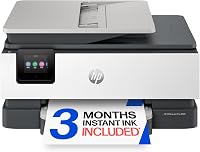
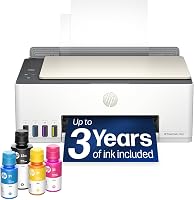
What Is a HP Smart Tank Printer?
A HP Smart Tank printer is an HP inkjet that holds ink in refillable tanks instead of cartridges. You pour ink from bottles into the printer, and a full set of bottles covers thousands of pages. The tank design is built for low ink cost and high volume at home.
On this page (9 sections)
- How does a HP Smart Tank printer work?
- What does a Smart Tank printer include in the box?
- How much does ink cost on a Smart Tank printer?
- What can you print and copy on a Smart Tank?
- Is a HP Smart Tank printer good for photos and documents?
- How does a HP Smart Tank printer compare to HP Instant Ink?
- Which Smart Tank model should you buy?
- How do you set up and use a HP Smart Tank printer?
- Who should buy a HP Smart Tank printer?
A HP Smart Tank printer is an HP inkjet printer that stores ink in built-in refillable tanks instead of sealed cartridges. You pour ink from bottles into the tanks, and HP includes enough ink for years of pages rather than a starter cartridge.
The tanks are the whole idea. A cartridge printer holds a small, sealed supply, so you buy a new cartridge often.
A Smart Tank printer holds more ink at once, so you refill less often and pay less per page. The printer itself costs more upfront, and the tradeoff pays off when you print regularly.
How does a HP Smart Tank printer work?
It works like any inkjet, except the ink lives in tanks on the printer. Four tanks hold black, cyan, magenta and yellow ink, and the printhead sprays ink onto the page from those tanks.
HP sells the ink in bottles. The HP 32XL black bottle holds 135ml, while each HP 31 color bottle holds 50ml.
You plug the bottle into the tank and let it drain. HP calls the system mess-free because there's no squeezing or spilling.
The printer still has printheads, which are the parts that actually put ink on paper. HP includes a black printhead and a tri-color printhead with the Smart Tank 5003.
Printheads last a long time, but they're the replaceable part rather than the ink.
The bottles are keyed so each color only fits its own tank, which stops a mix-up during a refill. The Smart Tank 5103 runs the same four-tank setup.
What does a Smart Tank printer include in the box?
The box holds the printer, a full set of ink bottles and the printheads. HP also includes a setup guide, reference guide and power cord.
You supply the paper.
The Smart Tank 5003 includes the 135ml black bottle and three 50ml color bottles. HP says that's up to 3 years of ink and up to 6,000 black or color pages.
The Smart Tank 5103 includes the same 135ml black bottle plus HP 31 color bottles. HP says that one covers up to 2 years of ink and up to 6,000 pages.
Those page counts assume typical documents. Photos and full-page color graphics use more ink per page.
The 5103 also adds a pack of HP Everyday Photo Paper in 4 x 6 inches.
The 5003 connects over USB, so have a USB cable ready for setup day.
How much does ink cost on a Smart Tank printer?
The ink cost is the point of the design. One set of bottles covers thousands of pages, so each page costs a few cents rather than the much higher cartridge cost.
HP 31 color bottles last about 8,000 pages each. A 3-pack of HP 31 cyan, magenta and yellow ink bottles covers up to 8,000 color pages.
The HP 32XL black bottle covers up to 6,000 pages. Compare that with a cartridge that prints a few hundred pages and needs replacing.
The bottles also suit the Smart Tank 5101 and 5104, the 6000 and 7000 series, and the Smart Tank Plus 500 and 600 series.
The HP 31 3-pack carries the part number 9C228AN. The black bottle is the outlier in both size and yield, which is why it's sold separately as the HP 32XL.
HP lists all four part numbers as the compatible inks for the Smart Tank 5003: HP 32XL black 1VV24AN, plus HP 31 cyan 1VU26AN, magenta 1VU27AN and yellow 1VU28AN.
What can you print and copy on a Smart Tank?
A Smart Tank all-in-one prints, copies and scans. The 5003 handles all three, with borderless prints and wireless printing from phones and laptops.
The 5103 adds copy and scan as well.
Both models print black pages at 10 to 12 pages per minute and color at 5 pages per minute. That's fine for homework, recipes and forms, and slower for big photo jobs.
The 5003 prints its first page in about 21 seconds. The 5103 starts a black page in about 14 seconds and a color page in about 21 seconds.
The 5103 also includes HP AI, which cleans up web pages and emails before printing so you don't waste paper on ads and menus. Both models handle legal-size paper up to 8.5 x 14 inches.
Duplex printing is manual on both, so you flip the page yourself.
Copying runs up to 99 copies in a single job on each model. The 5103 lists a copy resolution up to 1200 x 1200 dpi, so fine detail in a copied page holds up better.
Is a HP Smart Tank printer good for photos and documents?
It's good for everyday documents and fine for casual photos. Sharp text and rich color are the strength HP claims for the Smart Tank line.
The 5103's AI page cleanup helps for web pages, while borderless printing gives you edge-to-edge snapshots.
Skip a tank printer if photo quality is your top priority. A dedicated photo printer with more ink colors will beat it on fine gradients.
For school forms, shipping labels and the odd family photo, the tanks are more than enough.
The 5103 ships with 100 sheets of HP Everyday Photo Paper in 4 x 6 inches, so you can print snapshots straight out of the box. Neither printer offers a photo-specific ink set, so borderless 4 x 6 prints are the realistic ceiling for both.
How does a HP Smart Tank printer compare to HP Instant Ink?
A Smart Tank printer uses ink you own outright, and HP Instant Ink is a subscription that sends cartridges. With Instant Ink you pay monthly and the printer orders ink when it runs low.
With Smart Tank you buy bottles when you need them and keep them until you use them.
The right choice depends on how much you print. Heavy printers often save with tanks.
Our comparison of HP Instant Ink vs Smart Tank walks through both cost models.
Which Smart Tank model should you buy?
Start with how much you print. The 5003 is the better fit for most homes, because it comes with up to 3 years of ink.
The 5103 suits homes that print web pages and emails and want the AI cleanup, though it includes up to 2 years of ink.
The 5003 prints 10 black pages per minute. The 5103 prints 12 black pages per minute and adds tablet support plus voice control through Amazon Alexa.
How the two models differ in practice
The 5003 and 5103 are close in size and weight. Both measure about 17.11 inches wide and 14.23 inches deep, stand 6.19 inches tall and weigh 11.1 pounds.
So the choice comes down to ink years and features, not desk space.
The 5103 connects over USB 2.0 and lists laptops, PCs, smartphones and tablets as compatible devices. Its controller type covers Amazon Alexa, Android, iOS and hand control.
The 5003 lists laptops, PCs and smartphones. If you want voice commands or a tablet in the mix, the 5103 is the one.
If you're stocking up, the HP 31 cyan ink bottle keeps the tanks topped up. It's the single bottle you'll replace most often after black.
How do you set up and use a HP Smart Tank printer?
Unpack the printer, plug in the ink bottles and install the printheads. Then install the HP app, connect to Wi-Fi and load paper.
The bottles drain into the tanks on their own, so you don't squeeze or tip them.
Our guide to how to use an HP Smart Tank 5101 printer covers the setup steps in order. The 5003 and 5103 follow the same basic process.
Once set up, the printer stays connected and you print from your phone or laptop.
Keep the printer on a flat surface and leave the tanks upright. Refill when the ink warning appears, and run a printhead cleaning if lines appear in your prints.
That's the routine maintenance a tank printer needs.
A quick refill walkthrough
When a tank runs low, open the access cover and find the matching color. Take the HP 31 or HP 32XL bottle and plug its nozzle into the tank.
The ink drains down on its own, so wait until the tank reaches the fill line, then pull the bottle out. The keyed bottles make it hard to pour magenta into the cyan tank.
The whole job takes a couple of minutes, and you don't touch the printhead.
Who should buy a HP Smart Tank printer?
Buy one if you print often and want low ink costs without a subscription. School families, home offices and small businesses printing a few pages a day fit the tank design well.
The included ink means you won't buy ink for months after setup.
Skip it if you print rarely. The higher upfront cost doesn't pay back for a printer that sits idle.
If you print a handful of pages a month, a cheap cartridge printer is the simpler buy. Our roundup of the best HP printers for home use lists the models that fit each habit.
Compare brands too. Our guide to HP vs Epson printers shows where tank printers from each brand differ.
For most homes, a HP Smart Tank printer is the low-cost ink answer when the printer gets regular use.
Frequently asked questions
How long does the ink in a HP Smart Tank last?
It depends on the model and your page mix. HP says the Smart Tank 5003 box includes up to 3 years of ink and up to 6,000 black or color pages.
The Smart Tank 5103 comes with up to 2 years of ink and up to 6,000 pages in black or color.
Is a HP Smart Tank printer worth it?
It's worth it if you print often and want low ink costs without a subscription. The printer costs more upfront than a cartridge model, so light printers may not save.
Homes printing several pages a week for school, work or photos get the most from the tanks.
Can you print from a phone on a Smart Tank printer?
Yes. The Smart Tank 5003 and 5103 are wireless all-in-ones that print from laptops, PCs, smartphones and tablets.
You set them up through the HP app.
The 5103 also responds to Amazon Alexa, Android and iOS controls.