HP vs Epson Printers: Which Brand Is Better at Home? (October 2026)
For an HP vs Epson printer, choose HP for its OfficeJet document feeder or Smart Tank option, and Epson for borderless photos or EcoTank refills. Match the model to your print volume and most common jobs.
On this page (8 sections)
- HP vs Epson printer: what is the main difference?
- Is HP or Epson better for home office documents?
- Which printer is a better fit for photos?
- Should you choose an HP or Epson ink tank printer?
- How do cartridge choices affect daily use?
- What should you check before setting up a printer?
- How can you avoid common printer mistakes?
- Which HP vs Epson printer should you choose?
For an HP vs Epson printer, choose HP for a home office feeder or tank option, and Epson for borderless photo printing or an EcoTank refill system. The right match depends on how often you print, which jobs you handle and how you want to replace ink.
Both brands make home all-in-one printers that print, scan and copy. The models here cover two different decisions: cartridge or tank ink, and document-focused or photo-friendly features.
Start with our home printer guide to ink tank and inkjet options if you are still deciding which type suits your household. This comparison looks at 2 cartridge printers and 2 refillable tank printers from HP and Epson.
HP vs Epson printer: what is the main difference?
The main difference is the features and ink system of the model you choose, not a brand-wide winner. In this group, HP has a document-focused cartridge printer and a refillable tank printer, while Epson has a photo-friendly cartridge model and an EcoTank.
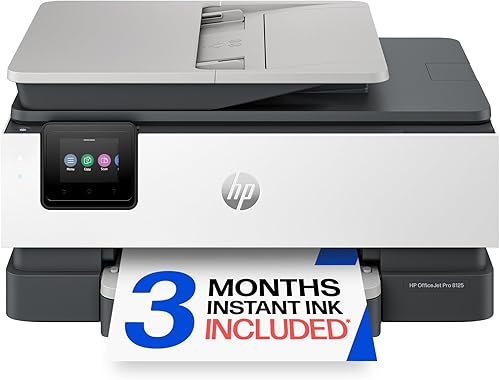
The HP OfficeJet Pro 8125 stands out for multipage paperwork. It has an automatic document feeder, automatic two-sided printing and a 225-sheet input tray.
The Epson Expression Home XP-5200 is a cartridge model with individual ink cartridges, borderless photo printing and automatic two-sided printing. The two tank models, HP Smart Tank 5003 and Epson EcoTank ET-2800, both print, scan and copy.
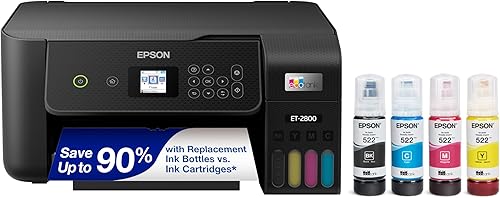
HP says the Smart Tank 5003 includes enough ink for up to 6,000 color or black pages. Epson says the ET-2800 includes up to 2 years of ink, with yields of up to 4,500 black and 7,500 color pages per bottle set.
Which HP vs Epson printer suits each home?
Choose the model that matches a repeated task in your home, such as scanning a stack of forms or printing family photos. These four options are not interchangeable, even though each can handle everyday printing.
- HP OfficeJet Pro 8125: Choose it for multipage home office paperwork, with an automatic document feeder and automatic duplex printing.
- Epson EcoTank ET-2800: Choose it for home printing with refillable tanks, Wi-Fi and print, scan and copy functions.
- HP Smart Tank 5003: Choose it for regular printing when you want refillable tanks and print, copy and scan functions.
- Epson Expression Home XP-5200: Choose it for everyday color and borderless photos, with individual cartridges and automatic duplex printing.
| Product | Best for | Functions | Paper input | Automatic document feeder | Our score |
|---|---|---|---|---|---|
| HP OfficeJet Pro 8125 | home office paperwork | Print, scan, copy and fax | 225 sheets | Yes | 8.4 |
| Epson EcoTank ET-2800 | regular home printing | Print, scan and copy | 8.4 | ||
| HP Smart Tank 5003 | high page volumes | Print, copy and scan | 8.0 | ||
| Epson Expression Home XP-5200 | borderless photo prints | Print, scan and copy | 150 sheets | 7.8 |
Is HP or Epson better for home office documents?
The HP OfficeJet Pro 8125 is the stronger fit here for multipage home office paperwork. Its automatic document feeder helps when you scan several pages, while automatic two-sided printing and its paper tray support regular document work.
The Epson XP-5200 also prints on both sides automatically, but it does not have an automatic document feeder. It may suit a home where printing is mostly single-page tasks, homework and occasional photos.
The HP OfficeJet Pro 8125 supports print, scan, copy and fax through the HP app. Its 2.7-inch touchscreen and dual-band Wi-Fi are useful if you prefer to control common tasks at the printer or from a phone.
Skip this HP if you rarely print multipage jobs and do not need the feeder, fax or larger paper capacity. For other HP options, see our HP printers for home use guide.
Which printer is a better fit for photos?
The Epson Expression Home XP-5200 is the clearest photo-oriented choice among these four models. Epson highlights borderless photos and color, and its individual cartridges let you replace only the color that runs out.
That does not make every Epson a better photo printer than every HP. Compare photo support and paper handling on the exact model, especially if you plan to print photos often.
The HP OfficeJet Pro 8125 is aimed at color documents such as reports, presentations and flyers. It is a better match for a home that mainly prints work and school pages, with occasional color jobs.
The XP-5200 has a 2.4-inch color display and works with Epson’s Smart Panel app for setup and operation. See our Epson printers for home use guide for more models, including Expression, WorkForce and EcoTank options.
Should you choose an HP or Epson ink tank printer?
Choose a tank printer if you print often enough to make refill bottles practical. The HP Smart Tank 5003 and Epson EcoTank ET-2800 both avoid cartridge replacement and include bottles for initial use.
HP says the Smart Tank 5003 includes ink for up to 6,000 color or black pages. Epson says the ET-2800 includes up to 2 years of ink, with bottle-set yields of up to 4,500 black pages and 7,500 color pages.
Those figures describe the models in different ways, so they do not show which will last longer in your household. Page coverage, color use and how much you print will affect refill timing.
The Smart Tank 5003 supports manual two-sided printing through its driver. The ET-2800 does not have automatic duplex printing, so consider how often you print long documents on both sides.
Skip a tank if you print only a few pages every month or want to avoid storing and pouring ink bottles. For a closer look at running costs and tank options, read our guide to printers with cheaper ink.
How do cartridge choices affect daily use?
Cartridges are straightforward to replace, while tanks reduce how often you need to replace ink supplies. Choose based on how much you print and which refill routine you prefer.
The Epson XP-5200 uses individual cartridges, so you can replace only the color that runs out. It also supports automatic two-sided printing and has a 150-sheet tray.
The HP OfficeJet Pro 8125 uses HP 923 cartridges and is designed to block cartridges without original HP chips or circuitry. Its 3-month Instant Ink trial has a monthly fee after the trial unless you cancel, so review the subscription terms before enrolling.
The HP Smart Tank 5003 uses HP 31 color bottles and an HP 32XL black bottle. Epson recommends genuine ink for the ET-2800 to support print quality and performance.
Do not choose by the included ink estimate alone. Think about the supplies you can readily keep on hand, whether you want a subscription and how frequently you expect to print.
What should you check before setting up a printer?
Check the space, network and ink type before you begin setup. A few minutes of preparation can prevent connection problems or a printer that does not fit where you planned.
Set the printer on a stable surface near a power outlet, with room to open its trays and scanner. The HP OfficeJet Pro 8125 is 18.11 in wide and 13.29 in deep, while the Epson ET-2800 is 22.8 in wide and 14.8 in deep.
Install the companion app or software for the model you choose, then connect the printer to your home Wi-Fi if you plan to print wirelessly. Keep the network name and password handy, and use the on-screen prompts or app instructions to finish setup.
For a tank model, fill the tanks with the matching bottles and follow the setup guide before printing. For a cartridge model, install each cartridge in its marked position and keep the protective materials out of the printer.
Print a basic document after setup and confirm that the correct printer is selected on your computer or phone. If you plan to print from an iPhone, our guide to printing from an iPhone covers the basic steps.
How can you avoid common printer mistakes?
Choose the right ink, paper and print settings for the job. The wrong supply or a poor setup choice can waste ink, paper and time.
- Do not assume HP and Epson supplies are interchangeable. Match bottles or cartridges to the exact model, and follow the brand’s guidance on genuine ink.
- Do not buy a tank model just because it includes a large amount of ink. First consider whether you print often enough to make that format useful.
- Do not overlook duplex differences. Automatic two-sided printing is available on the OfficeJet Pro 8125 and XP-5200, while the ET-2800 does not offer it.
- Do not assume every all-in-one has a document feeder. If you scan multi-page forms, check for an ADF specifically.
- Do not leave setup until after you have a deadline. Connect the printer and confirm that your main devices can print while you have time to resolve network or app issues.
- Do not use photo settings for routine text pages. Select paper type and print quality to match the material, so ordinary documents do not use a slower or more ink-heavy setting than needed.
Use plain paper for draft documents and reserve photo paper for photo jobs. If a print comes out blank, check ink levels, cartridge or tank installation, and the selected printer before repeating the job.
Which HP vs Epson printer should you choose?
Pick the HP OfficeJet Pro 8125 for document handling, the Epson XP-5200 for borderless photos, and a tank model for frequent printing. Then choose between the HP Smart Tank and Epson EcoTank by comparing their included ink, refill routine and duplex needs.
Choose the OfficeJet Pro 8125 if scanning multipage paperwork and automatic two-sided printing matter most. Choose the XP-5200 if you want individual cartridges and borderless photo support for occasional creative prints.
For frequent printing, compare the Smart Tank 5003 with the ET-2800 and decide which bottle system and included ink description suit your household. If you are still weighing printer types, return to our home printer guide for a broader comparison.
Frequently asked questions
Is HP or Epson better for home printing?
HP and Epson each make cartridge and refillable tank printers, so the better choice depends on print volume and features. The HP OfficeJet Pro 8125 has an automatic document feeder and duplex printing, while the Epson XP-5200 supports borderless photos and uses individual cartridges.
Are HP or Epson ink tank printers better?
Compare exact models and included ink rather than the brand name alone. The HP Smart Tank 5003 is cartridge-free, and HP says its included ink can print up to 6,000 color or black pages; Epson says the EcoTank ET-2800 includes up to 2 years of ink.
Which is better for home office documents, HP or Epson?
Look for an automatic document feeder, duplex printing and enough paper capacity for your routine. The HP OfficeJet Pro 8125 has all 3 features, while the Epson XP-5200 has automatic duplex printing but no automatic document feeder.
Which brand is better for home photos?
The Epson Expression Home XP-5200 is the clearest fit among these picks for borderless photo printing, a feature Epson highlights. Choose by the exact model because photo support and paper handling vary across both brands.



