HP Smart Tank 5101 Review: Worth It? (November 2026)
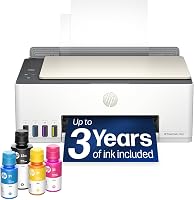
The HP Smart Tank 5101 is a sensible refillable printer for home users who print often and need copy and scan functions. Pick it for lower refill frequency, or choose the HP Smart Tank 7603 for automatic duplex printing, faxing and higher stated speeds.
On this page (11 sections)
- HP Smart Tank 5101 review: the quick verdict
- The HP Smart Tank 5101 at a glance
- Who should choose this HP Smart Tank?
- Which daily-use specs matter most?
- How does the ink system affect ownership?
- What is setup like?
- How should you care for the 5101?
- What are the real trade-offs?
- What alternatives fit different needs?
- Is HP Instant Ink better than Smart Tank ink?
- HP Smart Tank 5101 review: should you buy it?
The HP Smart Tank 5101 is a good pick for regular home printing when refillable ink matters more than advanced office features. This HP Smart Tank 5101 review finds a practical all-in-one design for printing, copying and scanning, with replacement ink and printhead options available for the model.
Choose it for school papers, household forms, occasional color pages and routine scanning. Choose the HP Smart Tank 7603 instead if you need automatic duplex printing, an automatic document feeder, faxing or Ethernet networking.
HP Smart Tank 5101 review: the quick verdict
The HP Smart Tank 5101 earns a buy recommendation for homes that print often enough to value an ink tank. Its main appeal is the refillable system, while its main trade-off is that the product data here does not give the same detailed speed and connectivity picture supplied for the 7603 alternative.
The printer belongs to HP's Smart Tank family, so its ink system is built around bottles rather than traditional cartridges. That makes refill planning part of ownership, but it also gives you a clear way to keep black and color ink available.
It is best for a household that wants one machine for everyday documents and basic image work. A low-volume user who prints only a few pages a month may get more value from a simpler printer with less refill planning.
The choice is firm: buy the 5101 for routine home all-in-one printing, or move up to the 7603 for a busier workflow.
The HP Smart Tank 5101 at a glance
The HP Smart Tank 5101 is an all-in-one ink tank printer designed for home printing, copying and scanning. Its model family connects it to refillable HP 31 and 32 ink bottles and compatible replacement parts.
The printer makes sense when you want color printing without managing a set of small cartridges. You fill separate black, cyan, magenta and yellow ink supplies, then use the printer for documents and household tasks.
inkgens 31 32XL Ink Bottle Set Refill: Best for replacement ink

- 31 and 32XL bottle set
- Black, cyan, magenta and yellow
- Anti-leak auto-stop design
- Compatible with HP Smart Tank 5101
A replacement bottle set for the HP Smart Tank 5101, with black pigment ink, dye-based color ink, gloves and opening tools.
Pros
- Includes black and three color bottles
- Anti-leak auto-stop refill design
- Names the HP Smart Tank 5101 as a compatible model
Cons
- Black and color inks use different ink bases
- The bottle set is for printing only
The inkgens 31 32XL Ink Bottle Set Refill is the most useful accessory here because it names the HP Smart Tank 5101 as a compatible model. It includes a 165 ml black bottle, three 100 ml color bottles, gloves and bottle-opening tools.
The replacement ink uses pigment black and dye-based color ink. If you change ink types, the product instructions call for cleaning the ink cartridge and nozzle first, so treat ink compatibility as a practical maintenance issue.
Who should choose this HP Smart Tank?
The HP Smart Tank 5101 suits families, students and home offices with recurring print tasks. It can cover worksheets, forms, shipping pages, color charts, copies and scans without requiring separate machines.
It also fits a home where several people print different types of pages. One person may need black text, another may need color school work, and someone else may need to scan a signed document.
The refillable tank is most useful when printing is steady. Regular use gives the larger ink supply a clear purpose, while occasional users may not benefit as much from buying into a tank-based system.
This printer is less compelling for a busy office that needs automatic document feeding, faxing and network flexibility in one workflow. The HP Smart Tank 7603 is the stronger alternative for that use because its data includes those features.
For a wider comparison of household models, see Best HP Printers for Home Use. The right choice depends on how often you print and whether you need more than basic all-in-one functions.
Which daily-use specs matter most?
The most important daily-use feature is the refillable four-color ink system. It separates black from cyan, magenta and yellow, so you can think about each ink color as its own supply.
The 5101 is an all-in-one printer, which means printing is only part of its role. Copying and scanning add value when your home paperwork includes forms, school pages, receipts or signed documents.
The available product information does not give a full speed table for the 5101. That makes the printer easier to recommend for normal home volume than for a workload where pages-per-minute figures decide the purchase.
The HP Smart Tank 7603 gives a useful point of comparison. It prints up to 15 black-and-white pages per minute and 9 color pages per minute, with an initial page print time of 14 seconds.
The 7603 also supports automatic duplex printing, Ethernet and USB, while its control method is an app. Those features matter when a printer serves several computers or handles longer document jobs.
How does the ink system affect ownership?
The ink system makes the HP Smart Tank 5101 attractive for planned, repeat printing. Instead of replacing a full cartridge set, you track black and color bottle levels and refill the tank as needed.
The compatible inkgens set includes one 165 ml 32XL black bottle and three 100 ml 31 bottles for cyan, magenta and yellow. Its stated model list includes the Smart Tank 5101 along with several other Smart Tank and InkTank printers.
The set uses pigment ink for 32XL black and dye ink for 31 color bottles. That difference is important because the product instructions say to clean the ink cartridge and nozzle when changing from one ink type to another.
The anti-leak, auto-stop bottle design is intended to let ink drain without squeezing. Gloves and bottle-opening tools are included, which gives you a more complete refill setup than buying loose bottles alone.
For a closer look at the bottle families, read HP Smart Tank Ink: Which Bottles Do You Need?. Match the bottle number to the printer before refilling.
What is setup like?
Setup should be treated as a sequence of physical and software tasks: place the printer, add the correct ink, install the printheads, connect the printer and complete alignment. Keep the tanks level during filling and protect the work surface from accidental spills.
Start with a location that has room for paper loading, output handling and access to the ink tanks. A cramped shelf can make routine refills awkward even when the printer itself fits.
Use the correct bottle color for each tank. The black, cyan, magenta and yellow supplies have separate roles, so a careful color match is part of basic setup.
Print a test page after installation and look for missing lines, uneven color or text gaps. If the output needs attention, use the printer's maintenance tools in the order shown for the model.
Connect the printer to the devices you actually use. A home setup might center on a smartphone and one laptop, while a small office may need a more deliberate network arrangement.
How should you care for the 5101?
The HP Smart Tank 5101 needs regular ink attention and clean print paths. Keep the tank caps closed between refills, use the correct color in each tank and avoid letting a supply run completely empty.
Print often enough to keep the printer part of your normal routine. Long gaps can make any inkjet workflow less convenient because the first job after storage may need extra maintenance.
When pages show streaks or missing color, begin with the printer's cleaning and alignment functions. Do not jump straight to replacing parts when a routine maintenance cycle addresses the problem.
A printhead replacement is relevant when the installed part needs changing. The XLhippo Smart Tank Plus 651 Printhead X4E75A is a two-piece set with one X4E75A black printhead and one M0H50A tri-color printhead.
XLhippo Smart Tank Plus 651 Printhead X4E75A: Best for printhead replacement

- X4E75A black printhead
- M0H50A tri-color printhead
- Compatible with HP Smart Tank 5101
- Gloves and user manual included
A two-printhead replacement set for listed HP Smart Tank models, including the Smart Tank 5101 series.
Pros
- Includes black and tri-color printheads
- Lists the HP Smart Tank 5101 as compatible
- Includes a glove and user manual
Cons
- Compatibility depends on the printer and old printhead model
- It is a replacement part rather than a complete printer
This replacement set lists the HP Smart Tank 5101 and 5102 among its compatible models. It also includes a glove and user manual, but model and old printhead matching still matter before you order.
Keep paper stored flat and dry. Dust, bent sheets and poor storage can create feed problems that look like printer faults.
What are the real trade-offs?
The strongest trade-off is simplicity versus feature depth. The 5101 gives you a refillable all-in-one printer for home tasks, while the 7603 adds more tools for demanding workflows.
The 7603 includes automatic duplex printing, so it can handle two-sided documents without manual page turning. It also has an automatic document feeder, which is useful when copying or scanning several pages.
The 7603 adds faxing and supports Ethernet, USB and wireless printing. Those features make it easier to place the printer into a small office setup with several connection needs.
The 5101 is the better fit when those features would sit unused. Extra functions add value only when they reduce work in your actual routine.
Physical size also matters. The 7603 measures 14.33 in deep, 16.83 in wide and 9.46 in high, and it weighs 17 lb.
Leave room around it for paper, output and access.
What alternatives fit different needs?
The best alternative depends on whether you need replacement supplies, a replacement printhead or a more complete printer. These three products serve different jobs, so they are not interchangeable.
For replacement ink
The inkgens 31 32XL Ink Bottle Set Refill combines a 165 ml black bottle with three 100 ml color bottles. Its compatible model list includes the HP Smart Tank 5101, and the anti-leak auto-stop design is intended to make refilling cleaner.
The ink details deserve attention. Black is pigment ink, while the 31 color bottles are dye ink, so changing ink types calls for cleaning the cartridge and nozzle first.
For a replacement printhead
The XLhippo Smart Tank Plus 651 Printhead X4E75A contains an X4E75A black printhead and an M0H50A tri-color printhead. Its compatibility list includes Smart Tank 5101, 5102, 5000 and 5100 models, plus several Smart Tank Plus printers.
This is a repair part, not a second printer. Match the old printhead model and the printer model before choosing it.
For a more capable printer
The HP Smart Tank 7603 is a full all-in-one printer with print, copy, scan and fax functions. It includes automatic duplex printing, an automatic document feeder, mobile and wireless printing, Ethernet and USB.
HP includes ink rated for up to 8,000 color or 6,000 black pages in the box. The printer also has a 15-page-per-minute black-and-white speed and a 9-page-per-minute color speed.
Its larger body and 17 lb weight make placement more deliberate. For a home office with regular multi-page work, those added features justify choosing it over the simpler 5101.
Is HP Instant Ink better than Smart Tank ink?
Smart Tank ink is the better match when you want bottle-based refills and control over when you replenish supplies. The HP Smart Tank 5101 is built around that refillable approach.
HP Instant Ink follows a different ownership model, so the right answer depends on whether you prefer a subscription arrangement or direct bottle refills. Compare the two systems in HP Instant Ink vs Smart Tank: Which Costs Less?.
For the 5101, the important habits are simple: use the correct bottle numbers, keep the colors separate and refill before a tank runs dry. The inkgens set gives you a compatible black and color option in one purchase.
A subscription can suit a user who wants supply delivery organized around usage. Bottle refills suit a user who wants to buy supplies directly and keep a set on hand.
HP Smart Tank 5101 review: should you buy it?
Buy the HP Smart Tank 5101 if you need a refillable home all-in-one for regular printing, copying and scanning. It is the clear choice when lower refill frequency and four-color tank printing matter more than office features.
Pick the HP Smart Tank 7603 if your routine includes two-sided documents, multi-page scanning, faxing, Ethernet or faster stated output. Its automatic document feeder and automatic duplex printing address tasks the 5101 is not positioned around.
Choose the inkgens 31 32XL Ink Bottle Set Refill for planned ink replacement, especially when you want black and color bottles together. Choose the XLhippo printhead set only when a compatible printhead replacement is the job.
The final rule is easy: the HP Smart Tank 5101 is worth buying for steady home printing, but the 7603 is the better workhorse. Keep the correct ink available, use the printer regularly and choose the alternative only when its specific features solve a real part of your workflow.
Frequently asked questions
Is the HP Smart Tank 5101 good for home use?
The HP Smart Tank 5101 suits home users who print enough to benefit from refillable ink and also need an all-in-one printer. It is a stronger fit for regular documents, school pages and household scanning than for buyers who print only a few pages each month.
What ink does the HP Smart Tank 5101 use?
The HP Smart Tank 5101 uses HP Smart Tank 31 and 32 ink bottles. The compatible inkgens set reviewed here includes one 165 ml 32XL black bottle and three 100 ml 31 color bottles for listed Smart Tank models.
Can the HP Smart Tank 5101 scan documents?
Yes, the HP Smart Tank 5101 is an all-in-one printer with scanning and copying functions. For a step-by-step walkthrough, see the guide to how to scan with an HP Smart Tank 5101.
Should you buy the HP Smart Tank 7603 instead?
Choose the HP Smart Tank 7603 if automatic duplex printing, an automatic document feeder, faxing or Ethernet matter to your workflow. The 5101 is the simpler choice for home printing when those added features are not central to your routine.