Dye Ink vs Pigment Ink Printer: Which Is Better? (October 2026)
Dye ink suits vivid color and photos, while pigment ink is often a better fit for crisp text. Some home printers use both, so check which ink goes with each color before you choose.
On this page (9 sections)
- Dye ink vs pigment ink printer: which should you choose?
- What is the difference between dye and pigment ink?
- Which ink is better for text and documents?
- Which ink lasts longer on paper?
- What does the Canon MegaTank G3290's hybrid ink mean?
- What should you check before buying ink?
- Does the ink type affect running cost?
- How do you choose a printer for your print mix?
- Which dye ink vs pigment ink printer is right for you?
Dye ink often suits vivid color and photos, while pigment ink is often preferred for crisp text. The best dye ink vs pigment ink printer for home use depends on whether you print more photos, schoolwork, or business documents.
Some printers use both types: pigment black for text and dye-based colors for photos. That setup can make sense when your household prints a mix of documents and images.
A practical example is the Canon MegaTank G3290. It uses a pigment-based black bottle and dye-based cyan, magenta, and yellow bottles.

Dye ink vs pigment ink printer: which should you choose?
Choose dye ink for vivid color and photos, and consider pigment ink for crisp text. The difference comes from how the ink colorant behaves on paper, but printer design and paper choice also matter.
Dye ink dissolves in liquid, which helps it spread smoothly into paper fibers. That can produce bright, saturated color that works well for photos and colorful graphics.
Pigment ink uses tiny solid particles suspended in liquid. It tends to sit closer to the paper surface, which can help produce sharp text.
Neither ink type wins for every job. A printer that uses pigment black and dye colors can offer a useful middle ground for a home that prints both documents and photos.
What is the difference between dye and pigment ink?
Dye ink uses colorants dissolved in liquid; pigment ink carries tiny solid color particles. That difference affects how each ink interacts with paper.
Dye ink can soak into paper and create smooth color transitions. It often works well for photos, charts, and colorful school projects where bright tones matter.
Pigment particles can stay nearer the paper surface. That can help text look crisp.
The printer's ink formulation and paper are part of the result. Use media made for your printer, and follow its instructions for the best fit.
Is dye ink or pigment ink better for photos?
Dye ink is often a strong choice for vivid photo color, while pigment ink can suit prints where longevity matters. Your printer and paper combination still determines the final result.
If family photos are your main use, look for a printer that supports photo paper and provides color inks suited to that work. Store finished prints away from direct sunlight and moisture.
For labels, charts, or documents that may be handled often, pigment ink can be useful. Check the printer maker's guidance for supported paper and print settings.
Which ink is better for text and documents?
Pigment black ink is often the better fit for sharp, readable text. A hybrid printer can pair it with dye-based color inks for graphs, images, and photos.
The Canon MegaTank G3290 uses pigment-based black ink and dye-based cyan, magenta, and yellow ink. That split makes it relevant if you print reports during the week and color images on occasion.
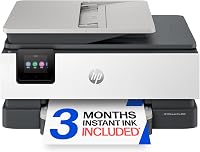
The HP OfficeJet Pro 8125 uses separate black and color cartridges, but the ink type for each is not specified here. Its automatic two-sided printing and automatic document feeder may suit a home office that handles multi-page paperwork.
If your documents need to resist smearing, verify the ink and paper recommendations for the exact printer. Handling and drying time can affect a page as much as the ink category.
Which ink lasts longer on paper?
Pigment ink can suit prints exposed to light or moisture, but no ink type guarantees a fixed lifespan. Paper, exposure, and storage all affect how a print holds up.
Keep important documents and photos in a dry place away from direct sunlight. For archival or display prints, check the printer and paper makers' guidance for expected print permanence.
Dye ink can still be a sensible choice for everyday photos and color pages. If you print keepsakes, choose media made for the printer and store the finished prints carefully.
What does the Canon MegaTank G3290's hybrid ink mean?
The G3290 pairs pigment black with dye-based colors, so it is designed to cover both text and color printing. That combination can simplify the choice if you regularly print both types of work.
Canon specifies GI-21 pigment-based black ink and GI-21 dye-based cyan, magenta, and yellow ink bottles for this printer. It is a refillable tank model with print, scan, and copy functions.
The hybrid system does not mean every paper type will suit every job. Match the media and print settings to what you're making, especially for glossy photos or pages that need careful handling around moisture.
What should you check before buying ink?
Match the ink to the exact printer model and color before buying a refill or cartridge. Similar printer names can use different ink families.
Start with the printer's manual or the manufacturer's ink compatibility guide. Confirm the model number and whether the color you need is pigment or dye based.
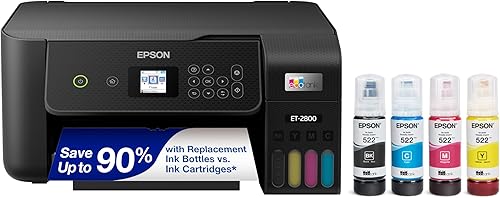
The EcoTank ET-2800 uses refillable bottles in black, cyan, magenta, and yellow, but the ink type for each color isn't specified here. Epson recommends genuine ink and warns that non-genuine ink could cause damage not covered under the printer's limited warranty.
For a cartridge printer, check whether it requires a brand-specific chip or circuitry. The HP OfficeJet Pro 8125 is intended to work only with cartridges that use original HP chips or circuitry.
If ink cost is part of your decision, our guide to printers with cheap ink compares tank systems and cartridge options. You can also read why printer ink costs so much for factors beyond the ink type.
Does the ink type affect running cost?
Ink type alone doesn't tell you what a printer will cost to run. Compare the printer's ink system, yield information, and the amount you expect to print.
A refillable tank printer uses bottles, while many home office models use cartridges. Their replacement patterns differ, so consider how often you print and whether you prefer bottles or cartridges.
The Epson EcoTank ET-2800 includes ink bottles and has stated yields of up to 4,500 black and 7,500 color pages per bottle set. Those figures help frame use, but your actual yield will depend on what you print.
For more on how older ink behaves, see whether printer ink expires. Store unopened ink as the manufacturer directs, and check bottle or cartridge compatibility before replacing it.
How do you choose a printer for your print mix?
Choose by your most common print job, then check the ink system and paper support. The best match for a photo-heavy household may differ from the right fit for a document-heavy home office.
For mixed documents and color pages, consider a hybrid system such as the Canon G3290. For regular home printing with refillable bottles, the Epson ET-2800 offers a tank system and includes black and color ink.
For work documents, the HP OfficeJet Pro 8125 has an automatic document feeder and automatic two-sided printing. It uses HP 923 cartridges and requires original HP chips or circuitry.
Our best inkjet printers for home use guide covers more home printing choices. If ink use is your main concern, the cheap ink printer guide can help you compare cartridge and tank designs.
Which dye ink vs pigment ink printer is right for you?
Pick a dye-focused printer for vivid color and photos, a pigment-focused system for crisp text, or a hybrid printer for both. Check the exact ink type in each color before you buy.
The Canon MegaTank G3290 is the clearest fit here for mixed use because its black ink is pigment based and its color inks are dye based. Choose a refillable tank like the Epson EcoTank ET-2800 if bottle refills fit your routine, or consider the HP OfficeJet Pro 8125 for home office document handling.
For a broader view of home ink systems, read our home printer guide.
Sources
Frequently asked questions
Is dye ink or pigment ink better for home printing?
Dye ink is often a good fit for vivid color and photo printing, while pigment ink is often chosen for crisp text and prints that need better resistance to water or fading. The right choice depends on what you print, the paper you use, and the exact printer's ink system.
Can one printer use both dye and pigment ink?
Yes. Some printers use pigment-based black ink for text and dye-based color inks for photos.
The Canon MegaTank G3290 is one example, with pigment black and dye-based cyan, magenta, and yellow bottles.
Check the ink type for each color before buying replacement bottles.
Does pigment ink work on glossy photo paper?
Some pigment ink systems support glossy photo paper, but results depend on the printer, ink, and paper combination. Check the printer maker's approved media and print settings before using glossy stock.
Dye-based color inks are also common in printers designed to print vivid photos.
Does dye ink fade faster than pigment ink?
Dye ink can be more vulnerable to light and moisture than pigment ink, though paper, storage, and the ink formulation also affect print life. Keep important prints out of direct sunlight and follow the printer maker's paper and storage guidance.