Canon MegaTank G3270 vs G3290: What Is the Difference? (October 2026)
The G3290 adds a color touchscreen and automatic two-sided printing; the G3270 has a smaller square LCD and prints on one side only. Both are wireless print, copy and scan MegaTank printers with the same stated ink yield.
On this page (6 sections)
The Canon MegaTank G3290 adds automatic two-sided printing and a larger color touchscreen, while the G3270 prints on one side and has a smaller LCD. Both are wireless all-in-one ink tank printers with the same stated yield of up to 6,000 black and white or 7,700 color pages per ink set.
That makes the G3290 the more convenient fit for regular document printing. If you mostly print occasional pages and don't need automatic duplexing, the G3270 covers the core print, copy and scan tasks.

Canon G3270 vs G3290: what changes?
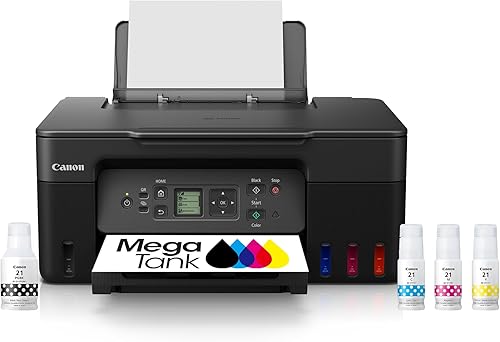
The display and two-sided printing are the clearest differences. The G3270 has a 1.35 in square LCD and single-sided printing; the G3290 has a 2.7 in color touchscreen and automatic two-sided printing.
Both models support wireless printing, copying and scanning. Their listed black and color print speeds are also the same: 11 pages per minute for black and 6 for color.
| Feature | Canon MegaTank G3270 | Canon MegaTank G3290 |
|---|---|---|
| Wireless functions | Print, copy, scan | Print, copy, scan |
| Display | 1.35 in square LCD | 2.7 in color touchscreen |
| Two-sided printing | Single-sided | Automatic |
| Stated ink yield per set | Up to 6,000 black, 7,700 color pages | Up to 6,000 black, 7,700 color pages |
| Listed speed | 11 black, 6 color pages per minute | 11 black, 6 color pages per minute |
Use the feature that matters most to you to make the choice. A bigger display helps with on-printer controls, while duplex printing changes how you handle multi-page jobs.
Which printer is better for two-sided printing?
The G3290 is the better choice if you want pages printed on both sides automatically. The G3270 prints on one side, so double-sided jobs require you to turn the paper over and feed it again.
Automatic duplexing is useful for reports, school work and long household documents. It can reduce the amount of paper a job uses, though you'll still want to check the print settings for each task.
When does the G3270 still make sense?
The G3270 makes sense if most of your printing is single-page forms, labels or short documents. You may not miss duplexing if two-sided jobs are rare.
If you do need both sides, manual page turning adds a step and can make the job slower. Consider how often you print several pages before deciding that the G3270's simpler setup is enough.
Is automatic duplexing worth choosing the G3290?
It is useful if you print multi-page documents often and want the printer to handle both sides. You don't have to reinsert the paper between sides.
If your documents are usually a page or two, the convenience may matter less than the controls or the way you use the printer. Choose based on your normal print jobs, not a rare task.
How do the G3270 and G3290 displays compare?
The G3290 has a larger, color touchscreen; the G3270 uses a small square LCD. If you expect to use the printer's own controls, the G3290's 2.7 in display gives you a larger panel to work with.
The G3270's 1.35 in square LCD is a more compact option. Both models also have wireless printing, so you can use a compatible device rather than relying only on the printer's panel.
Which controls fit your routine?
Choose the G3290 if you prefer a larger screen with touch controls. Choose the G3270 if you don't expect to make many adjustments on the printer itself.
Neither display changes the core functions: both models print, copy and scan wirelessly. The difference is how you interact with the printer when setting up or managing a job.
For more context on wireless printing, see our guide to the best wireless printers for home use. It can help you weigh the connection method alongside the features you use most.
Are print speed and ink yield different?
The listed speeds and stated page yields are the same for both models. Each is listed at 11 black pages per minute and 6 color pages per minute, with a stated maximum yield of 6,000 black and 7,700 color pages per ink set.
Those yield figures are not a guarantee that every set will print exactly that number of pages. Text coverage, images and print settings affect how much ink a job uses.
Since the listed speed is equal, it doesn't give you a clear reason to choose one over the other. Focus on duplexing and display size, then consider your printing volume.
If low ongoing ink use is central to your choice, our guide to printers with cheap ink covers tank models and other options. It also explains why the purchase price alone doesn't tell you the long-term cost of printing.
Which one should you buy for home or home office use?
Choose the G3290 for frequent documents and the G3270 for basic wireless printing with fewer controls. The right fit depends on whether automatic two-sided output and a larger display will save you effort.
A home office with multi-page paperwork is more likely to benefit from the G3290's duplex feature. A household that prints occasional pages may be satisfied with the G3270's smaller screen and one-sided output.
Both models print, copy and scan, so either can cover common home all-in-one tasks. If you need a broader comparison of printer types for home, start with our home printer guide.
Should you consider another MegaTank model?
The Canon PIXMA G6020 MegaTank adds Ethernet and USB alongside wireless connectivity, plus automatic two-sided printing. It has a 2-line LCD rather than a color touchscreen.
Consider it if wired network access matters to your setup. For another comparison in this category, our guide to Epson ET-2850, ET-3850 and ET-4850 differences shows how features can vary across ink tank models.
Canon MegaTank G3270 vs G3290: which should you choose?
Pick the G3290 if you want automatic two-sided printing and a larger color touchscreen; pick the G3270 if you mostly print single-sided pages and want simpler controls. Their listed speeds and stated ink yields are the same, so the choice turns on those day-to-day features.
If you want to compare more tank printers before deciding, see our guide to printers with cheap ink. It can help you weigh the printing features you need against your expected ink use.
Frequently asked questions
What is the main difference between the Canon G3270 and G3290?
The G3290 has a 2.7 in color touchscreen and automatic two-sided printing. The G3270 has a 1.35 in square LCD and prints on one side only.
Both offer wireless print, copy and scan and the same stated yield of up to 6,000 black or 7,700 color pages per ink set.
Do the Canon G3270 and G3290 use the same amount of ink?
Canon gives both models the same stated yield: up to 6,000 black and white or 7,700 color pages from a single set of inks. Actual page yield depends on what you print and how you print it, so treat that number as a stated maximum rather than a promise for every household.
Does the Canon G3270 print double-sided?
No. The G3270 is a single-sided printer, so you would need to turn pages over yourself to print on both sides.
The G3290 has automatic two-sided printing, which can save steps when you print longer documents.
Is the Canon G3290 a color printer?
Yes. The G3290 is a wireless color inkjet all-in-one that prints, copies and scans.
Its 2.7 in color touchscreen is a control display; the G3270 also prints in color but has a smaller 1.35 in square LCD.
Which Canon MegaTank is better for home use?
Choose the G3290 for automatic two-sided printing and its larger color touchscreen. Choose the G3270 if single-sided printing and a smaller display meet your needs.
For a broader look at home printer types, see our home printer guide.