Best Mega Tank Printer for Photos: How to Choose
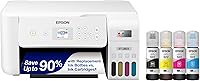
The Epson EcoTank Photo ET-8550 is the best mega tank printer for photos for most shoppers because it combines 6-color photo ink, wide-format printing and low-cost bottle refills. Choose the ET-8500 for similar photo features in a smaller body, or the Canon PIXMA G6020 for high-yield everyday printing.
On this page (11 sections)
- Which MegaTank photo printer is the best overall?
- How do the 3 photo MegaTank printers compare?
- Why does 6-color ink matter for photos?
- Is the ET-8550 worth choosing for large photos?
- Is the ET-8500 better for a smaller photo setup?
- When does the Canon PIXMA G6020 make more sense?
- What paper sizes and media should you plan to use?
- How much do ink bottles matter for photo printing?
- What features matter beyond photo color?
- How should you care for an ink tank photo printer?
- Which best MegaTank printer should you choose?
The Epson EcoTank Photo ET-8550 is the best mega tank printer for photos for most people because it combines 6-color photo ink, 13 x 19 in media support, scanning, copying and bottle-based ink. The Epson EcoTank Photo ET-8500 is the smaller photo-focused alternative, while the Canon PIXMA G6020 MegaTank suits high-volume home documents with occasional photos.
A photo printer should match more than image quality. Paper size, ink colors, refill habits, cabinet space and scanning or copying needs all affect the right choice.
This guide compares 3 options using their stated features and specifications. We looked at photo printing, creative projects and regular home use.
Which MegaTank photo printer is the best overall?
The Epson EcoTank Photo ET-8550 is the best overall choice when photo printing is the main reason you're shopping. Its 6-color Claria ET Premium ink system, wide-format support and all-in-one design give it the broadest photo-focused feature set here.
It prints borderless photos up to 13 x 19 in and handles cardstock and other media up to 1.3 mm thick. It also supports copying and scanning.
Epson says 4 x 6 in photos can cost about 4 cents each with replacement ink, compared with about 40 cents using traditional cartridges. Actual costs vary with paper, coverage, settings and usage.
The ET-8550 measures 29.8 in deep, 20.6 in wide and 16.9 in high. That size is the trade-off for choosing the most capable photo and creative-work option.
Pick the ET-8550 when photo range matters more than compact size.
How do the 3 photo MegaTank printers compare?
The ET-8550 wins on photo flexibility, the ET-8500 wins on a smaller body with similar photo ink, and the Canon PIXMA G6020 wins on high-yield everyday printing.
| Printer | Photo ink system | Largest media size | Functions | Best fit |
|---|---|---|---|---|
| Epson ET-8550 | 6-color Claria ET Premium | 13 x 19 in | Print, scan, copy | Wide photo and creative projects |
| Epson ET-8500 | 6-color Claria ET Premium | 13 x 19 in | Print, copy | Photo work in a smaller body |
| Canon PIXMA G6020 | MegaTank ink system | Not stated here | Print, copy, scan | High-yield home documents and photos |
The Epson models share the strongest photo position because both use 6-color Claria ET Premium ink and support 13 x 19 in media.
The Canon includes wireless printing, copying, scanning, automatic 2-sided printing and high stated page yields of up to 6,000 black-and-white pages and 7,700 color pages from one ink set.
The ET-8550 and ET-8500 both print color at 12 pages per minute and black and white at 16 pages per minute. The Canon is listed at 6.8 color pages per minute and 13 black-and-white pages per minute.
Choose the ET-8550 for the widest photo range, the ET-8500 for a smaller photo setup, and the Canon for document-heavy use.
Why does 6-color ink matter for photos?
Six-color ink gives the Epson photo models a photo-first design, with Claria ET Premium inks built around vibrant colors and detailed images. Both include photo black, black, cyan, magenta, yellow and gray ink.
The ET-8550 is described for lab-quality photos, graphics and creative projects. The ET-8500 is designed for color photos, graphics, invitations and personalized gifts, with edge-to-edge printing and support for cardstock, envelopes, CDs and DVDs.
Epson EcoTank Photo ET-8550: wide creative work
The ET-8550 prints borderless 13 x 19 in photos, supports media up to 1.3 mm thick and includes a scanner and copier. Its maximum color copy resolution is listed as 5760 x 1440 dpi.
Epson EcoTank Photo ET-8500: photo work with less cabinet space
The ET-8500 also supports up to 13 x 19 in media and uses the same 6-color Claria ET Premium ink family. Its dimensions are 24.1 in deep, 15.9 in wide and 13.7 in high, making it smaller than the ET-8550 in every listed dimension.
Choose 6-color Epson ink when photo detail and color range are the main goal.
Is the ET-8550 worth choosing for large photos?
The ET-8550 is the strongest choice for large photos because it supports media up to 13 x 19 in and includes a wide-format photo workflow. It also handles everyday documents, copying and scanning.
A 13 x 19 in maximum media size suits wall prints, portfolio pages, large family photos and creative projects. Borderless printing helps when you want the image to reach the paper edges.
The wide-format body needs a permanent work area. Its listed dimensions are 29.8 in deep, 20.6 in wide and 16.9 in high, with a weight of 24.5 lb.
The ET-8550 also includes wireless printing, app and touch control, USB, automatic duplex printing and compatibility with PCs and smartphones.
Ink replacement is designed around bottles. Epson says the printer can print up to 6,200 color pages and that each set of ink bottles can last up to 2 years under stated usage conditions.
Those claims help with planning, but photo paper remains a separate running cost. Heavy photo coverage also uses ink differently from ordinary documents.
Pick the ET-8550 if you expect to print large photos or creative media often and have room for its deeper cabinet.
Is the ET-8500 better for a smaller photo setup?
The ET-8500 is the better choice when you want Epson photo ink and wide-format support in a smaller cabinet. It keeps 6-color Claria ET Premium ink and 13 x 19 in media support while taking up less listed space than the ET-8550.
Its dimensions are 24.1 in deep, 15.9 in wide and 13.7 in high, and it weighs 18.5 lb. That makes it easier to fit into a home office or craft area.
The ET-8500 supports copying, automatic duplex printing, Ethernet, voice control and connections for laptops, PCs and smartphones. It also supports cardstock, envelopes, CDs and DVDs.
What the ET-8500 suits best
Choose the ET-8500 for family photos, invitations, flyers, personalized gifts and other creative work. Its stated maximum media size is 13 x 19 in.
It prints color at 12 pages per minute and black and white at 16 pages per minute. Epson describes 4 x 6 in photo printing at about 4 cents per photo with replacement ink, compared with about 40 cents using traditional cartridges.
The main choice between the Epson models is the body size and the ET-8550's broader all-in-one setup, including scanning.
Choose the ET-8500 when you want photo-focused printing in less space.
When does the Canon PIXMA G6020 make more sense?
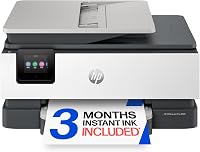
The Canon PIXMA G6020 makes more sense when documents are the main workload and photos are a secondary use. Its MegaTank system, automatic 2-sided printing, scanning and copying support a practical home office routine.
Canon states that one set of ink can print up to 6,000 black-and-white pages and 7,700 color pages. The printer also includes up to 2 years of ink under a stated average document-printing condition.
The G6020 supports wireless printing, USB and Ethernet. It works with laptops and smartphones, and its 2-line LCD keeps the control panel simple.
The Canon measures 14.6 in deep, 15.9 in wide and 7.7 in high. It weighs 17.8 lb and comes in black.
Canon describes the G6020 as supporting high-quality borderless photos. It includes a 4 x 6 in photo paper sample pack and uses Canon GI-20 ink.
The photo trade-off
The Canon's 4-color system makes it less photo-focused than the 6-color Epson models. Its listed color speed is 6.8 pages per minute, compared with 12 pages per minute for both Epson choices.
That makes it better for one economical home printer handling documents, copies, scans and occasional borderless photos.
Choose the Canon PIXMA G6020 when automatic duplexing, high document yields and a smaller body matter more than a 6-color photo system.
What paper sizes and media should you plan to use?
Choose the printer around your largest regular project. The Epson models are the clear choices for 13 x 19 in photos, while the Canon fits standard home photo and document work better.
The ET-8550 supports borderless 13 x 19 in photos, cardstock and other media up to 1.3 mm thick. It also supports customized CDs and DVDs.
The ET-8500 supports borderless 8.5 x 11 in photos, cardstock, envelopes, CDs and DVDs. Its maximum media size is listed as 13 x 19 in.
The Canon supports borderless photos and includes a 4 x 6 in photo paper sample pack. Its strongest documented use here is a mixture of documents, copies, scans and photos.
Use photo paper for finished images, plain paper for drafts and documents, and cardstock only where the printer supports the thickness. A paper type can change colors, contrast and fine detail.
Store photo paper flat and keep the printable side oriented correctly. Use the matching media setting so the feed and ink application suit the paper.
Pick an Epson model for 13 x 19 in work, and pick the Canon for a standard home mix with occasional photos.
How much do ink bottles matter for photo printing?
Ink bottles matter most when you print often, because they reduce cartridge changes and support longer runs. They don't make paper free, and photo coverage still affects ink use.
The ET-8550 and ET-8500 both use bottles for their 6-color Claria ET Premium systems. Each Epson set includes photo black, black, cyan, magenta, yellow and gray bottles.
The Epson models carry an up-to-2-year bottle claim based on average monthly document printing of about 200 pages. The Canon includes black, cyan, magenta and yellow bottles, plus 2 bonus black bottles.
Canon states up to 6,000 black-and-white pages and 7,700 color pages from one set under its stated conditions. These figures are most useful for comparing document volume.
Photo pages use ink based on image coverage, color balance, paper size and print settings. Bottle systems also reduce disposable cartridges over time.
Choose bottle-based printing for frequent output, but judge photo cost by ink, paper and actual image volume together.
What features matter beyond photo color?
The most useful extra features are scanning, copying, automatic duplex printing and device connections. Choose them based on the work you will do beside photos.
The ET-8550 includes print, scan and copy functions, app and touch control, USB, automatic duplex printing and compatibility with PCs and smartphones.
The ET-8500 includes printing and copying, automatic duplex printing, Ethernet, voice control and support for laptops, PCs and smartphones.
The Canon includes print, copy and scan functions, automatic 2-sided printing, Ethernet, USB, wireless printing and mobile printing. It also supports voice control through Amazon Alexa.
If you scan old photos, the ET-8550 and Canon are the more complete choices because both include scanning. All 3 models include automatic duplex capability in the supplied specifications.
For a broader household decision, compare this guide with our printer for home use guide. Students can also review our printer for college students guide before choosing a larger photo model.
Choose the extra functions you will use every week, not features that only sound useful on a comparison table.
How should you care for an ink tank photo printer?
Good care starts with correct ink, suitable paper and regular use. Keep the printer level, use the intended bottles and follow maintenance prompts when print quality changes.
Epson strongly recommends genuine ink for the ET-8550 and warns that non-genuine ink can damage the printer in ways its limited warranty doesn't cover. Use the correct bottle family rather than mixing ink systems.
Keep paper dry and free from dust. Dust, curled sheets and damp paper can affect feeding and leave marks on photos.
If a color looks uneven, use the printer's maintenance tools before replacing ink. A nozzle check can show whether a color channel is printing consistently, while a cleaning cycle uses ink.
For the Canon model, its GI-20 ink family is the compatible cartridge information supplied for the printer. Keep bottle caps and the work area clean during refills.
Our how to clean ink tank Canon printer guide covers the Canon-focused cleaning routine.
Maintain the ink path and paper path first when a photo printer's output changes.
Which best MegaTank printer should you choose?
The Epson EcoTank Photo ET-8550 is the best mega tank printer for photos overall because it combines 6-color photo ink, 13 x 19 in media support, scanning, copying and a wide-format creative workflow.
Choose the Epson EcoTank Photo ET-8500 if you want the same 6-color photo focus and large media support in a smaller cabinet. Its 24.1 in depth and 18.5 lb weight make it easier to place than the ET-8550.
Choose the Canon PIXMA G6020 MegaTank if documents lead your workload and you want automatic 2-sided printing, scanning, copying and high stated ink yields. Its 4-color system and slower stated color speed make it a weaker photo-first choice.
Before you decide, write down your largest regular photo size, whether you need scanning and where the printer will sit. That list will separate the wide-format Epson pick from the compact Epson alternative and the document-first Canon.
Pick the ET-8550 for the broadest photo work, the ET-8500 for compact 6-color printing, and the Canon PIXMA G6020 for high-yield everyday home printing.
Frequently asked questions
Is an ink tank printer good for photo printing?
Yes. An ink tank printer can be a strong choice for photos when it uses a photo-focused ink set and supports the paper sizes you need.
The Epson ET-8550 and ET-8500 use 6-color Claria ET Premium inks, while the Canon PIXMA G6020 uses a 4-color MegaTank system.
Which photo printer is best for large prints?
The Epson EcoTank Photo ET-8550 is the strongest fit here for large prints because its maximum media size is 13 x 19 in. The ET-8500 also supports up to 13 x 19 in, while the Canon PIXMA G6020 is better suited to standard home printing and borderless photos.
Do MegaTank printers save ink for photos?
They can reduce how often you replace ink because bottles hold more ink than standard cartridges. Photo costs still depend on paper, image coverage, print settings and how often you print, so compare the full printing routine rather than ink alone.
Can these printers also scan and copy?
The Epson ET-8550 and Canon PIXMA G6020 support scanning and copying. The ET-8500 includes copying and photo printing, making it a better fit for shoppers who want photo work with basic all-in-one functions.
What should I print with a photo MegaTank printer?
Use photo paper for photos, cardstock for suitable creative projects and plain paper for documents. Match the paper size and media type to the printer's supported formats, then keep photo work separate from everyday document settings.