How to Empty an Epson Ink Tank
Emptying an Epson ink tank usually means drawing the old ink out with a syringe through the fill port, then flushing and drying the tank. Most home users never need to do it; you only empty a tank to clear a mixed color, remove expired ink, or fix a bad clog.
On this page (8 sections)
- When should you actually empty an Epson ink tank?
- What should you have ready before you start?
- How do you empty an Epson ink tank step by step?
- How do you empty a tank when the printer won't turn on?
- Which Epson ink bottles should you refill with?
- How do you avoid spilling ink while you drain a tank?
- What should you do with the drained ink and the dirty syringe?
- How do you refill and reset after emptying?
Emptying an Epson ink tank means drawing the old ink out through each tank's fill port with a syringe, then flushing the tank and letting it dry. You only do this when a tank holds the wrong color, when ink has sat unused for a long time, or when a clog won't clear.
Most EcoTank owners will never need to empty a tank at all, because the tanks are built to be topped up, not drained.
This guide covers the job in order, from knowing when to bother to refilling without mixing colors. It fits EcoTank models such as the ET-2800, ET-2803, ET-4700 and ET-4800 series, and the steps are the same idea for every tank size.
When should you actually empty an Epson ink tank?
Only empty a tank when something is wrong with the ink inside it. A healthy EcoTank gets topped up when the warning appears; draining it is a repair step, not routine maintenance.
The three real cases are a color mix-up, stale ink, and a stubborn clog. Each has a different cause and a different amount of work.
Wrong color in the tank
This happens when someone tops up with the wrong bottle. Epson's EcoFit bottles are keyed so only the matching color fits each port, but a determined fill can still cross colors.
You'll see it at the nozzle check: a cyan tank printing magenta stripes, or a color bar in the wrong place. Drain that one tank and flush it before the wrong ink reaches the printhead.
Stale ink after long storage
Epson's ink is water-based and does not keep forever. A printer left unused for many months can build pigment sediment that clogs nozzles.
If cleaning cycles keep failing and the ink in the tank looks separated or cloudy, fresh ink is the fix. Draining and refilling with a genuine bottle gives you a clean start.
A clog that cleaning won't clear
Sometimes the head cleaning routine runs its course and the missing lines stay. When a tank holds very old or mixed ink, emptying it removes the suspect ink so a new cleaning cycle has something fresh to work with.
This is the last resort. Most clogs clear with two or three cleaning cycles from the printer menu.
What should you have ready before you start?
Gather a syringe with a blunt needle, paper towels, gloves, a sealed waste container, and the matching Epson ink bottles. Plan to work on a hard surface you can wipe clean.
- A plastic syringe of 10 ml to 60 ml, with a blunt tip wide enough to reach the bottom of the tank.
- Nitrile gloves, since Epson ink stains skin and fabric.
- Kitchen paper or old towels under each tank you open.
- A sealed jar or bottle for the drained ink.
- The correct genuine Epson refill bottle for each color you empty.
Skip sharp needles. A blunt tip won't scratch the tank walls and won't pierce the ink bag inside a bottle.
How do you empty an Epson ink tank step by step?
Open the tank cover, insert the syringe into the fill port, and draw ink out slowly. Repeat in short pulls until the tank is empty, then flush and dry it before refilling.
- Power the printer off at the button and unplug it from the wall.
- Open the ink tank cover on the front of the printer and lift out the tank cap for the color you are emptying.
- Fit the blunt needle onto the syringe and push the plunger all the way down.
- Slide the needle straight down into the tank until the tip is near the bottom, without forcing it against the wall.
- Pull the plunger slowly. Stop when ink stops flowing, then empty the syringe into your waste container.
- Repeat until the tank looks clear. Expect several syringe loads for a full tank.
- Flush with a small amount of distilled water, draw it out again, and repeat until the water runs clear.
- Leave the cap open and let the tank air dry completely before you add new ink.
Work one color at a time and wipe the needle between colors. A dirty needle is how a cyan tank ends up with a trace of magenta in it.
How do you empty a tank when the printer won't turn on?
Use the same syringe method with the printer unplugged. The fill port is open to the air, so no power is needed to draw ink out.
The tanks sit above the printhead, and the printer does not pump ink when it's off. A syringe gives you the suction the machine would normally provide.
Keep the printer flat and steady. Do not tip it toward the front or back to pour ink out; that sends ink into places it shouldn't go.
If the printer is stuck mid-job, wait for it to finish or stop before unplugging.
Which Epson ink bottles should you refill with?
Refill with the genuine Epson bottle that matches your model and color. Epson says non-genuine ink can cause damage the printer's limited warranty does not cover, so the saved money is a false economy here.
The bottle families are keyed to printer series. Epson 522 bottles fit the ET-2720, ET-2800, ET-2803, ET-2840, ET-4700, ET-4800 and ET-4810.
Epson 502 bottles fit the ET-2750, ET-2760, ET-2850, ET-3750, ET-3760, ET-3850 and ET-4850, among others. Check your model number against the bottle before you order.
Best for the ET-2800 series: Epson 522 bottle combo pack
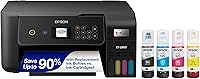
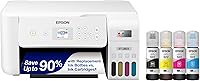
The Epson 522 pack is the right refill for the ET-2800 family, the ET-2803 and the ET-4800. It holds one black bottle and three color bottles (cyan, magenta and yellow) with the T522120-BCS part number.
The EcoFit keying means each bottle only seats in its own tank, which is the simplest defense against a color mix-up. Epson says a set delivers thousands of pages, so you won't be draining these tanks again soon.
If you are shopping for a printer to pair with this ink, our guide to the best Epson printer for home use covers the models that take it.
Best for the ET-2750 and ET-3750 series: Epson 502 color combo pack
The Epson 502 three-bottle pack covers the color tanks on the ET-2750, ET-2760, ET-2850, ET-3750 and ET-4850. It's a color-only pack, so order a separate black bottle for the black tank.
The autostop design stops the flow when the tank is full, which matters more after you have just emptied one. Pair it with a black bottle from the same 502 family so all four tanks get matching genuine ink.
If you're deciding between tank brands, our Epson vs Brother ink tank printer comparison is a useful next read.
Best printer to skip the emptying job entirely: Epson EcoTank ET-2803
The EcoTank ET-2803 is the model to buy if you would rather not think about tanks at all. It's a cartridge-free all-in-one that fills from bottles and prints thousands of pages per set.
Epson says each replacement bottle set equals about 80 cartridges, with up to 4,500 black pages and 7,500 color pages per set. The printer also has a flatbed scanner, a color display and Wi-Fi with AirPrint and the Epson Smart Panel app.
For a wider look at everyday machines, compare options in our printer for home use guide.
How do you avoid spilling ink while you drain a tank?
Work slowly, keep the syringe upright, and hold a towel under the port. The fill port is wide enough that a fast pull can splash ink onto the printer body.
Set the printer near the front edge of a hard table so you can see into the tank. Wipe the needle tip on a towel before each pull and empty the syringe into the waste jar in short, controlled squirts.
Wear gloves and keep the cover open only as long as you need. If ink lands on the casing, wipe it straight away with a damp cloth; dried ink is much harder to remove.
What should you do with the drained ink and the dirty syringe?
Seal the waste ink and take it to a hazardous waste drop-off. Home quantities are small, but ink is not something to pour down a drain or bin.
Many office supply stores accept used ink bottles and cartridges for recycling. Check your local household hazardous waste site if a store near you doesn't.
Rinse the syringe with water after use and let it dry. Reuse it for the next tank job rather than buying a new one each time.
Store it out of reach of children.
How do you refill and reset after emptying?
Fill each tank to the upper line with the matching bottle, close the caps, and run a nozzle check. Epson's bottle design stops the flow when the tank is full, so you don't need to measure.
Close all caps firmly and plug the printer back in. Run a head cleaning cycle, then print a nozzle check to confirm each color is flowing.
If a bar is still missing, run one more cleaning and check again.
The low ink warning resets when the printer detects a genuine bottle being used. Since you have just added fresh ink, the warning should clear after the next fill cycle.
If it doesn't, check that the cap is seated all the way down.
If you are still deciding which tank printer fits your desk and budget, our HP vs Epson printer comparison weighs the two brands on ink cost and everyday use. Then run a test page to confirm the tanks are clean before you print anything important.
Emptying an Epson ink tank is a repair job you'll rarely repeat once the right ink is in place.
Frequently asked questions
Can I empty an Epson ink tank by turning the printer upside down?
No. Tilting or inverting an EcoTank printer can push ink into the printhead, the waste pad, and the electronics.
Drain each tank through its own fill port with a syringe instead.
How do I know when an Epson ink tank needs emptying?
Epson's low ink warning tells you to refill, not to empty. Empty a tank only when you see the wrong color in it, when ink has sat unused for many months, or when a cleaning cycle cannot clear a clog.
Should I use a syringe or Epson's own ink bottles to empty a tank?
A syringe with a blunt needle draws ink out through the fill port. Refill with genuine Epson bottles afterward, since Epson says non-genuine ink can cause damage its warranty does not cover.
What do I do with the ink I drain from the tanks?
Collect it in a sealed container and take it to a household hazardous waste drop-off or an office supply store that accepts ink. Do not pour it down a sink or into household trash.
Will emptying the tanks reset the low ink warning?
No. The EcoTank warning counts pages and resets when you refill with a genuine bottle.
Emptying a tank without refilling it leaves the printer warning you about low ink.
Do I need to empty a new Epson printer before first use?
No. New EcoTank models ship with ink in the box and arrive ready for charging.
The first job is the initial charge routine in the setup guide, not draining the tanks.