Epson EcoTank ET-2803 vs ET-2800: Which to Buy? (November 2026)
Choose the Epson EcoTank ET-2803 for most home users. It has the higher score, the same ink yield and print speeds as the ET-2800, plus a color display and a lighter white desktop design.
On this page (11 sections)
- Epson EcoTank ET-2803 vs ET-2800: the quick verdict
- How are the ET-2803 and ET-2800 different side by side?
- Which printer has the better ink-tank setup?
- Which model is better for wireless printing?
- Does the ET-2803 scan and copy better?
- Which printer is easier to control day to day?
- Which printer fits a small home office?
- Who should buy the Epson EcoTank ET-2803?
- Who should buy the Epson EcoTank ET-2800?
- How should you set up and care for either printer?
- Is the ET-2803 worth choosing over the ET-2800?
Choose the Epson EcoTank ET-2803 for most home users. In this Epson EcoTank ET-2803 vs ET-2800 comparison, both printers share the same cartridge-free ink system, listed print speeds and basic all-in-one design.
The main differences are the display description, color, scanner resolution details, wireless features and weight. The ET-2803 earns the higher score at 8.5, while the ET-2800 scores 8.4.
Both are wireless color all-in-one inkjet printers with refillable ink tanks. Each prints, scans and copies, uses Micro Piezo Heat-Free technology, and includes up to 2 years of ink based on roughly 125 pages per month.

Epson EcoTank ET-2803 vs ET-2800: the quick verdict
The ET-2803 wins overall because it combines the stronger listed scanner details, color display and wider wireless feature set with a lower weight. The ET-2800 remains a sensible choice when a black printer fits your desk better or its wireless all-in-one basics are all you need.
The 2 models have the same stated print speeds: up to 10 black-and-white pages per minute and 5 color pages per minute. Neither model uses automatic two-sided printing, since both are listed with simplex printing.
Ink capacity is also tied. Each uses refillable tanks rather than cartridges, and each replacement ink set provides up to 4,500 black pages and 7,500 color pages.
That leaves the buying decision focused on everyday control and device access. The ET-2803 supports voice-activated printing, Apple AirPrint and the Epson Smart Panel app.
The ET-2800 supports Wi-Fi printing from computers, laptops and smartphones.
How are the ET-2803 and ET-2800 different side by side?
The Epson EcoTank ET-2803 has the more complete feature set, while the ET-2800 matches it on core print speed, size and ink yield.
| Product | Best for | Print speed | Ink yield | Size | Our score |
|---|---|---|---|---|---|
| Epson EcoTank ET-2803 | most home users | 10 black-and-white, 5 color pages per minute | Up to 4,500 black and 7,500 color pages | 22.8 x 14.8 x 10 in | 8.5 |
| Epson EcoTank ET-2800 | a black desktop setup | 10 black-and-white, 5 color pages per minute | Up to 4,500 black and 7,500 color pages | 22.8 x 14.8 x 10 in | 8.4 |
Both models measure 22.8 x 14.8 x 10 inches, so desk planning is nearly identical. The ET-2803 weighs 8.8 pounds and the ET-2800 weighs 11.4 pounds.
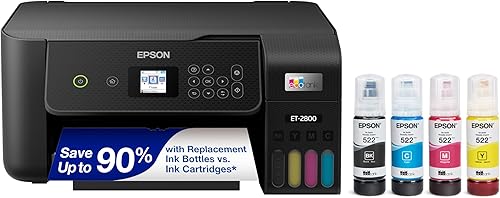
The ET-2803 is white, while the ET-2800 is black. That color difference is simple, but it can matter if your printer sits in an open workspace where the finish needs to match your desk or other equipment.
Each printer combines printing, scanning and copying in one desktop unit. The ET-2803 includes the all-in-one printer, manual, CD-ROM for product setup, power cord and 522 black, cyan, magenta and yellow ink bottles.
The ET-2800 includes ink bottles, manuals, power cord and software.
Which printer has the better ink-tank setup?
Neither model wins on ink yield because both provide the same stated capacity. Each replacement ink bottle set is equivalent to about 80 individual cartridges, with up to 4,500 black pages and 7,500 color pages.
That capacity suits households that print regularly and want fewer cartridge changes. The refillable tanks also make the running routine different from a cartridge printer: you watch the tank levels and refill with the appropriate bottles when needed.
Both printers include up to 2 years of ink in the box, based on roughly 125 pages per month. That estimate gives you a useful way to think about your own workload.
A household printing less than that pace has a different usage pattern from a home office printing more.
The key care rule is to use the correct ink color in each tank. Epson strongly recommends genuine ink for the ET-2800, and the ET-2803 uses T522-compatible ink.
For the broader brand question, our guide to HP vs Epson printers explains how cartridge and tank designs compare across home printing needs.
Which model is better for wireless printing?
The ET-2803 is the better wireless choice because its listed options cover voice printing, AirPrint and the Epson Smart Panel app. That gives households several ways to send a document from a phone, tablet or computer.
The ET-2800 also connects over Wi-Fi and supports printing, scanning and copying from computers, laptops and smartphones throughout a home office. Its wireless coverage is practical for shared household use, even though the ET-2803 lists more specific mobile and voice features.
Think about the devices in your home. If everyone prints from a mix of phones, tablets and computers, the ET-2803 gives you more named connection paths.
If most jobs start on one computer or laptop, the ET-2800 already covers that basic pattern.
Both models also have a USB hardware interface. Wireless printing is convenient for shared access, while USB can suit a single nearby computer when you prefer a direct connection.
Does the ET-2803 scan and copy better?
The ET-2803 has the stronger listed copy-resolution figures, so it is the better choice for users who scan or copy often. Its flatbed scanner supports up to 600 dpi for black-and-white copying and up to 600 x 1200 dpi for color copying.
The ET-2800 also has a flatbed scanner for document and photo scanning, but its listed maximum copy resolution is up to 300 x 600 dpi in black and white and 720 x 720 dpi in color.
A flatbed design works well for pages, forms and flat originals that need to stay aligned. It also keeps scanning and copying in the same desktop unit as printing, which saves space compared with separate devices.
The difference matters most if scanning and copying are regular parts of your routine. For occasional household copies, both models cover the same basic job.
For higher-resolution color copying, the ET-2803 has the clearer advantage in the figures.
If you are comparing Epson models beyond these 2, our guide to the best Epson printer for home use can help you match features to your room and printing habits.
Which printer is easier to control day to day?
The ET-2803 is easier to choose for on-printer control because it includes a color display. Its display supports straightforward document copying and menu navigation alongside app-based control.
The ET-2800 includes an LCD display. It still provides an on-printer control point for basic tasks, while the wireless connection lets you send work from compatible computers, laptops and smartphones.
This difference is less about print quality and more about how you work. A color display can make menus and copy tasks easier to follow when you are standing at the printer.
An LCD remains suitable when most jobs begin from a computer or mobile device.
Both models use app control and both support Android as a controller type. The ET-2803 adds named support for the Epson Smart Panel app, AirPrint and hands-free voice-activated printing.
Choose the ET-2803 when several people will operate the printer from different devices. Choose the ET-2800 when you want a black all-in-one with wireless access and a simpler control setup.
Which printer fits a small home office?
The ET-2803 fits a small home office better when you move the printer or scan documents regularly. It has the same listed footprint as the ET-2800 but weighs 2.6 pounds less.
The dimensions are important because neither model is especially narrow in the stated measurements. Each measures 22.8 inches deep, 14.8 inches wide and 10 inches high, so measure the desk surface in that order before placing the printer.
The ET-2803's 8.8-pound weight makes it easier to reposition between a desk and nearby storage. The ET-2800 weighs 11.4 pounds, which favors leaving it in one established workspace.
Both are desktop color inkjet printers. Each uses a flatbed scanner above the printer section, so leave enough room to open and use that scanning area comfortably.
For a home office that prints forms, school pages and everyday documents, the shared 10 black-and-white pages per minute and 5 color pages per minute are enough for normal batch sizes. Neither is the right fit for a high-volume office that needs rapid duplex output.
Who should buy the Epson EcoTank ET-2803?
Buy the Epson EcoTank ET-2803 if you want the better all-around home printer. Its 8.5 score reflects the combination of a color display, high-resolution flatbed scanner, broad wireless options and lower weight.
It suits families and home offices that print from more than one device. AirPrint, voice-activated printing and the Epson Smart Panel app give you several ways to start a job without staying at one computer.
It also fits users who scan and copy more than a few pages each month. The listed copy-resolution figures are stronger than the ET-2800's figures, especially for black-and-white copying.
The ET-2803 keeps the same useful ink-tank advantages as its rival. Up to 4,500 black pages and 7,500 color pages per replacement set reduce the need for frequent cartridge changes, while up to 2 years of included ink supports regular home use.
Its trade-offs are clear. Printing is simplex, color speed is 5 pages per minute, and the unit still needs a desk with enough depth for its 22.8-inch measurement.
Who should buy the Epson EcoTank ET-2800?
Buy the Epson EcoTank ET-2800 if a black wireless all-in-one meets your needs and you do not need the ET-2803's extra control and scanner advantages. Its 8.4 score places it close behind the ET-2803.
The ET-2800 suits a home that prints from computers, laptops and smartphones over Wi-Fi. Its printer, scanner and copier functions cover everyday documents, school work and basic color printing in one unit.
It also makes sense when the black finish works better with your desk or room. The color choice does not change the listed print speed or ink yield, but it can be the deciding detail for an open workspace.
The ET-2800 shares the same refillable-tank system, up to 4,500 black pages and 7,500 color pages per ink set, and up to 2 years of ink in the box. It also uses Micro Piezo Heat-Free technology.
Its real trade-offs are the heavier 11.4-pound body, LCD display and lower listed copy-resolution figures. It remains a solid basic choice, but the ET-2803 gives more reasons to spend the extra attention on features.
How should you set up and care for either printer?
Set either printer on a stable desktop, connect it through Wi-Fi or USB, and keep the refillable tanks supplied with the correct ink colors. The setup process centers on filling, connecting and using the printer's print, scan and copy functions.
Both models include a power cord and ink bottles. The ET-2803 also includes a CD-ROM for product setup, while the ET-2800 includes software.
Place the printer where you can reach the display and open the flatbed scanner. Keep the full 22.8-inch depth available rather than pushing the unit against a wall or stacking objects over the scanner area.
Use the wireless connection for shared household access. The ET-2803 works with AirPrint, voice-activated printing and Epson Smart Panel, while the ET-2800 connects to computers, laptops and smartphones through Wi-Fi.
Refill each tank with the matching color and use Epson's recommended genuine ink. If you print infrequently, run normal maintenance tasks through the printer's controls when needed, and keep the paper path clear.
The shared simplex design means you turn pages yourself for two-sided documents. Plan that extra step when printing forms or longer documents that need text on both sides.
Is the ET-2803 worth choosing over the ET-2800?
Yes, the ET-2803 is worth choosing for most buyers because its higher score reflects useful differences in control, scanning, wireless access and weight. The ET-2800 remains the better match when a black finish and core Wi-Fi printing matter more than those extras.
Pick the ET-2803 for mobile-heavy homes, frequent scanning, color-display control or a printer you may move between work areas. Its shared ink yield and print speed mean you are not giving up the ET-2800's main tank-printer strengths.
Pick the ET-2800 for a black desktop printer that prints, scans and copies over Wi-Fi from the devices you already use. Its lower score comes from the narrower feature set, not from a difference in listed ink capacity or print speed.
If you are weighing this pair against another Epson comparison, read Epson EcoTank ET-2800 vs ET-2850 next. For the Epson EcoTank ET-2803 vs ET-2800 decision itself, the rule is simple: choose the ET-2803 for the fuller home setup, and choose the ET-2800 only when its black design and basic wireless all-in-one format are enough.
Frequently asked questions
Do the Epson EcoTank ET-2803 and ET-2800 use the same ink yield?
Yes. Both models provide up to 4,500 black pages and 7,500 color pages per replacement ink set.
Both also include up to 2 years of ink based on roughly 125 pages per month, so ink capacity does not separate these printers.
Which Epson printer is better for mobile printing?
The ET-2803 is the better mobile-printing choice because it supports AirPrint, voice-activated printing and the Epson Smart Panel app. The ET-2800 also supports wireless printing from computers, laptops and smartphones across a home network.
Are the Epson EcoTank ET-2803 and ET-2800 fast printers?
They have the same listed speeds: up to 10 black-and-white pages per minute and 5 color pages per minute. That makes both a fit for normal home documents, school pages and occasional color work rather than large fast-printing workloads.
Which Epson EcoTank printer has the better scanner?
The ET-2803 has a high-resolution flatbed scanner with black-and-white copy resolution up to 600 dpi and color copy resolution up to 600 x 1200 dpi. The ET-2800 also has a flatbed scanner, with listed copy resolutions up to 300 x 600 dpi in black and white and 720 x 720 dpi in color.
Is the Epson ET-2803 smaller than the ET-2800?
No. Both models measure 22.8 x 14.8 x 10 inches in the dimensions.
The ET-2803 weighs 8.8 pounds, while the ET-2800 weighs 11.4 pounds, so the ET-2803 is the lighter choice for moving around a home office.