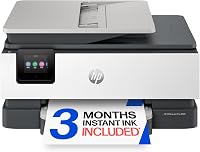
Epson EcoTank ET-2800 vs ET-2850: Which to Buy? (November 2026)
Choose the Epson EcoTank ET-2850 for most people because it adds automatic 2-sided printing and a higher-resolution color copy mode. Choose the ET-2800 when simple home printing and a black printer body matter more.
On this page (10 sections)
- Epson EcoTank ET-2800 vs ET-2850: quick verdict
- How do the ET-2800 and ET-2850 compare side by side?
- Which printer is better for double-sided documents?
- Which Epson has better scanning and copying?
- Which printer is faster for home printing?
- Which printer is easier to connect and control?
- Which printer has the better ink system?
- Who should buy the ET-2800?
- Who should buy the ET-2850?
- Epson EcoTank ET-2800 vs ET-2850: which should you buy?
Choose the Epson EcoTank ET-2850 for most people because it adds automatic 2-sided printing and stronger copy resolution. The Epson EcoTank ET-2800 vs ET-2850 choice favors the ET-2850 for home offices, while the ET-2800 remains a sensible pick for basic wireless printing, scanning and copying.
Both printers use refillable EcoTank tanks, connect wirelessly and combine printing, scanning and copying in one unit. The main differences are automatic duplex printing, copy resolution, body color, dimensions and weight.
Epson EcoTank ET-2800 vs ET-2850: quick verdict
The ET-2850 wins overall, while the ET-2800 wins for straightforward home use. The ET-2850 earns the higher printer score because automatic 2-sided printing saves manual page handling and its copy resolutions are higher.
The ET-2800 still handles the core jobs many households need. It prints in black and color, scans documents and copies pages, and connects to computers, laptops and smartphones over Wi-Fi.
Choose the ET-2850 when you print school packets, work documents or multi-page forms often. Its automatic duplex feature turns double-sided printing into a printer setting instead of a manual page-turning task.
Choose the ET-2800 when you mostly print single-sided pages and prefer its black finish. Its listed black print speed is 10 pages per minute, just below the ET-2850's 10.5 pages per minute.
For refill planning, both models use high-capacity ink tanks rather than small cartridges. The ET-2800 includes ink capacity for up to 4,500 black pages and 7,500 color pages per bottle set, while Epson gives the ET-2850 an up-to-7,500 black and 6,000 color page claim.
How do the ET-2800 and ET-2850 compare side by side?
The ET-2850 has the stronger feature set, but the ET-2800 keeps the same basic all-in-one layout. Their listed color print speed is 5 pages per minute, so duplex and copying matter more than color speed.
 Best for fabric projects
Hiipoo Sublimation Ink Refilled Bottles Compatible
 Best for everyday refill capacity
ZhuFeng Ink Refill Bottles for ET-4850 ET-3850
| Feature | Epson EcoTank ET-2800 | Epson EcoTank ET-2850 |
|---|---|---|
| Overall score | 8.4 | 9.2 |
| Body color | Black | White |
| Black print speed | 10 pages per minute | 10.5 pages per minute |
| Color print speed | 5 pages per minute | 5 pages per minute |
| Duplex printing | Simplex | Auto |
| Black copy resolution | 300 x 600 dpi | 600 dpi |
| Color copy resolution | 720 x 720 dpi | 1200 x 2400 dpi |
| Dimensions | 14.8 D x 22.8 W x 10 H in | 14.8 D x 22.3 W x 10.2 H in |
| Weight | 11.4 lb | 11.9 lb |
| Main control | App | Voice |
| Display | LCD | LCD |
The ET-2850 is slightly narrower and taller, while the ET-2800 is slightly lighter. The difference is small enough that desk placement should focus on the available width, height and space for paper handling.
Both models include a flatbed scanner, copier, LCD display and USB interface. The ET-2800 lists Android app control, while the ET-2850 lists Android control and voice control.
Our score weighs specs, features and buyer feedback against what you're shopping for. For this comparison, the ET-2850 scores higher because its extra paper-handling and copy features affect everyday use.
Which printer is better for double-sided documents?
The ET-2850 is the clear choice for automatic double-sided printing. Its auto duplex function handles both sides of a page, while the ET-2800 is listed as simplex.
This difference matters for school assignments, meeting handouts, forms and longer documents. You can select double-sided output on the ET-2850 without manually turning each sheet.
The ET-2800 still suits single-sided printing. If most of your pages are shipping labels, worksheets, recipes or short notes, simplex printing keeps the workflow simple.
Paper savings also favor the ET-2850 when your documents work well on both sides. The printer's automatic duplex function does not change the listed color speed, so the gain is convenience and paper handling rather than faster color output.
If double-sided printing is an occasional task, the ET-2800 can still serve you with manual page handling. If it is part of your weekly routine, the ET-2850 is worth choosing for the feature you will use repeatedly.
Which Epson has better scanning and copying?
The ET-2850 is better for copying because its listed black and color copy resolutions are higher. The ET-2800 remains suitable for everyday document copies where maximum detail is not the main concern.
The ET-2850 lists 600 dpi black copy resolution and 1200 x 2400 dpi color copy resolution. The ET-2800 lists 300 x 600 dpi for black copies and 720 x 720 dpi for color copies.
That difference gives the ET-2850 more room for detailed color pages, scanned graphics and copies where small text or fine lines matter. Both printers use flatbed scanners, so you can place one sheet or a small item directly on the glass.
The ET-2800's lower listed copy resolutions do not prevent normal household copying. It can still copy documents and photos as part of its all-in-one design.
For a home office that scans and copies often, the ET-2850 is the better fit. Readers comparing it with other EcoTank models can also see how the Epson EcoTank ET-2850 compares with the ET-3850 and ET-4850.
Which printer is faster for home printing?
The ET-2850 is slightly faster for black printing, while both models share the same listed color speed. The ET-2800 reaches 10 black pages per minute and 5 color pages per minute.
The ET-2850 lists 10.5 black pages per minute and 5 color pages per minute. That half-page difference is modest, so it should not decide the purchase by itself.
Print speed also depends on the kind of document. A black text page and a full-color graphic place different demands on the printer, even when both are sent from the same device.
For regular black documents, the ET-2850 has the edge. For color pages, neither model has a listed speed advantage over the other.
The stronger reason to choose the ET-2850 is the combination of slightly faster black output and automatic duplex printing. The stronger reason to choose the ET-2800 is that its basic printing speed already covers ordinary home documents.
Which printer is easier to connect and control?
Both printers support wireless home printing, but the ET-2850 adds voice control to its app and LCD controls. The ET-2800 supports wireless printing through an app and connects to several device types.
The ET-2800 connects to computers, laptops and smartphones over a home wireless network. Its app-based control suits households that already send print jobs from phones or tablets.
The ET-2850 also supports wireless printing and includes the Epson Smart Panel App. Its listed control method is voice, and Epson describes hands-free voice-activated printing as part of the feature set.
Both printers include a color display and USB hardware interface. That gives you a direct connection option alongside wireless printing.
Choose the ET-2850 if voice control or phone-based setup is useful in your home. Choose the ET-2800 if app control already covers how you print and you do not need hands-free commands.
For a wider brand comparison, our guide to the HP vs Epson printer choice for home use explains how Epson's tank design fits against a cartridge-focused alternative.
Which printer has the better ink system?
Both models are cartridge-free EcoTank printers with refillable tanks, so ink capacity is a shared strength. The ET-2800 has an explicit capacity of up to 4,500 black and 7,500 color pages per bottle set, while the ET-2850 carries Epson's separate page-yield figures.
The ET-2800 includes up to 2 years of ink in the box and uses high-capacity refillable tanks. Its included bottle set is described as equivalent to about 80 individual cartridges.
The ET-2850 also uses refillable EcoFit ink bottles and includes up to 2 years of ink in the box. Epson lists up to 7,500 black pages and 6,000 color pages for replacement ink, with actual results varying by print task and usage.
Epson recommends genuine ink for optimal print quality and performance with both models. Non-genuine ink can cause damage that is not covered by the printer's limited warranty.
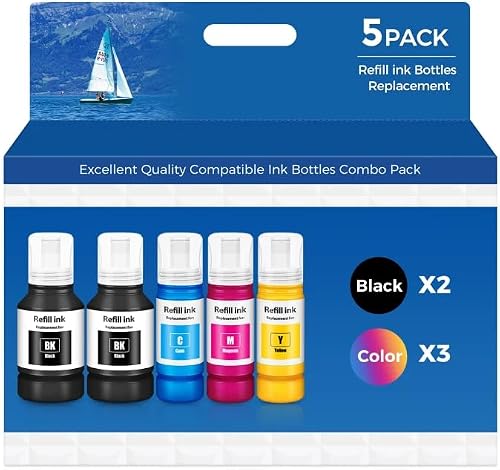
For ordinary paper printing, the ZhuFeng refill pack includes 2 black bottles plus cyan, magenta and yellow bottles and is compatible with the ET-2850.
For sublimation projects, Hiipoo offers separate sublimation bottles compatible with both the ET-2800 and ET-2850. Its stated fabric use is limited to materials containing less than 30% cotton.
Who should buy the ET-2800?
Buy the Epson EcoTank ET-2800 for basic wireless home printing when automatic duplexing is not a priority. Its black finish, flatbed scanner, copier and refillable tanks cover the main needs of a simple home printer.
The ET-2800 suits families printing homework, forms, recipes and occasional photos. Wireless access lets several devices send jobs, and the all-in-one design avoids buying a separate scanner or copier.
Its 11.4 lb weight is slightly below the ET-2850's 11.9 lb weight. The body measures 14.8 D x 22.8 W x 10 H inches, so it is a little wider and shorter than the ET-2850.
Choose the ET-2800 when your documents are mostly single-sided. It also fits a desk better when a black printer matches the rest of your equipment.
The trade-off is clear: simplex printing and lower copy resolutions. Those features are acceptable for basic pages, but the ET-2850 is the better choice when document handling or copy detail affects your routine.
Who should buy the ET-2850?
Buy the Epson EcoTank ET-2850 for home offices and households that print double-sided pages or make detailed copies. It combines automatic duplex printing, a slightly faster black speed and higher listed copy resolutions.
The ET-2850 is also the stronger choice for people who use voice-activated printing. Its wireless connection, Epson Smart Panel App, LCD and flatbed scanner support several ways to send and manage jobs.
Its 14.8 D x 22.3 W x 10.2 H inch body is slightly narrower than the ET-2800. It weighs 11.9 lb and has a white finish.
The ET-2850's main trade-off is not a performance weakness. It is simply a slightly heavier white printer with features that matter most when you use duplex printing, copying or voice control.
If you are comparing it with a larger office model, our HP OfficeJet Pro 8125 vs 9125 comparison covers a different printer class with different office priorities. For another EcoTank option, see our Epson EcoTank ET-4850 printer reviews.
Epson EcoTank ET-2800 vs ET-2850: which should you buy?
Buy the Epson EcoTank ET-2850 for most homes because automatic duplex printing and stronger copy resolution justify its higher score. Pick the ET-2800 when you mainly need wireless single-sided printing, scanning and copying with a black body.
The ET-2850 wins for double-sided documents, detailed copies, voice control and slightly faster black printing. Its color speed matches the ET-2800 at 5 pages per minute.
The ET-2800 wins for basic home printing and a slightly lighter body. It also gives you the same core all-in-one layout, wireless access and refillable tank approach.
The decision rule is simple. Choose the ET-2850 if you will use automatic duplex printing or higher-resolution copying.
Choose the ET-2800 if those features would sit unused and your priority is a straightforward EcoTank printer.
For the Epson EcoTank ET-2800 vs ET-2850 question, the ET-2850 is the better overall buy, while the ET-2800 is the value-focused choice for uncomplicated home pages.
Frequently asked questions
Do the Epson ET-2800 and ET-2850 use the same ink?
Both printers are compatible with Epson 502 ink bottles, and the listed refill options include the ET-2800 or ET-2850. Choose ordinary water-based ink for paper documents and a sublimation set only for compatible craft projects.
Can the ET-2850 print on both sides automatically?
Yes. The Epson EcoTank ET-2850 has automatic 2-sided printing.
The ET-2800 uses simplex printing, so double-sided pages require manual handling.
Which printer is faster, the ET-2800 or ET-2850?
The ET-2850 has a listed black print speed of 10.5 pages per minute, while the ET-2800 is listed at 10 pages per minute. Both have a listed color speed of 5 pages per minute.
Are the Epson ET-2800 and ET-2850 wireless?
Yes. Both are wireless all-in-one printers that support printing from computers, laptops and mobile devices.
The ET-2850 also includes hands-free voice-activated printing.
Is the ET-2850 better for scanning and copying?
Yes. The ET-2850 has a 600 dpi black copy resolution and 1200 x 2400 dpi color copy resolution.
The ET-2800 has 300 x 600 dpi black and 720 x 720 dpi color copy resolution.